
AI analyst agents
Ask questions in natural language and use analyst agents to turn those questions into answers tied to your connected data.

Supaboard is an AI business intelligence platform for asking questions in natural language, generating dashboards, and refining queries from connected data sources. It is built for individuals, teams, and enterprises that want faster self-serve analysis and reporting.
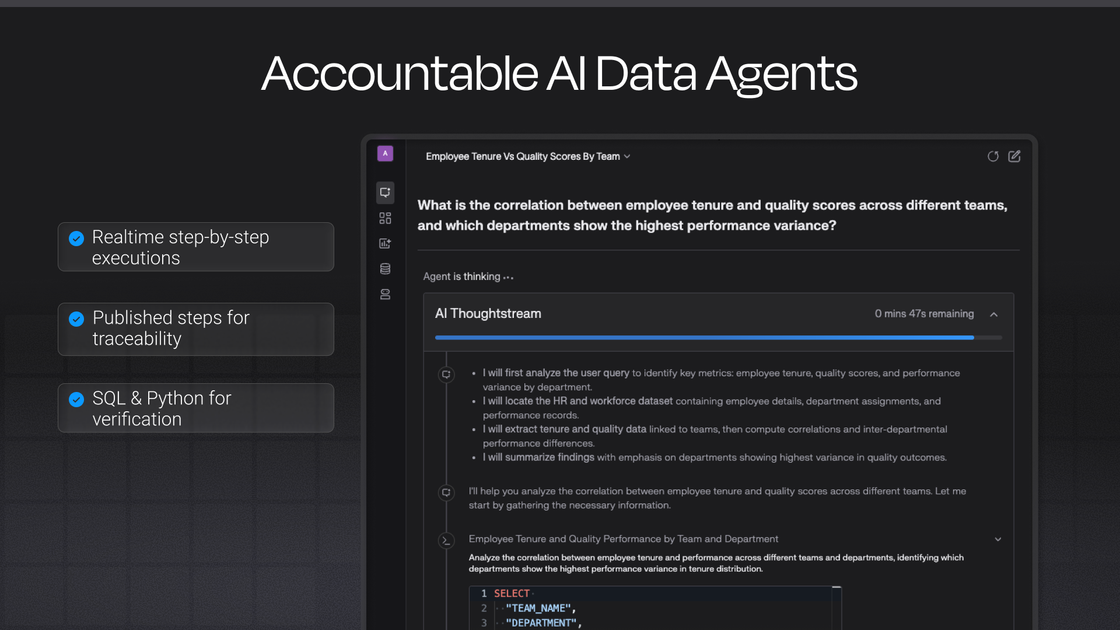
Supaboard is an AI business intelligence platform that helps teams analyze data, ask questions in natural language, and generate dashboards and reports from connected sources. The product is presented as an AI analyst layer for business data, with workflows for exploration, dashboard creation, and query assistance.
The homepage emphasizes fast answers from analyst agents, while the pricing page shows tiered plans for Individual, Business, and Enterprise users. Across those plans, Supaboard supports SQL sources and a wider integration set that expands from core data connections to business apps, collaboration tools, automation, and enterprise controls.
Ask questions in natural language and use analyst agents to turn those questions into answers tied to your connected data.
Generate live interactive dashboards from a prompt, including charts, tables, and KPI-style widgets for marketing and product analysis.
Use the query builder with AI assistance to generate, fix, and visualize SQL queries, including schema-aware help for common edits.
Connect to a broad set of sources, including SQL databases, warehouses, business apps, REST APIs, Slack, Teams, and Git sync workflows.
Share outputs through dashboards, reports, embedded analytics, Slack or Teams bots, and private or white-labeled experiences depending on the plan.
Scale usage with plan-based controls for agents, automations, support, security, and workspace management.
A marketer or growth lead can ask for campaign ROI, customer acquisition cost, or return-rate analysis and use the returned chart, table, and recommendation output to decide where to reallocate spend.
Product and operations teams can connect internal systems and ask cross-functional questions that span revenue, support, infrastructure, and product usage without waiting on a data analyst.
Analysts who still prefer SQL can use the query builder to generate, fix, or pivot queries, then refine the result before sharing it with the team.
Teams that need polished internal or customer-facing views can create dashboards and embed them, or use Slack and Teams bots to surface answers where work already happens.
Larger organizations can move beyond a single-user workflow by using multiple agents, automation, dedicated support, and enterprise controls such as white-labeling and identity management.
Supaboard is positioned as an AI business intelligence platform. Its homepage describes it as an AI analyst that lets users ask questions in natural language and get answers, dashboards, and query help from connected data sources.
The pricing page shows three plans: Individual, Business, and Enterprise. Individual and Business are offered with monthly or yearly billing, while Enterprise uses custom pricing and a demo flow.
The source shows support for SQL data sources, business apps, warehouses, Git sync, Slack and Teams integrations, data warehouse SSH tunnels, OAuth database connections, query builder workflows, and REST APIs. The Business plan adds access to 700+ business apps, while Enterprise includes custom white-labeling and expanded controls.
The homepage and pricing page both show prompt-driven analysis, dashboard creation, reports, and query building. The product is aimed at people who want to explore data and produce outputs quickly without relying on a traditional analyst workflow.
Supaboard offers self-serve plans for individuals and growing teams, plus an Enterprise plan for larger organizations that need unlimited agents, white-labeling, dedicated support, and bespoke onboarding.

PromptScout tracks how ChatGPT, Gemini, Google AI Overviews, and Perplexity mention your brand or competitors, then pairs those results with source analysis and website audits. It helps teams decide what to fix in content, positioning, or site readiness next.

SaveMRR is a Stripe retention tool for SaaS teams that scans billing data for churn and MRR leaks, then automates recovery through dunning, cancel-save offers, win-back emails, and onboarding nudges. It is built for founders and bootstrapped teams using Stripe.

Hype is a web tool for finding trending YouTube topics by category, time range, and scoring mode. It helps creators spot emerging ideas, inspect source videos, and decide what to cover next.

Sleek Analytics is a privacy-friendly web analytics tool with real-time visitor tracking, Core Web Vitals, and revenue attribution. It helps site owners understand traffic and conversions without cookie banners or a heavy setup.

Struere is an AI-native platform for turning spreadsheet data into structured operational software with dashboards, alerts, and automations. It is aimed at teams that want to replace manual spreadsheet workflows without building custom tools from scratch.

ClayHog est une plateforme de visibilité SEO IA pour suivre la présence des marques sur ChatGPT, Gemini, Perplexity, Claude et Google AI Overviews. Elle aide les agences, équipes marketing et SEO à suivre citations, concurrents, sentiment et opportunités de contenu depuis un seul tableau de bord.