
Reads local usage metadata
Runs against records already on the user's machine, including Claude Code and Codex desktop or CLI logs, so reported usage comes from local files rather than a browser form or manual entry.

Tokimeter is a local-first usage and cost reporting tool for AI coding assistants, helping developers and teams see spend, limits, and session activity from local logs. The free CLI keeps metadata on the device, while Pro and Team add hosted dashboards, sync, and shared reporting.
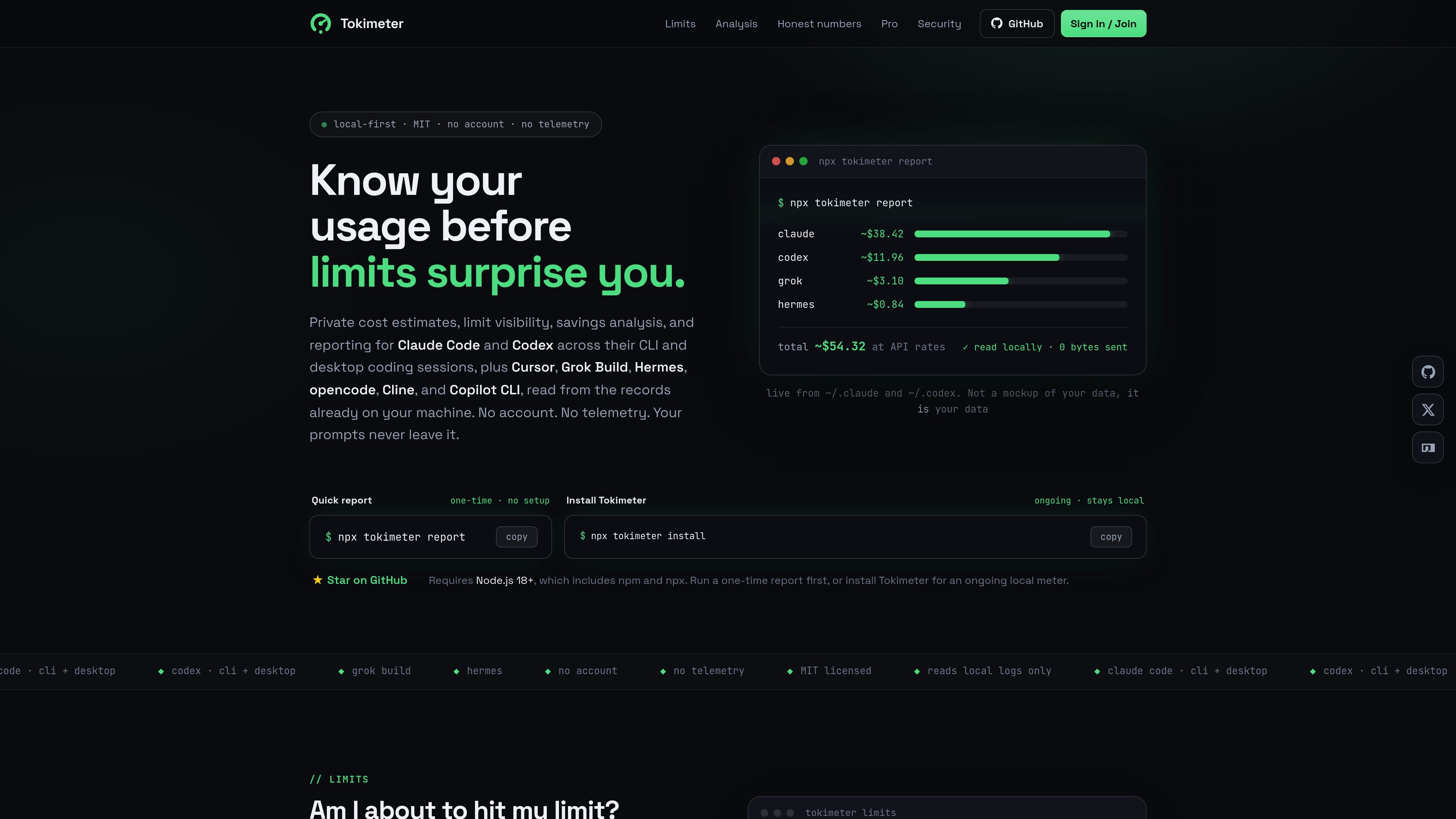
Tokimeter is a local-first usage and cost reporting tool for AI coding assistants such as Claude Code, Codex, Cursor, Grok Build, Hermes, opencode, Cline, and Copilot CLI. It reads records already on the user's machine and turns them into reports about spend, limits, savings, and session activity.
The product is positioned for developers and teams that want to understand AI coding usage without sending prompts or responses to a third party. The site emphasizes no account and no telemetry for the local tool, with the same local metadata also powering a hosted Pro dashboard and Team features for shared visibility, alerts, and allocation.
Runs against records already on the user's machine, including Claude Code and Codex desktop or CLI logs, so reported usage comes from local files rather than a browser form or manual entry.
Generates usage, limit, savings, and reporting views from the same metadata, including per-tool totals, budget windows, cost breakdowns, and session trace views.
Shows vendor-reported rate-limit counters when tools record them, and keeps Claude Code on rolling-window views when no exact reset time is available.
Calculates daily, weekly, per-tool, 5-hour, and per-session budgets and surfaces warnings in the CLI and in Claude Code's status line after 80%.
Offers a VS Code / Cursor extension with a status bar view and an in-editor dashboard that uses the same local metadata as the CLI.
Provides Markdown or HTML report output for handoff, client chargeback, or personal records, and the dashboard can also sync usage metadata for Pro and Team plans.
Run a quick local report to see what Claude Code, Codex, or other supported tools have been doing on your machine, without creating an account or uploading content.
Review 5-hour and 7-day budget windows to see whether current spend is approaching a user-defined cap, with warnings when usage crosses the configured threshold.
Use savings, trace, and delegation views to inspect which sessions, models, or subagents drove the cost of a project and where cheaper alternatives may have been possible.
Generate Markdown or HTML output to share a clean cost report with a client, keep personal records, or support internal chargeback workflows.
Use the VS Code or Cursor extension when you want a spend indicator and dashboard in the editor while keeping the CLI as the source of truth.
Tokimeter is designed to read local usage metadata from supported AI coding tools and generate reports from what is already on your machine. The homepage says it requires Node.js 18+ and can be used either as a one-time report or as an ongoing local meter.
The source shows a one-time report command and an install command for ongoing use. It also shows a VS Code / Cursor extension that reads the same local metadata and displays a dashboard inside the editor.
No. The site states that Tokimeter stores usage metadata only and never prompt or response content. It also says no account or telemetry is required for the local tool.
The dashboard page says Pro adds cloud sync and a hosted dashboard, while Team adds shared org views, seat management, and allocation tools. The local CLI reports remain free.
The support page says the dashboard can export eligible hosted metadata and that account deletion is available. It also points users to billing, privacy, security, and teams topics for help.

ByteAsk is a terminal-first AI coding agent for C and C++ that edits repositories and verifies changes with the real compiler, debugger, sanitizers, and tests before showing a diff. It offers a free tier plus paid plans, with editor connectors and zero-retention handling described in the source.

PromptScout tracks how ChatGPT, Gemini, Google AI Overviews, and Perplexity mention your brand or competitors, then pairs those results with source analysis and website audits. It helps teams decide what to fix in content, positioning, or site readiness next.

Goldfish is an AI memory app for macOS that helps you reply, write, summarize, and continue using the context already on your Mac. It stores memory locally and writes in your tone.

CreateOS Sandbox is an isolated compute environment for running code and agent workloads inside Firecracker micro-VMs. It is designed for workflows that need machine-level isolation, private networking between sandboxes, and programmatic control through SDK, CLI, or MCP.

ArtDeck is a visual reference board app for iPhone, iPad, and Mac that lets artists collect mixed reference material on one canvas and study it with ToolBox lenses. It works offline, supports optional iCloud sync, and is sold as a one-time purchase with no account required.

Biji est une plateforme polyvalente conçue pour améliorer la productivité grâce à des outils et des fonctionnalités innovants.