
Unified workspace
Berd combines chats, agents, skills, automations, and projects in one interface so you can move between them without spreading work across separate tools.

Berd is a desktop app for building with AI agents in a single workspace. It combines chats, projects, skills, and automations, with customizable agents and support for switching providers.
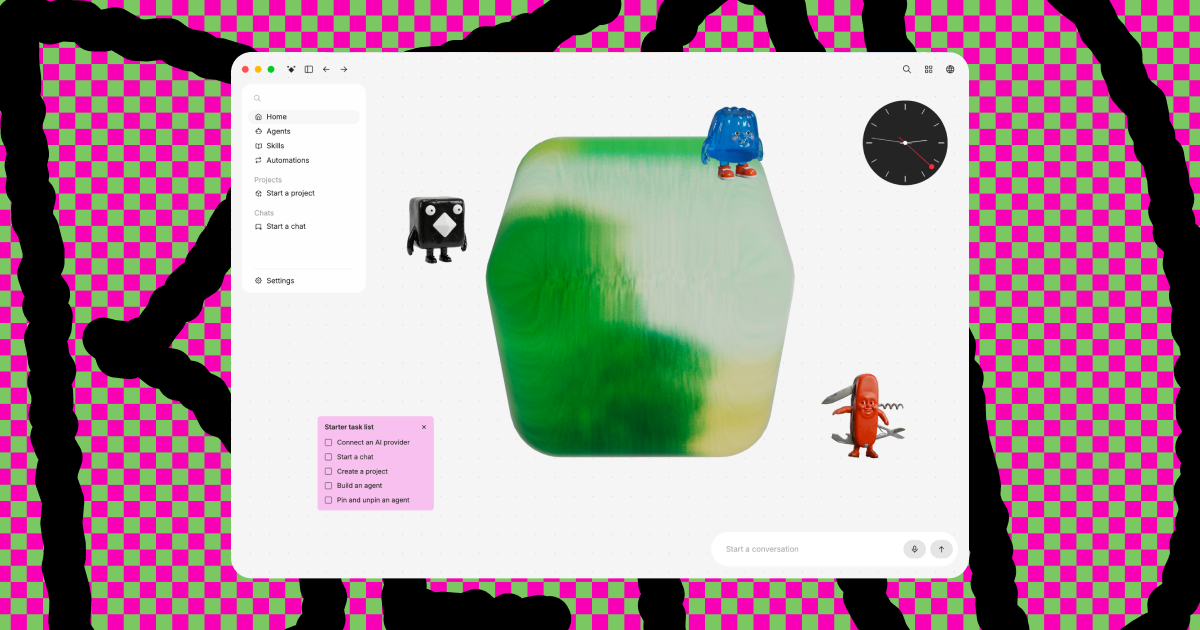
Berd is a desktop app for building with AI agents. Its homepage frames the product around doing more work and less back-and-forth chat, with a workspace that brings chats, agents, skills, automations, and projects together.
The product is designed around a customizable canvas and a set of named agents with different roles. The site suggests you can pin what matters, link projects to folders and repos you already use, and switch AI providers when a task calls for a different model.
Berd combines chats, agents, skills, automations, and projects in one interface so you can move between them without spreading work across separate tools.
The interface is built around a customizable canvas where you can pin and unpin agents and organize the space around the work you are doing.
The homepage says you can link projects to folders and repositories you are already working in, which suggests a workflow that fits existing code or file structures.
Berd Agents are described as specialists with specific roles and personalities, such as critique, choice-making, writing support, and idea generation.
The site says you are not married to one model and can switch providers when a task needs a different model.
The product is open source, and the site includes a privacy notice plus a telemetry note describing optional usage telemetry in official distributions.
Use Berd as a central place to start conversations with agents, keep related work visible, and move from chat into projects without changing tools.
Use the named agents when a task needs a particular perspective, such as critique, writing support, or idea generation, instead of relying on one generic assistant.
Use the canvas to pin important agents and organize the workspace around active tasks, especially when you are juggling several threads at once.
Use the provider-switching approach when one model is better for a specific task and you want to change models without rebuilding your setup.
Use the project-linking workflow if you want your AI work to sit closer to folders or repositories you already use.
Berd is a desktop app for building with AI agents. The homepage presents it as a place for chats, agents, skills, automations, and projects in one workspace.
The source shows a desktop app and a website experience, but it does not provide a full platform support matrix beyond the desktop framing on the homepage.
The homepage emphasizes working with AI providers, and the starter task list includes connecting an AI provider. It does not list specific provider names on the pages provided.
The homepage presents project linking, pinning items on the canvas, and agents with different roles and personalities. It does not provide detailed collaboration or team-management documentation in the source provided.
The source does not include pricing details. The pricing page returned 'not found,' so plan structure and free or paid tiers are not confirmed from the available evidence.

Biji è una piattaforma versatile progettata per migliorare la produttività attraverso strumenti e funzionalità innovative.

Dcyde is a decision log for product teams that captures what was decided, the reasoning behind it, and the source in one shared place. It supports pinning decisions from Slack, Figma, or inside Dcyde and keeps the record searchable over time.

Goldfish is an AI memory app for macOS that helps you reply, write, summarize, and continue using the context already on your Mac. It stores memory locally and writes in your tone.

CreateOS Sandbox is an isolated compute environment for running code and agent workloads inside Firecracker micro-VMs. It is designed for workflows that need machine-level isolation, private networking between sandboxes, and programmatic control through SDK, CLI, or MCP.

ArtDeck is a visual reference board app for iPhone, iPad, and Mac that lets artists collect mixed reference material on one canvas and study it with ToolBox lenses. It works offline, supports optional iCloud sync, and is sold as a one-time purchase with no account required.

Malyatko is a baby tracker for logging feeding, sleep, growth, teething, and milestones in one app. It works on iPhone, Apple Watch, and widgets, with no sign-up, offline use, and family sharing through iCloud.