
Prompt-to-video generation
Describe a video idea with a prompt and Cliptalk can produce a draft containing a script, visuals, voiceover, and captions.

Cliptalk is an AI video creation and editing tool for turning prompts, scripts, articles, web pages, or raw text into short-form videos with visuals, voiceover, and captions. It is designed for creators and marketers publishing content to YouTube Shorts, Instagram Reels, and TikTok.
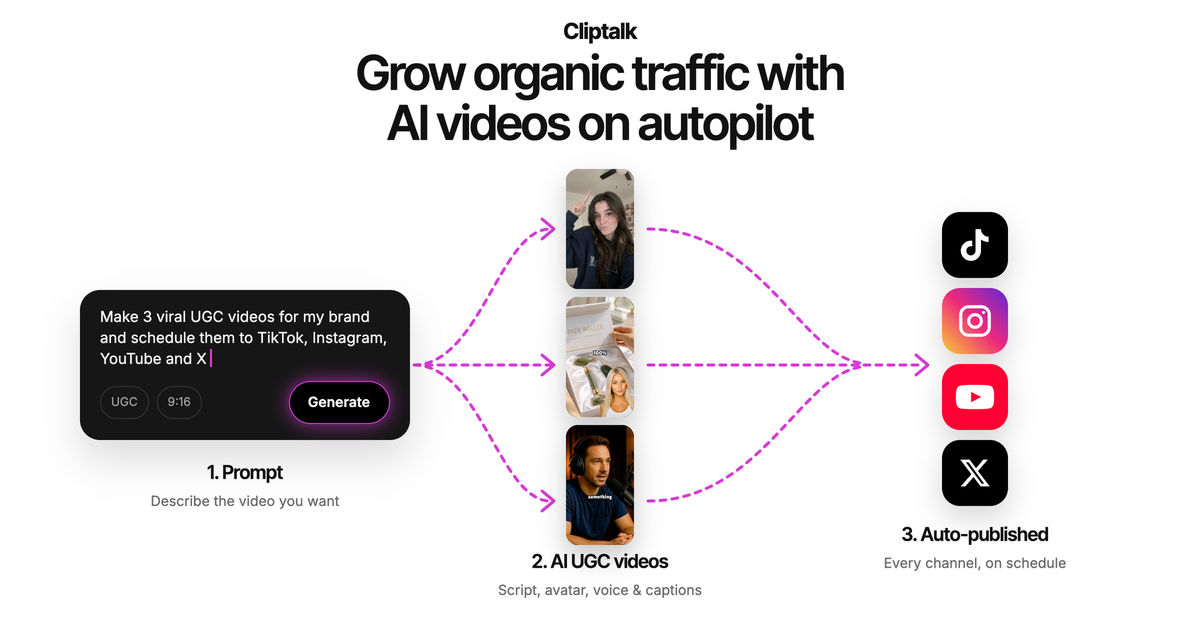
Cliptalk is an AI video creation and editing tool for short-form social content. It turns a prompt, script, article, web page, raw text, or other idea into a video draft with a script, visuals, voiceover, and captions. The service is positioned for publishing to channels such as YouTube Shorts, Instagram Reels, and TikTok.
After generation, creators can adjust the script, captions, visuals, scenes, music, and other timeline elements rather than accepting the first output. Cliptalk also supports automated editing tasks such as captioning, B-roll insertion, silence removal, and text-prompt-based clipping, allowing users to combine AI generation with manual creative control.
Describe a video idea with a prompt and Cliptalk can produce a draft containing a script, visuals, voiceover, and captions.
The tool can automatically edit clips, remove silences and filler words, and create clips from text prompts.
Add captions, including animated word-by-word styles, and automatically place B-roll footage into video clips.
Edit by describing changes in natural language or by working directly in the timeline. Users can also regenerate visuals and recreate scenes in another style.
Choose from more than 140 AI voices and characters, with voice and character options presented in more than 30 languages. Pro users can clone up to three voices; Ultra supports up to 10 cloned voices.
Create voiceovers and captions in the language used by the intended audience. The site lists English, Spanish, French, German, and Chinese among its language examples.
Start with a topic or script and generate a short video with narration, visuals, captions, and optional B-roll for regular social publishing.
Create videos without appearing on camera by combining AI-generated scripts, voices, characters, scenes, and captions.
Turn a product concept or campaign script into a short UGC-style or explainer draft, then adjust scenes, captions, and voice to match the intended presentation.
Convert written material such as an article, web page, or raw text into a narrated video format for educational or informational content.
Use direct prompts and automated editing to cut clips, remove pauses, add captions, and prepare existing media for short-form distribution.
Enter a text script, article, web page, raw text, or another idea prompt. Cliptalk can generate a video with a script, visuals, voiceover, and captions, then you can revise the result in the editor.
Yes. New accounts receive 50 free credits. Videos created on the free plan include a watermark.
Yes. You can change captions, edit the script, generate new visuals, or recreate a scene in a different style. Editing tools such as auto-editing, auto-captions, and removing silences or filler words do not use credits; credits are mainly used for AI image, video, or audio generation.
Cliptalk says its videos can be monetized and are unique and original according to its generative-AI workflow. Users should still review platform rules and the rights associated with any media they provide or generate.
Subscriptions can be canceled from the dashboard by opening Account, selecting Open Customer Portal, and canceling there. The site also provides an email address for additional assistance.

ngram is an AI video generator and editor for teams and individual creators. It turns prompts, uploaded files, or screen recordings into editable videos for demos, training, onboarding, sales enablement, explainers, and launches.

Omni AI is a browser-based image and video generator for creating visuals from text prompts or reference photos. It supports text-to-image, image-to-image, text-to-video, and image-to-video workflows, with free sign-up credits and downloadable results.

Zella is a screen recorder and on-device AI video editor for Mac and iPhone. It helps creators record screens or cameras, automatically clean up footage, add captions, reframe clips, and export videos without uploading the core project to the cloud.
艺映AI is a free AI video creation tool for generating video from text, images, or existing footage. It is positioned for short-form social content, promotional clips, and stylized AI video projects.

CAMB.AI Streams dubs live audio in multiple languages in real time for broadcasts on platforms like YouTube, Twitch, and X. It plugs into existing live workflows using common streaming protocols and avoids a post-production step.

VIDEOAI.ME is an AI video generator for making spokesperson-style videos, ads, explainers, and social content from a script. It is aimed at founders, marketers, agencies, and creators who want to produce videos without filming.