
Live driver alerts
The app shows live community reports such as police, hazards, accidents, jams, and route notes posted by other drivers ahead. The home page frames these as pace notes meant to be read quickly while driving.

codriver is a browser-based navigation companion for Tesla drivers that adds live community alerts, charger intelligence, and route notes on top of the car’s built-in map. It is designed to run in the Tesla browser without a separate app install.
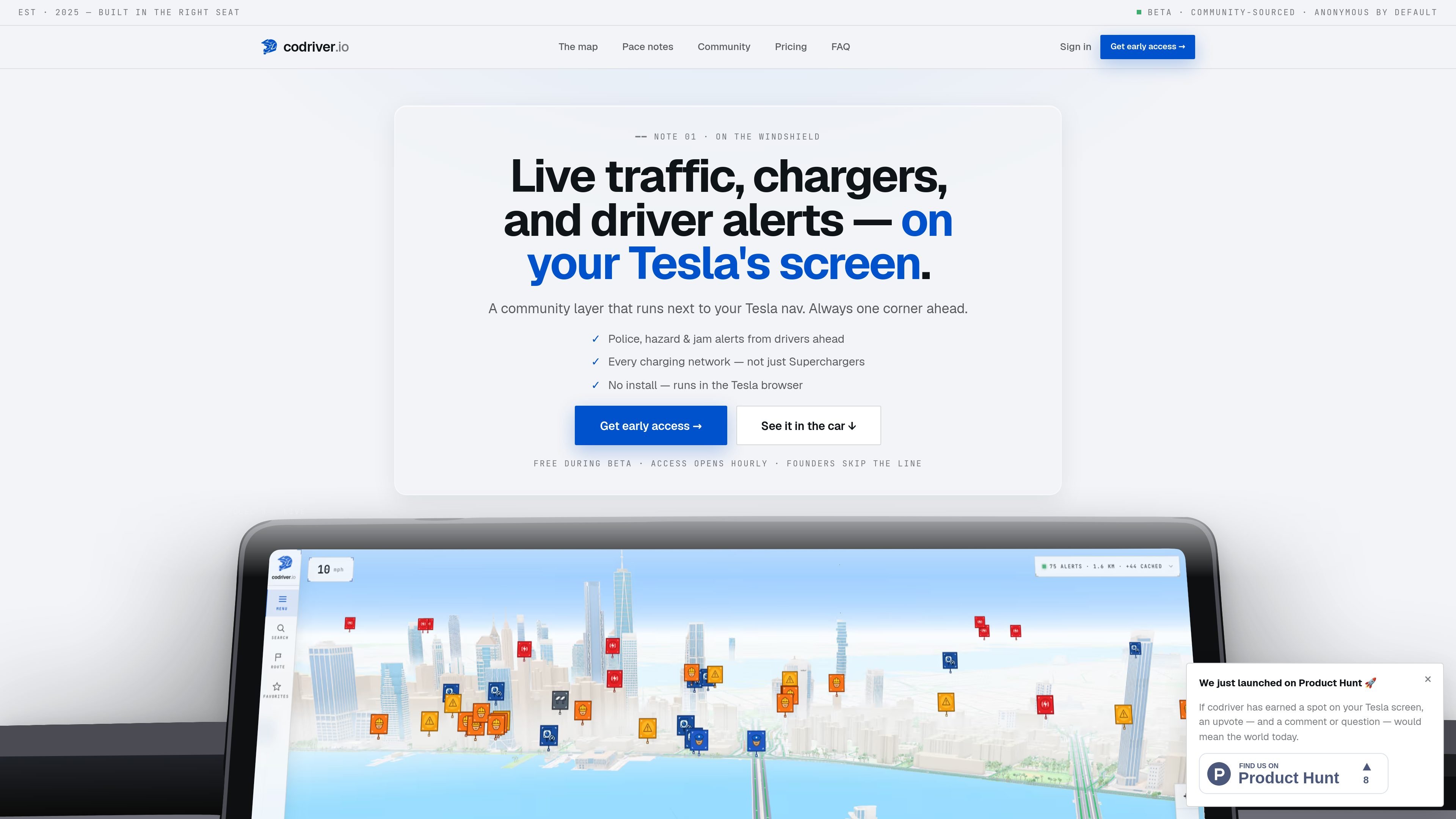
codriver is a community navigation companion for the Tesla browser. It adds live alerts from other drivers, charger intelligence across multiple networks, and route notes that are meant to be read quickly in the car.
The product is positioned as a layer on top of Tesla's built-in navigation rather than a replacement. The site says you can open codriver.io in the Tesla browser, pair the car with a QR scan from your phone, and start seeing community reports and charger data live.
The interface is built for glanceable driving: pace-note style messages, map views tailored to different road contexts, and auto-reroute behavior that only triggers after real drift. The developer page also shows that codriver exposes a public read endpoint and a feed system for external data sources.
Support and comparison pages frame codriver as a browser-based, driver-owned tool for Tesla owners who want more road context than Tesla's stock nav provides. The published copy emphasizes open access, EU hosting, and the absence of ads or surveillance in the product's positioning.
The app shows live community reports such as police, hazards, accidents, jams, and route notes posted by other drivers ahead. The home page frames these as pace notes meant to be read quickly while driving.
Charger coverage is broader than Tesla's own network and includes networks such as Supercharger, ChargePoint, Electrify America, and IONITY. Filters are tuned to the car's connector compatibility, adapter-only stations, and charging type.
The map can switch between Compass, Track, Tilt, and Cityscape views. Compass is free, while the other views are part of Premium according to the comparison text on the home page.
codriver is designed for the Tesla browser, with no app installation or firmware update required. Users open the site in the car, pair it with a QR scan from a phone, and pin the tab.
The system supports an open data layer through /v2/entities/nearby for reads and /v2/feeds for pushes or pulls. The developer page says the API is unauthenticated for reads and CORS-open.
The product includes a performance-oriented Lite mode for older Tesla hardware. The source says it reduces visual complexity, such as 3D buildings and complex pins, to improve frame rate on MCU 2.
Open codriver in the Tesla browser before a drive to get live driver alerts, speed-camera reports, and jam updates from people ahead on the same route.
Use the charger map to compare charging options beyond Tesla's own network, including connector-compatible stations and network filters that matter on longer EV trips.
Switch views depending on the road: Compass for familiar routes, Track for windshield-style guidance, Tilt for highway driving, and Cityscape for denser downtown context.
If you maintain traffic, camera, or incident data, connect it through the developer endpoints so your feed can be read publicly or owned privately.
For older Tesla hardware, enable Lite mode to reduce visual load and keep the browser experience usable while driving.
It runs in the Tesla browser. The site says you sign up on your phone, open codriver.io in the car, pair the car with a QR scan, and pin the tab.
The product is built to sit alongside Tesla's built-in navigation rather than replace it. The compare page describes codriver as a live community and EV layer on top of the base map.
The source says live alerts, chargers, and cameras are exposed through an open read endpoint, and developers can also register feeds to push or pull data into the layer.
No pricing details are published on the pricing page because it currently returns a 404. The home page describes codriver as free during beta.
The support form is set up for bug reports, billing questions, feedback, feature ideas, and press inquiries. It also asks for Tesla configuration details to help reproduce issues.

Sour Mango is an iOS and Android travel app for digital nomads that combines AI trip planning, visa tracking, translation, currency conversion, and community features. It is free to download and free to start, with a privacy policy that says the app is unavailable in Hong Kong S.A.R. and intended for users 16+.

MeetPoint is a web app that compares live flight prices from multiple origins to find the cheapest destination where a group can meet. It helps people planning travel from different cities narrow options by budget, stops, and flight duration.

Wabi is a task-oriented messenger for organizing shared activities, with group trip planning as its clearest documented use case. Its broader product vision centers on personalized mini apps shaped by users’ context, habits, and preferences.

Flown: Live Flights & Trips is an iPhone travel app that logs flights into a private map, passport, and travel stats. A Pro layer adds live flight status and trip-planning tools.

ClawApp is a MacOS desktop app for starting and using OpenClaw bots with no setup or technical knowledge required. The site shows natural-language workflows for tasks like email, notes, travel planning, code work, and chat coordination.

Sunny Days Ahead is a free travel discovery web app for finding sunny destinations month by month using historical weather data, climate insights, and side-by-side comparisons.