
Steam-based library
Use an existing Steam account and manage supported games from a single GameToMac library; no separate GameToMac account is required.

GameToMac is a Mac application that lets Apple Silicon users install and launch a curated selection of Windows games through their own Steam accounts. It offers guided setup and a single library for supported titles, with additional account or service requirements varying by game.
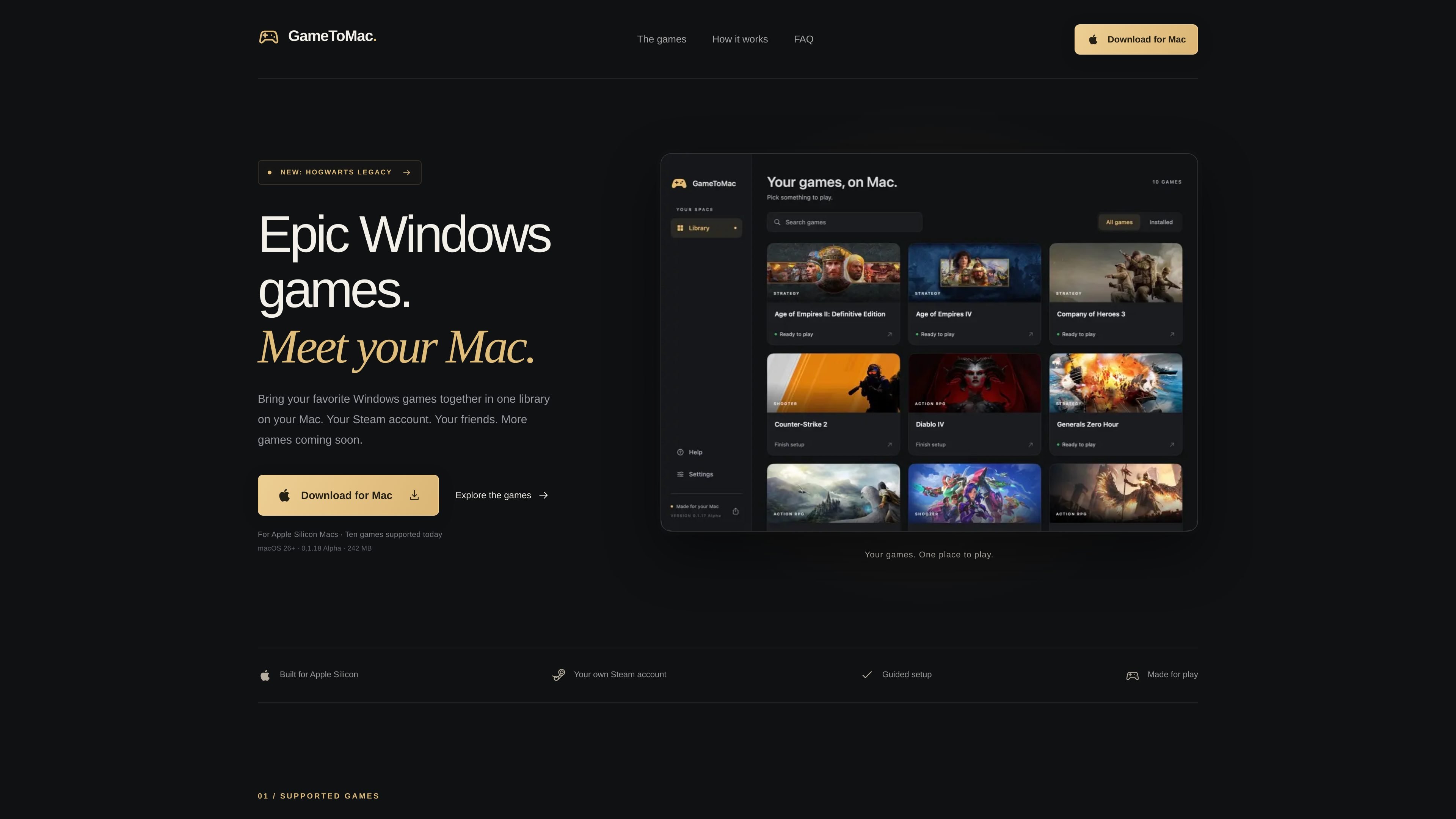
GameToMac is a Mac application for running a curated selection of Windows games on Apple Silicon Macs. It brings supported titles into one library and uses the user's Steam account and game ownership or access rather than supplying games or paid licenses.
The app provides a guided workflow: install GameToMac, choose a supported title, sign in to Steam, install the game, and launch it from GameToMac. The catalog includes games such as Age of Empires II: Definitive Edition, Age of Empires IV, Company of Heroes 3, Counter-Strike 2, Diablo IV, Hogwarts Legacy, Overwatch, Path of Exile 2, Red Alert 2, and Generals Zero Hour. Support is added through app updates and may depend on the requirements listed for each game.
Use an existing Steam account and manage supported games from a single GameToMac library; no separate GameToMac account is required.
Select a supported title and follow the in-app setup flow while Steam handles sign-in and game installation.
Launch installed supported games from GameToMac after completing their individual Steam setup.
Receive fixes, improvements, and new game support through app updates. Updates wait until Steam and the game are closed.
The supported catalog includes strategy, action RPG, tactical shooter, and team-based shooter titles, with each game listing its relevant single-player, multiplayer, account, or internet requirements.
Mac owners with an Apple Silicon computer can use GameToMac to access supported Windows titles without switching to a Windows machine for those games.
Players who already own supported Steam games can sign in with their usual account, install titles through Steam, and return to GameToMac for launching.
Players of Age of Empires IV, Company of Heroes 3, Red Alert 2, Generals Zero Hour, Counter-Strike 2, or other listed multiplayer titles can use the relevant game's online service where support and account requirements are met.
Players interested in single-player campaigns can use the app for titles including Hogwarts Legacy, Diablo IV, and the single-player modes of several strategy games, subject to each title's requirements.
GameToMac requires an Apple Silicon Mac with an M1 chip or later, macOS 26 or later, and Rosetta. Intel Macs are not supported. Diablo IV requires macOS 26.5 or later, and performance varies by Mac, game settings, and match size.
No. You use your own Steam account and must own the required game or have the relevant access. Purchased copies are required for several supported games; Path of Exile 2 requires Steam Early Access. Counter-Strike 2 and Overwatch are free to play on Steam, while optional purchases are separate. GameToMac does not include games or paid Steam licenses.
Install GameToMac, move it to Applications, open it, choose a supported game, and select Get started. Steam opens in a separate window for sign-in and installation. After installation, select Play now in GameToMac. Each game has its own Steam setup, so close one game's Steam session before switching games.
Online play has been tested for supported builds of Age of Empires IV and Company of Heroes 3, including matches with Windows players. Zero Hour uses GeneralsOnline, and Red Alert 2 uses CnCNet; Windows friends need the corresponding service and, for Red Alert 2, the same game mode. Other games use their own multiplayer services.
Yes. GameToMac lists updates as providing fixes, improvements, and additional game support. Updates wait until the game and Steam are closed, and installed games and saves remain in place. A game update may require a corresponding GameToMac compatibility update.

GameGrad turns PDF study material into quiz questions that appear inside arcade games, so users can practice active recall while they play. It offers a free tier with one PDF and a Pro plan with more uploads, more questions, and answer explanations.

DailyPlay.ai is a behavioral growth platform that uses AI site scanning and micro-games to help brands improve engagement and conversion. It supports web, mobile, and other digital touchpoints, with a one-line script setup and a free engagement scan.

ChessWoodie is a chess tactics training app based on the Woodpecker Method. It helps players build pattern recognition through repeated puzzle cycles, track speed and accuracy, and review missed tactics from their own games.

PixelForge turns a single photo into a game-ready 2D character sprite pack, including a 4×4 sheet, transparent frames, direction strips, and looping walk GIFs. It is designed for engine-ready use in Godot, Unity, Phaser, GameMaker, and web games.

Loniva is a mobile puzzle app that offers a calm daily mix of games across memory, attention, language, speed, logic, and focus. It runs on iPhone, iPad, and Android, with a free 7-day trial and a free daily workout after the trial.

Mixels.ai is a browser-based AI pixel art generator for creating 8-bit characters, sprites, avatars, and photo-to-pixel conversions. It is designed for users who want grid-aligned retro artwork without installing software.