
Local playback and playlists
Play locally stored MP3, AAC, M4A, FLAC, Apple Lossless, WAV, AIFF, CAF, AC3, and other formats decoded natively by macOS. Load and save M3U playlists, and import music by dropping files or folders into the app.

GhostDeck is an offline music player for macOS that plays local audio files in a retro, modular deck interface. It supports common native formats, M3U playlists, equalizer controls, five animated low-poly worlds, and offline playback without accounts or network access.
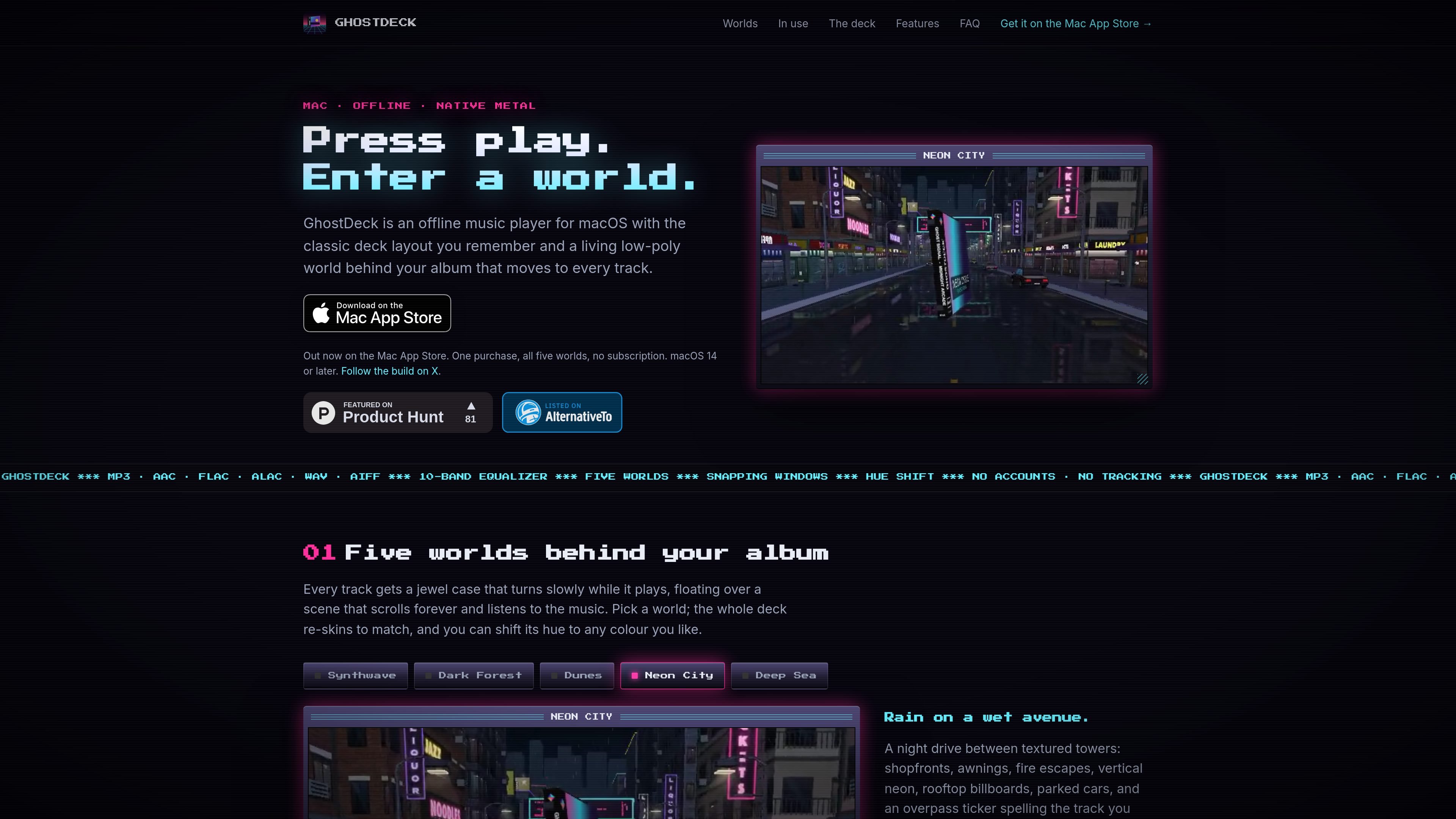
GhostDeck is an offline music player for macOS that plays audio files from folders on your Mac. It uses a classic deck-style interface with four snap-together modules for playback, playlists, equalizer controls, and visual feedback.
While a track plays, its artwork appears in a slowly turning jewel case over one of five low-poly scenes. The native Metal renderer generates the environments on the Mac, while controls such as playlist management, keyboard shortcuts, media keys, and dockable windows support desktop listening without a network connection.
Play locally stored MP3, AAC, M4A, FLAC, Apple Lossless, WAV, AIFF, CAF, AC3, and other formats decoded natively by macOS. Load and save M3U playlists, and import music by dropping files or folders into the app.
Shape playback with a 10-band equalizer, preamp, live response curve, and presets including Flat, Bass, and Headphones.
View a 32-band analyser, scrolling track title, and elapsed or remaining time while music plays.
Choose among five low-poly worlds, then shift a theme’s hue across the colour spectrum. The scenes are rendered in Metal with generated geometry, lighting, fog, reflections, and vignette effects.
Use four modules that snap together, dock the deck near a screen edge, and select a 1x–4x pixel scale. Keyboard shortcuts, media keys, the menu bar, and the Now Playing widget support control outside the main window.
The native macOS app runs offline, has no account or analytics, and is sandboxed to folders the user opens. The site states that the app is about 12 MB and idles at a few percent of one CPU core.
Open a music folder and play files recursively without sending the library to an online service. The app can use embedded artwork or nearby cover files, with a generated sleeve when neither is available.
Load or save M3U playlists, shuffle or repeat tracks, and control playback with keyboard shortcuts, media keys, the menu bar, or the Now Playing widget.
Select one of five scenes, adjust its hue, choose an equalizer preset, and dock the deck in a screen corner while it runs alongside other Mac work.
Use the 10-band equalizer, preamp, live response curve, spectrum analyser, and elapsed or remaining time display for more detailed playback control.
No. GhostDeck plays files stored on your Mac rather than streaming from Spotify or Apple Music. Select a folder and it scans its contents recursively.
It supports formats macOS can decode natively, including MP3, AAC, M4A, FLAC, Apple Lossless, WAV, AIFF, CAF, and AC3. M3U playlists can be loaded and saved.
GhostDeck requires macOS 14 Sonoma or later and supports both Apple silicon and Intel Macs.
Artwork is taken from embedded tags first, then cover.jpg or folder.jpg beside the track. If no artwork is available, GhostDeck generates a retro sleeve based on the title.
The app has no account requirement, analytics, or network access. It is sandboxed and only sees folders that you open.

KarmaBoard turns browser-capable TVs and other screens into 24×8 split-flap message boards for custom text, playlists, menus, announcements, and live feeds. It is designed for homes, cafés, offices, schools, hospitality venues, and travel displays that want remotely managed signage without dedicated split-flap hardware.
Farol is a native macOS terminal for supervising Claude Code, Codex, and other terminal-based AI coding agents. It runs sessions in isolated git worktrees, surfaces agent status and notifications, and provides tools to review, resolve, commit, push, and open pull requests for the resulting changes.

Pickle Sensei is an iPhone app for analyzing pickleball technique through rear-camera video and on-device pose tracking. It helps players review strokes, receive targeted coaching cues, practice with guided drills, and monitor individual progress.

NewMinecraftServers is a directory for finding Java and Bedrock Minecraft servers by platform, game mode, status, and newest listing date. Server owners can add or claim listings for free, while Paper operators can optionally use an open-source plugin for ownership verification and server statistics.

Poke Finder is a browser-based Pokémon collection experience that lets users encounter, catch, and organize Pokémon while browsing the web. It includes a nine-generation Pokédex, Shiny variants, Mega forms, achievements, and optional on-screen companions, with collection data stored locally.
EdgeVolume is a small macOS utility that lets users adjust output volume with a one-finger vertical gesture along a selected trackpad edge. It supports left, right, or both edges, adjustable sensitivity, and Apple Silicon or Intel Macs running macOS 15 or later.