
Multiple ways to add documents
Granite accepts PDF, Word, common image formats, and HEIC/HEIF photos, and it can also take whole folders. On the paid plan, you can forward email into your vault or sync a Dropbox folder.

Granite is a document vault that reads uploaded paperwork, files it automatically, and lets you search or ask questions in plain English later. It is designed for personal records such as tax forms, IDs, insurance policies, leases, and vehicle titles.
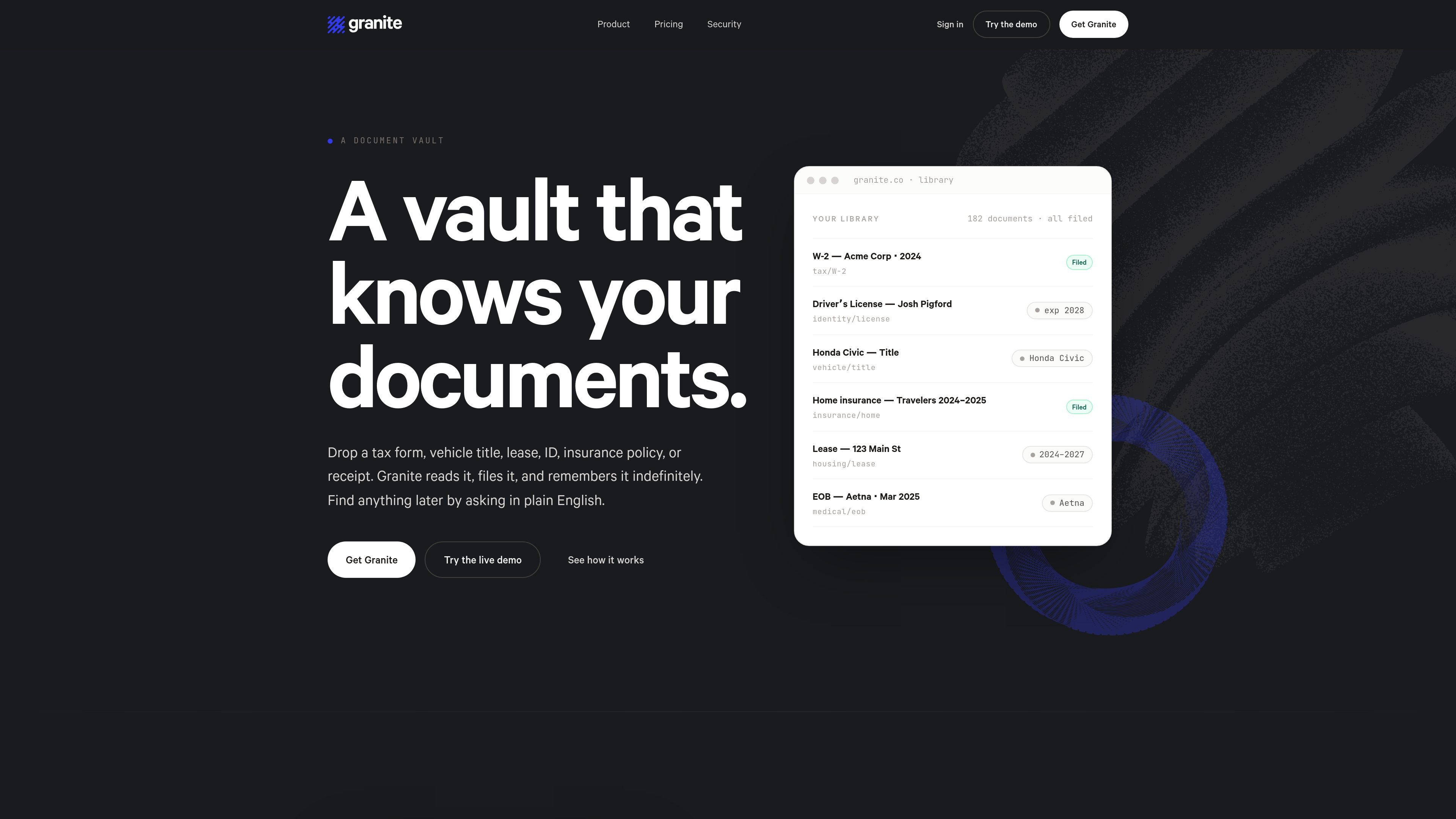
Granite is a document vault for personal records that need to stay findable over time. It is built to take in paperwork in many formats, read each file as soon as it is uploaded, and file it by what the document is rather than by a folder name you have to invent.
The product is designed around a simple workflow: drop in a document, let Granite extract and organize it, then ask for the document or the information inside it later in plain English. The site positions it as a place for tax forms, IDs, insurance policies, leases, vehicle titles, medical records, and similar documents that are easy to misplace but hard to replace.
Granite accepts PDF, Word, common image formats, and HEIC/HEIF photos, and it can also take whole folders. On the paid plan, you can forward email into your vault or sync a Dropbox folder.
Each upload is classified against a library of more than sixty document types. Granite extracts fields such as amounts, dates, account numbers, and expiration dates, then links documents to related people, vendors, vehicles, and tax years.
Every document gets a plain-English summary and can be searched by keywords, semantic meaning, or the entities it contains. You can ask a question and get an answer with a citation back to the source page.
Documents are organized into permanent collections based on what they concern, such as tax years or vehicles, and you can also create manual collections. Re-dropping the same file does not create a duplicate.
Granite supports encrypted archive exports, audit logs with 12-month retention, and emergency access for a named contact. The paid plan also adds Move Mode, which builds an address-change checklist from your vault.
Store tax forms, insurance policies, IDs, and receipts in one archive, then find them later by asking for the document or the detail you need. Granite’s summaries and citations help you verify the result quickly.
Use the paid plan’s email-in and Dropbox features to route incoming records into a vault without opening the app for every file. That makes it easier to keep recurring documents flowing into the same archive.
Organize leases, property insurance, mortgage statements, and other home records into a property-focused vault or collection. The product’s entity linking and permanent collections help related paperwork stay together.
Build a checklist from your stored records when you move, so you can see which banks, insurers, and providers need address updates. Granite’s Move Mode is designed around that transition.
Give a trusted contact a path to request your archive if needed, with approval or a wait window before release. That is aimed at continuity and emergency-access planning rather than daily collaboration.
Granite’s free plan allows up to 25 documents and 1 GB of storage. The paid plan removes the document cap and increases storage to 100 GB.
Yes. The pricing page says Granite supports Evernote imports, Dropbox syncing, and uploading folders of files. It also says a direct Google Drive connector is still on the roadmap.
Granite supports PDF, Word, JPG, PNG, WebP, HEIC, and HEIF uploads, and it can also ingest emailed documents on the paid plan.
Granite v1 is one vault per person. The pricing page says there is not yet a team or family plan.
You can export your vault at any time. The app builds an encrypted ZIP containing original documents, extracted fields, and an audit-log manifest, then provides a one-time authenticated download link.

nolainocr is an AI OCR tool that extracts structured data from PDF invoices, receipts, forms, contracts, and bank statements. It helps teams move document data into Excel, Google Sheets, JSON, or CSV without manual entry.

PDFTools is a browser-based suite of free and premium PDF utilities for editing, conversion, and document handling. It helps users work on PDFs locally in the browser without uploading files to a server.
司马阅是一款面向企业的AI文档智能体平台,帮助团队把分散在文档中的知识转成可用于问答、检索、写作和审查的结构化能力。它适合对准确性和数据安全要求较高、且有大量文档工作流程的企业。

DocuSmart AI is a cloud-connected document search tool for nonprofits and civil society organisations. It searches existing files in Google Drive, OneDrive, and Dropbox and returns citation-backed answers for reporting, compliance, and grant work.

Extend is a document processing platform for turning PDFs and other documents into structured data. It helps teams parse, extract, split, classify, and route documents through APIs, Studio, Evals, Composer, and Workflows.

Codex Plugins bundle reusable skills, app integrations, and MCP servers into workflows you can install in the Codex app or use from Codex CLI. They help extend Codex with connected-service tasks, reusable instructions, and shared team workflows.