
Metric ownership
Assign a looper a measurable objective such as organic clicks, post impressions, qualified leads, first-response time, or unreconciled transactions, then monitor the current value and target.

Looper is a browser-based AI teammate platform that assigns recurring work to metric-focused agents for goals such as organic clicks, response time, post reach, leads, and accounting operations. It connects to business tools, tracks work on boards, and requires approval before consequential actions are sent or published.
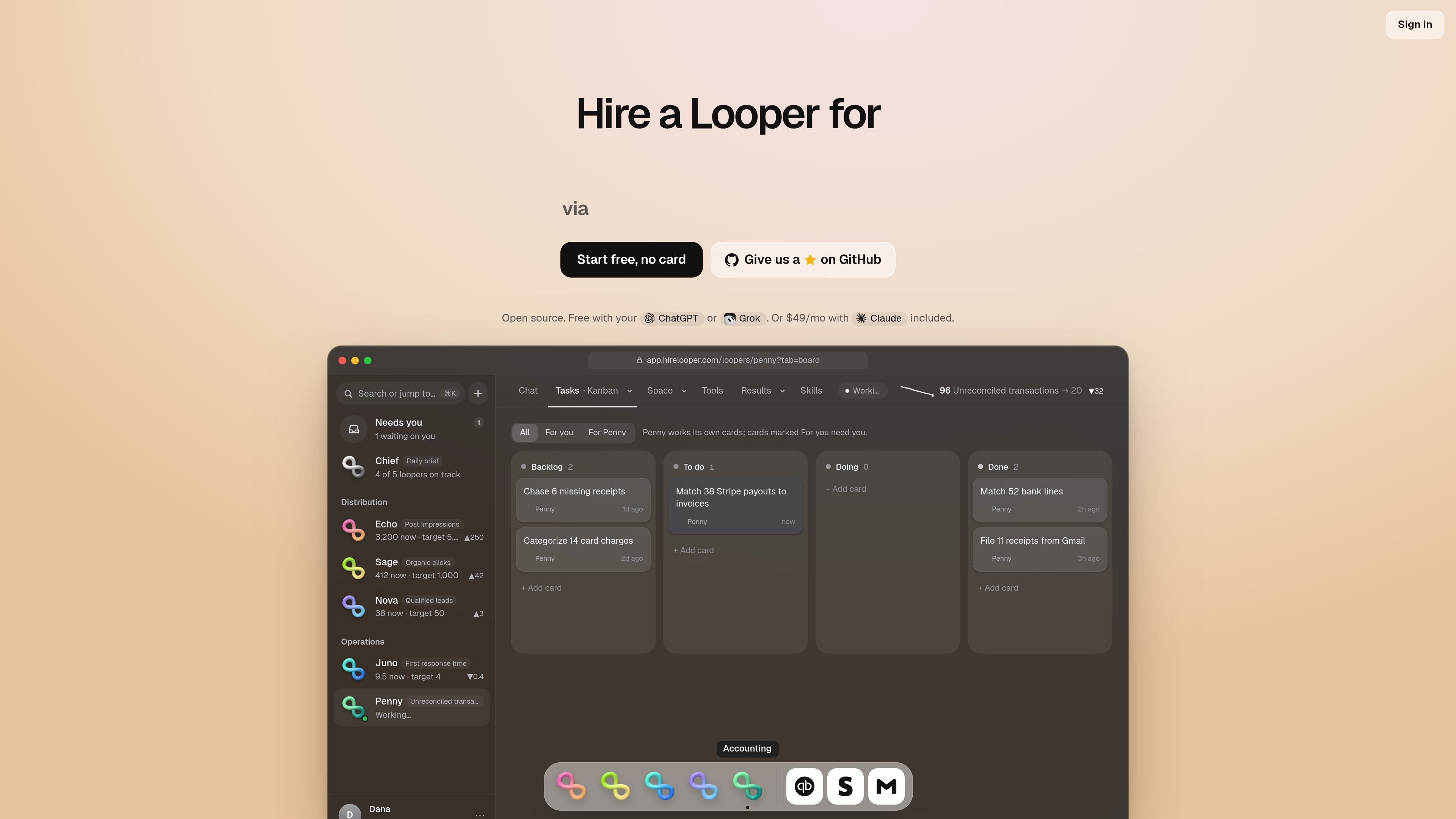
Looper is a browser-based AI teammate platform built around business metrics. Instead of assigning an open-ended assistant, you create a looper for a target such as organic clicks, post reach, qualified leads, response time, or unreconciled transactions. The looper has its own skills, schedule, board, and metric history.
After setup, a looper runs scheduled work such as researching, drafting, checking connected tools, or updating a workflow. It can work independently on planning and preparation, but sending, publishing, paying, and deleting require user approval. Progress is presented through boards, briefs, changelogs, weekly retrospectives, and current-versus-target metric values.
Looper is aimed at individuals and teams that want recurring operational or growth work organized around measurable outcomes. The site describes Personal, Team, and Company options, with Personal workspaces for one person, Team workspaces for collaborators, and an on-premises Company option for organizations that need their own servers.
Assign a looper a measurable objective such as organic clicks, post impressions, qualified leads, first-response time, or unreconciled transactions, then monitor the current value and target.
Schedule recurring skills for specific days and times. Examples include checking search performance, improving a page, drafting social posts, pulling Linear issues, or matching Stripe payouts.
Loopers research, draft, and plan independently, while actions that send, publish, pay, or delete remain in a Needs you approval queue.
Each looper works from a board with backlog, to-do, doing, and done cards. Users can review the steps taken, current status, changelog, and metric history.
Connect tools used by the workflow, including GitHub, Linear, Buffer, Search Console, Google Docs, Gmail, HubSpot, QuickBooks, Stripe, LinkedIn, Slack, Google Sheets, Notion, Shopify, and Google Ads. The site also says more connections are available through Composio.
Loopers run a weekly retro, report progress in a daily brief, and can update their skills based on what worked. Team workspaces support shared collaboration around loopers and approvals.
A looper can check search and AI-answer performance, rewrite pages, and draft answers for missed queries on a recurring schedule while tracking organic clicks against a target.
A build-in-public or social-content looper can prepare a LinkedIn post, connect Buffer or LinkedIn, and track post impressions while leaving publication for approval.
A customer-support looper can use Gmail and Docs to draft replies to refund emails and monitor first-response time against an operational target.
A sales looper can work with HubSpot, Gmail, and LinkedIn to enrich demo requests and track qualified leads toward a defined goal.
An accounting looper can connect QuickBooks, Stripe, and Gmail to match payouts and reduce unreconciled transactions through a reviewed workflow.
Looper researches, drafts, and plans on its own. Actions such as sending, publishing, paying, and deleting wait for your approval in the Needs you queue.
You set up a looper by naming the metric, connecting the relevant tools, and defining its schedule and skills. The site shows examples using ChatGPT or Grok subscriptions, or Claude on the paid option.
Loopers run scheduled skills on Looper's servers, while the product is accessed in a browser, so your laptop does not need to remain open.
A workspace contains your loopers, connected apps, boards, approvals, runs, databases, and metric history. Personal workspaces are for one person; Team workspaces add collaborators through invite links.
Personal access is described as pay as you go: AI can run through a connected ChatGPT or Grok subscription, while advanced tools such as computer use and web search are billed according to use. The site also describes a $49-per-month option with Claude included, plus Team and Company offerings.

Codex Plugins bundle reusable skills, app integrations, and MCP servers into workflows you can install in the Codex app or use from Codex CLI. They help extend Codex with connected-service tasks, reusable instructions, and shared team workflows.

AgentMail is an email inbox API for AI agents that lets developers create, send, receive, and search messages through REST APIs and SDKs. It supports agent workflows such as threaded replies, verification, customer support, scheduling, and inbox-based approvals.

Lasso is an ecommerce product data platform for enriching catalog records, processing supplier files, generating product content, and monitoring competitors. It combines a web app with a REST API, SDK, and MCP server for teams and developers.

CreateOS Sandbox is an isolated compute environment for running code and agent workloads inside Firecracker micro-VMs. It is designed for workflows that need machine-level isolation, private networking between sandboxes, and programmatic control through SDK, CLI, or MCP.

GitBot is a local browser-based workspace for creating reusable coding bots powered by Claude Code, Codex, or OpenCode. It helps developers run those agents across repository folders with persistent threads and configurable permissions.

Struere is an AI-native platform for turning spreadsheet data into structured operational software with dashboards, alerts, and automations. It is aimed at teams that want to replace manual spreadsheet workflows without building custom tools from scratch.