
Works on your folder
Point Palette Desktop at any folder on your machine, including folders shared through Google Drive or Dropbox, and use that folder as the workspace for agent work.

Palette Desktop is a macOS app for running Claude Code and Codex on shared folders. It helps teams work with agents inside their existing folder structure, review changes before saving, and keep shared context in one place.
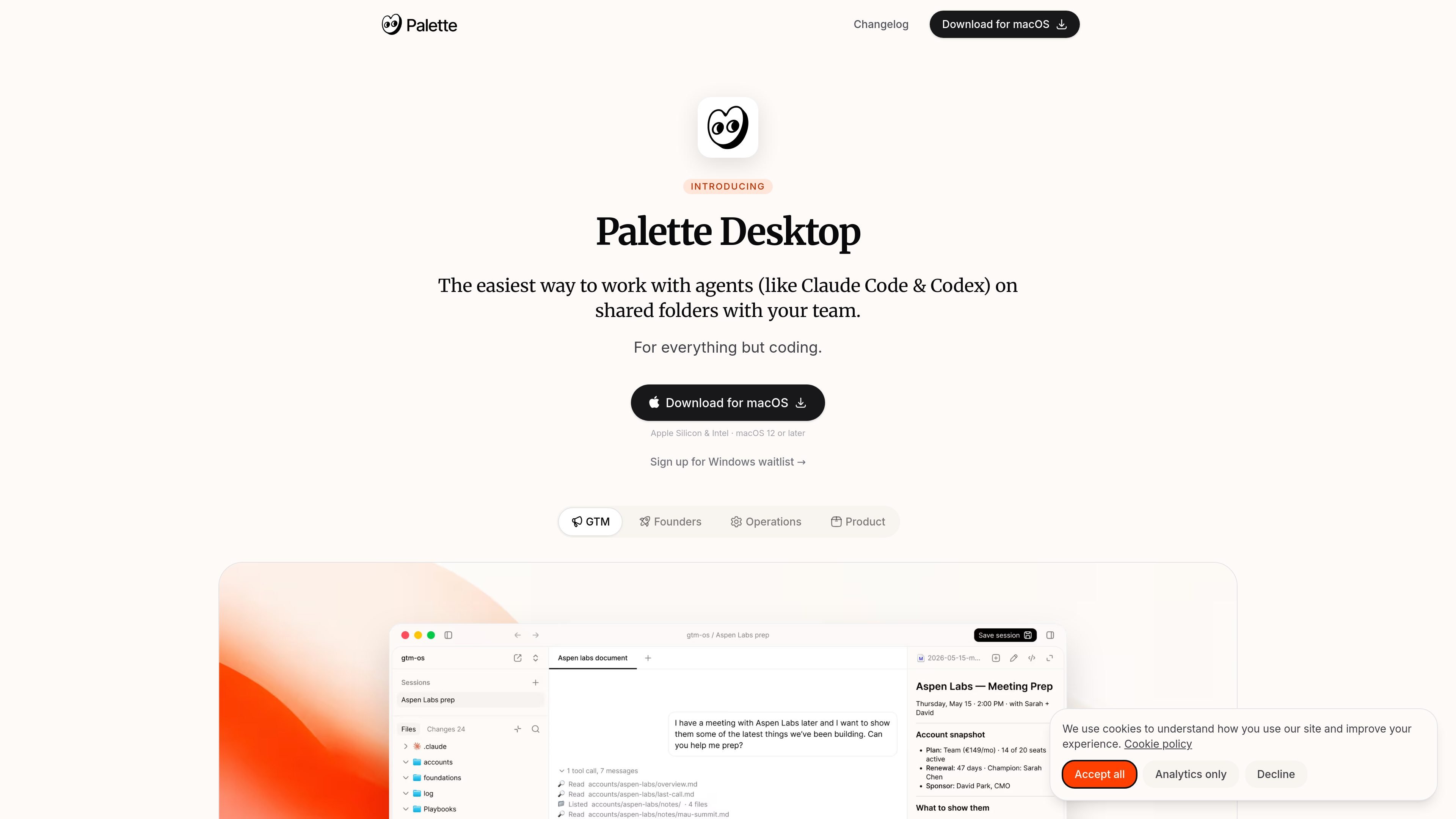
Palette Desktop is a macOS app for running Claude Code and Codex on shared folders. It is aimed at knowledge work outside engineering, where teams want agent help on writing, research, planning, operations, GTM, and design tasks without moving work out of the folders they already use.
The product’s core workflow is to point Palette Desktop at a folder, start a chat session, review the staged changes, and save back only what you approve. It supports local folders and folders shared through Google Drive or Dropbox, and it is designed to keep agent work reviewable while letting teams keep their own context in one place.
Point Palette Desktop at any folder on your machine, including folders shared through Google Drive or Dropbox, and use that folder as the workspace for agent work.
Choose Claude Code or Codex per session, with the option to switch between agents instead of locking the workspace to a single vendor.
Run several chat sessions at once, so different tasks can move in parallel inside the same shared folder context.
Palette Desktop stages each session’s changes and lets you approve them before anything writes back to the shared folder.
Sessions are sandboxed clones of your workspace, letting you try changes safely before saving only what you want.
The app surfaces your workspace’s commands and skills in an actions list, and shows integrations connected to your agents in one place.
Use Palette Desktop when a non-engineering team needs agent help on copy, planning, research, operations, or design while keeping work inside the folders the team already shares.
Use it when you want Claude Code or Codex to work against a team folder but still review staged changes before they are written back.
Use parallel chats when different tasks need to move at the same time, such as one session researching while another drafts or reorganizes files.
Use the built-in templates when you want a starting folder structure for GTM, startup, or ops work without designing the hierarchy from scratch.
Use Palette Desktop alongside the context layer when your team wants org context available to agents, not just the files in a single workspace.
Palette Desktop runs on your own machine and works with folders you control, including folders synced through Google Drive or Dropbox. The source says agent calls go directly through Anthropic or OpenAI, and that you bring your own Claude Code or Codex subscription.
Yes. The homepage and FAQ state that you need either a Claude Code or Codex subscription to use Palette Desktop.
Palette Desktop is a local app for macOS today. The homepage says it supports Apple Silicon and Intel Macs running macOS 12 or later, and the site also mentions a Windows waitlist.
The homepage says Palette Desktop points at a folder, starts a chat session in that workspace, and stages changes so you can review what changed before saving back to the shared folder.
The FAQ says Palette Desktop detects Claude Code or Codex automatically if they are installed, and helps you install them if they are not.
SignalLEMO is a B2B lead intelligence and outreach platform for field-service and specialized service teams. It helps users find prospects, draft outreach, and track pipeline activity in one place.

Goldfish is an AI memory app for macOS that helps you reply, write, summarize, and continue using the context already on your Mac. It stores memory locally and writes in your tone.

Lasso is an ecommerce product data platform for enriching catalog records, processing supplier files, generating product content, and monitoring competitors. It combines a web app with a REST API, SDK, and MCP server for teams and developers.

Biji è una piattaforma versatile progettata per migliorare la produttività attraverso strumenti e funzionalità innovative.

Codex Plugins bundle reusable skills, app integrations, and MCP servers into workflows you can install in the Codex app or use from Codex CLI. They help extend Codex with connected-service tasks, reusable instructions, and shared team workflows.

Struere is an AI-native platform for turning spreadsheet data into structured operational software with dashboards, alerts, and automations. It is aimed at teams that want to replace manual spreadsheet workflows without building custom tools from scratch.