
English and Japanese card search
Search more than 20,000 English cards by name, set, or artist, and more than 21,000 Japanese cards by name or set. English and Japanese cards can be mixed on the same page.

Pokébinder is a free browser tool for planning Pokémon TCG binder pages, searching English and Japanese cards, and arranging them in 3×3 layouts. Collectors can mark cards they do not own and print true-size placeholders, with optional artwork spanning the page.
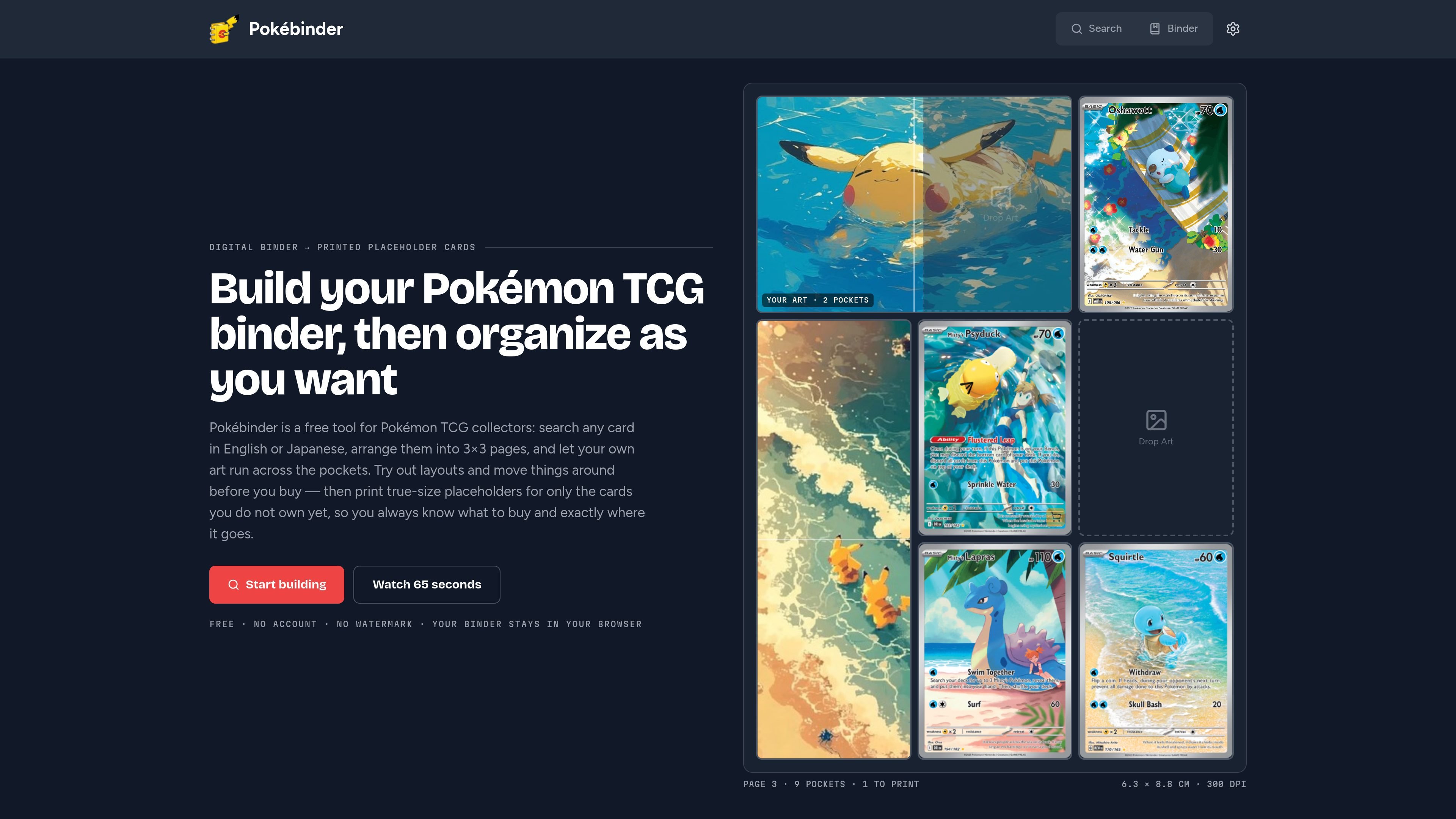
Pokébinder is a browser-based organizer for Pokémon TCG collectors who want to plan physical binder pages before buying or rearranging cards. It lets users search card data, place cards into 3×3 layouts, and preview pages as a digital binder.
The tool also turns an unfinished page into a practical want list: cards marked as not owned can be printed as true-size placeholders for standard binder pockets. Users can test how a page will look, keep the placeholder in position until the real card is found, and use their own artwork as a single-pocket, spanning, or full-page background.
Search more than 20,000 English cards by name, set, or artist, and more than 21,000 Japanese cards by name or set. English and Japanese cards can be mixed on the same page.
Place cards into 3×3 pages, move them by dragging or tapping, and preview the binder as a page-turning spread on desktop or as swipeable pages on a phone.
Use an image in one pocket, across two or three pockets in a row or column, or behind a complete page with cards on top. The image can be zoomed and repositioned before printing.
Mark cards as not owned and print only those cards at true Pokémon card size, with dashed cut guides. Artwork used on the page is printed in alignment with the card guides.
Keep a placeholder in the same pocket until the real card is acquired, so buying a card does not require rearranging the rest of the page.
Build a themed or set-based page digitally, compare card positions and artwork, and make layout changes before purchasing cards or moving them in a physical binder.
Mark cards that are still missing and print inserts that occupy their exact pockets. The page then doubles as a visual want list at card shows or while shopping.
Create a connected visual page by carrying personal artwork across a row, column, several pockets, or the full 3×3 layout, then print the artwork with the card guides.
Use placeholders to keep an incomplete page readable for family members or newer collectors who identify cards by their pictures, not by set symbols or collector numbers.
No. Pokébinder runs in a browser, requires no installation or account, and stores the binder in the browser. Clearing browser data clears the binder because there is no cloud save today.
Search for a card, place it on a 3×3 page, arrange the page, and mark cards you do not own. The print output includes only the marked missing cards, along with any spanning artwork used on the page.
Print at 100% scale or Actual size, with Fit to page and Shrink oversized pages disabled. Placeholders measure 6.3 × 8.8 cm, include dashed cut guides, and print nine cards per A4 or US Letter sheet.
Yes. They are intended for standard trading-card pockets, including 9-pocket binders. Plain paper works; 160–250 gsm card stock is suggested when you want a stiffer insert. A test sheet is recommended before printing a full binder.
No. A placeholder is for filling an empty binder pocket until the real card is found. It is not intended for play, resale, or presentation as a genuine card. English artist search is currently supported, while Japanese search supports card name and set.

GameGrad turns PDF study material into quiz questions that appear inside arcade games, so users can practice active recall while they play. It offers a free tier with one PDF and a Pro plan with more uploads, more questions, and answer explanations.

DailyPlay.ai is a behavioral growth platform that uses AI site scanning and micro-games to help brands improve engagement and conversion. It supports web, mobile, and other digital touchpoints, with a one-line script setup and a free engagement scan.

ChessWoodie is a chess tactics training app based on the Woodpecker Method. It helps players build pattern recognition through repeated puzzle cycles, track speed and accuracy, and review missed tactics from their own games.

PixelForge turns a single photo into a game-ready 2D character sprite pack, including a 4×4 sheet, transparent frames, direction strips, and looping walk GIFs. It is designed for engine-ready use in Godot, Unity, Phaser, GameMaker, and web games.

Loniva is a mobile puzzle app that offers a calm daily mix of games across memory, attention, language, speed, logic, and focus. It runs on iPhone, iPad, and Android, with a free 7-day trial and a free daily workout after the trial.

Mixels.ai is a browser-based AI pixel art generator for creating 8-bit characters, sprites, avatars, and photo-to-pixel conversions. It is designed for users who want grid-aligned retro artwork without installing software.