
Short screen recordings
Capture concise screen recordings capped at 3 minutes, which keeps clips focused for quick sharing and walkthroughs.

QuackScreen is a native macOS app for quick screen recordings and screenshots from the menu bar notch. It helps users capture short clips or annotated screenshots and drag them directly into apps like Slack, Mail, or Finder.
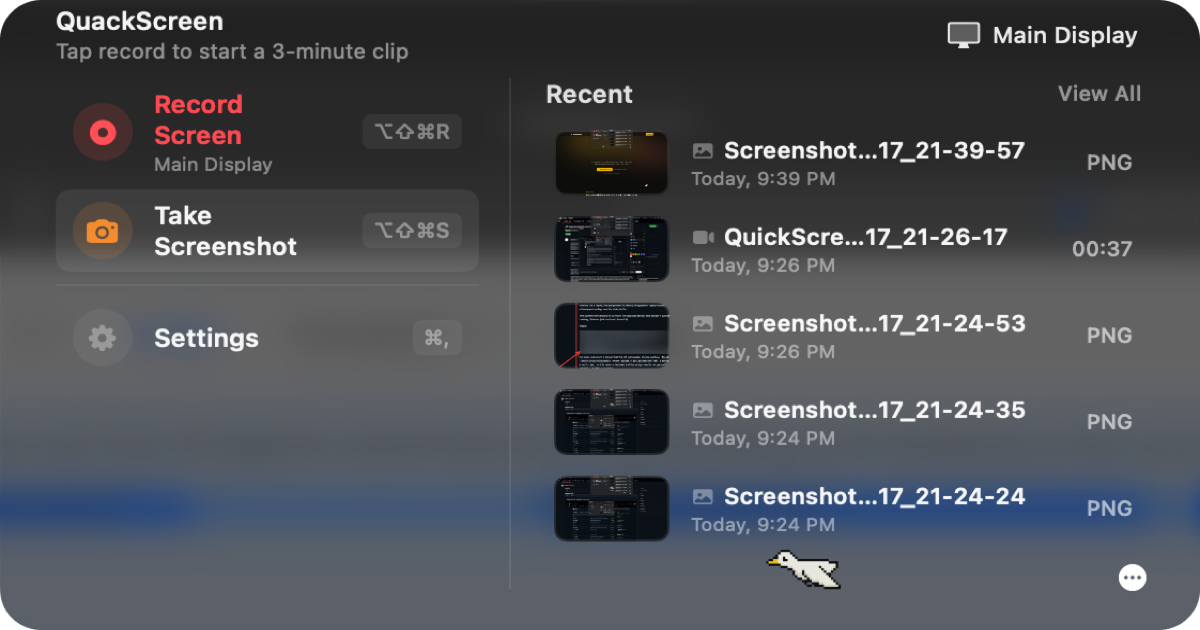
QuackScreen is a native macOS app for taking quick screen recordings and screenshots from the menu bar notch. It is designed for short, focused captures that can be dragged straight into another app without going through an upload or link-sharing step.
The product centers on a simple workflow: record a clip or take a screenshot, then drag it from the notch into apps such as Slack, Mail, Finder, Jira, Linear, GitHub, or a pull request thread. It targets people who need to explain something visually and want to move from capture to sharing with minimal friction.
Capture concise screen recordings capped at 3 minutes, which keeps clips focused for quick sharing and walkthroughs.
Record either the full display or a single window, depending on how much context you want to show.
Automatic cursor-following zoom is built into every clip, helping viewers track the action without extra editing.
Take screenshots and mark them up in the app with pen, arrow, rectangle, highlight, and blur tools.
Choose a microphone for narration when you want to add voice to a clip.
Use system-wide shortcuts to start recording or grab a screenshot without opening a separate workflow.
Capture a brief repro clip, then drop it into Jira, Linear, or GitHub so collaborators can see the issue without a separate upload step.
Record a short screen walkthrough and paste it into a pull request thread when a visual explanation is clearer than a written note.
Take an annotated screenshot or short clip to explain an account issue, then send it through Slack or Mail.
Use a quick 90-second screen walk to share progress in async updates without scheduling a meeting.
Annotate a screenshot, narrate a clip, and share it as a compact demo for internal or external review.
Yes. QuackScreen can be downloaded and used for free, and a license unlocks watermark-free exports and longer recordings.
Buy once and receive a license key by email. You can paste it into the app on up to two Macs, and it works offline most of the time.
QuackScreen needs macOS 26 (Tahoe) or newer and Apple silicon. Intel Macs are not supported.
Yes. QuackScreen should be launched from the display with the notch, which is typically the MacBook’s built-in screen. If the menu bar is on an external display, the popover may not anchor correctly.
If the app does not meet your expectations within 3 days of purchase, you can reply to the receipt email for a refund.

Tavus is an AI video platform for building real-time, face-to-face agents, digital twins, and AI companions. It combines APIs, custom replicas, and multilingual conversational workflows for developers and teams.

HiringPartner.ai is an autonomous AI recruiting platform for sourcing, screening, and interviewing candidates 24/7. It supports ATS-connected workflows, bulk resume uploads, and reviewable interview outputs for hiring teams.

Pixelcut is an AI photo editor for creating and editing product images, social content, and video assets. It offers free and paid plans, plus mobile app and browser access for individual users and teams.

Petalica Paint is a web service for automatically coloring line art and tracing line drawings from photographed images. The home page says it can be used under the stated terms for commercial and noncommercial work, but it is scheduled to end on 2025-07-31 at 16:00 JST.

Wearvue AI generates personalized outfit previews from a photo, lets users refine the style for an occasion, and surfaces similar real products to shop. It is aimed at people who want to preview outfit ideas before buying and compare them with shoppable alternatives.

Upscale.media is an AI image upscaling and enhancement tool from Pixelbin that enlarges low-resolution or pixelated images and improves clarity in the browser. It offers free individual image use, paid credit plans, and team-oriented workflows such as bulk processing and API integration.