
Daily reserve estimate
Combines overnight sleep recovery with daytime heart and HRV readings to estimate a personal reserve from 0 to 100%.

Your Stressy is a wellness and recovery app for iPhone and Apple Watch that turns sleep, heart, stress, and activity data into a 0–100% daily reserve estimate. It helps users review recovery, plan training, adjust bedtime, and understand how their day affected their energy.
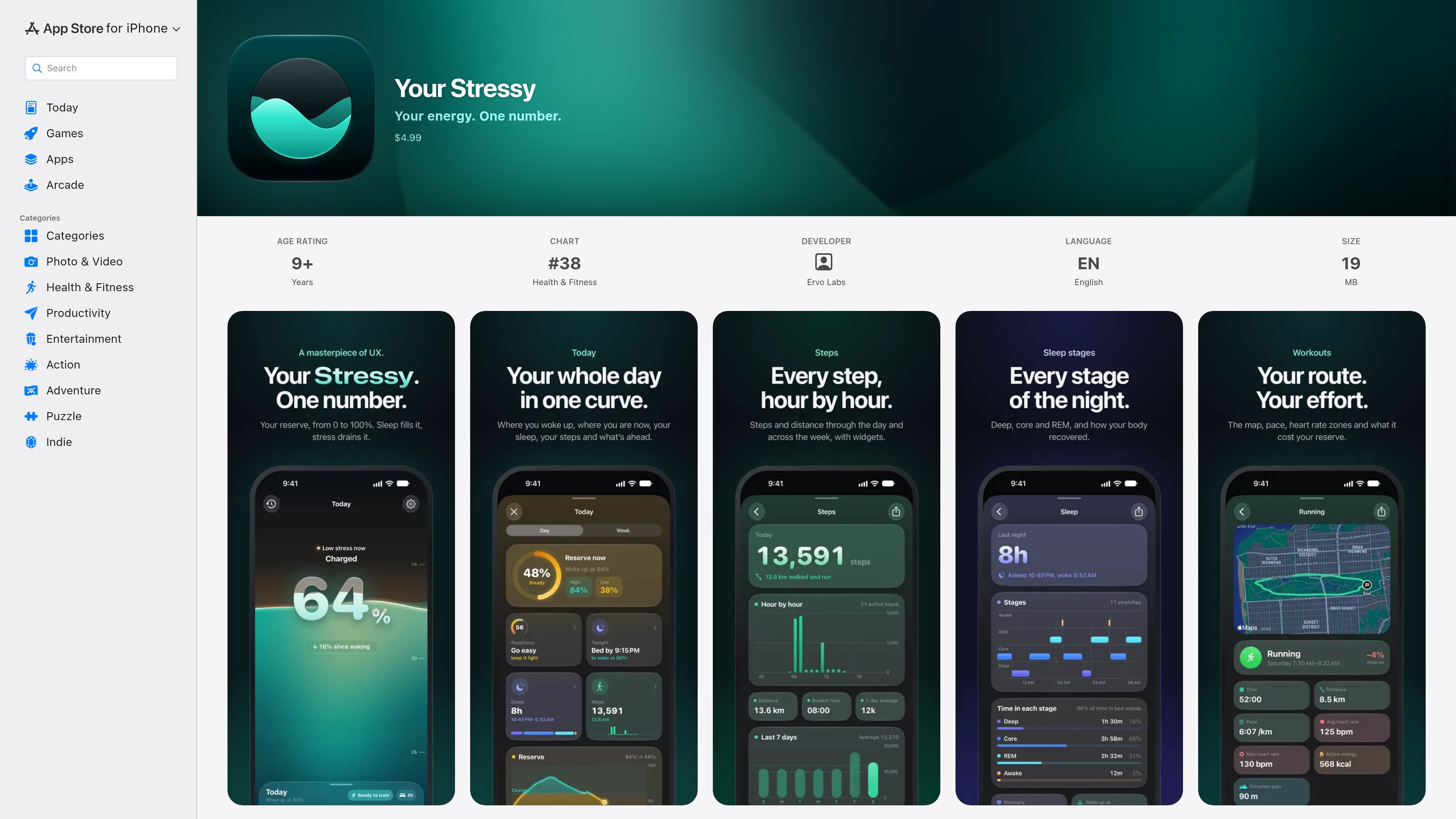
Your Stressy is a wellness and recovery app for iPhone and Apple Watch from Ervo Labs. It converts supported Apple Watch and Apple Health measurements into a single reserve estimate from 0 to 100%, helping users review how sleep, stress, calm, and activity have shaped their day.
The app combines overnight recovery with daytime readings and presents the result through a daily curve, activity explanations, readiness guidance, sleep and workout details, and watch or iPhone surfaces. It is intended as an interpretive wellness tool rather than a medical device, and the developer says health data remains on the user's iPhone and Apple Watch.
Combines overnight sleep recovery with daytime heart and HRV readings to estimate a personal reserve from 0 to 100%.
Shows the day's reserve as a curve, breaks stress down into five-minute readings, and lists activities with their estimated effect on the reserve.
Provides readiness guidance for hard training and a bedtime coach that estimates the latest bedtime for waking at 100%, 90%, or 80% reserve.
Displays sleep stages including deep, core, and REM, along with the time spent in each stage and overnight recovery information.
Records workout routes, time, distance, pace, heart rate, heart-rate zones, and the estimated reserve cost of each workout. Steps and distance can be viewed by hour and across the week.
Offers an Apple Watch tank, complications, Smart Stack support, and iPhone Home Screen and Lock Screen widgets for reserve, stress, steps, or distance. Steps, sleep, and workouts can also be exported as image or video stories.
Check the morning reserve and overnight recovery to decide whether the day is better suited to demanding training or a lighter plan.
Review the stress curve, activity costs, and mindful minutes to identify when the reserve changed during a workday or other busy period.
Use the bedtime coach to compare a planned bedtime with target wake-up reserve levels, then inspect the explanation behind its recommendation.
Review deep, core, and REM sleep alongside recovery information to understand how a particular night affected the next day.
Track routes and workout metrics, or create a shareable story from steps, sleep, or a workout directly on the iPhone.
Stressy requires an iPhone running iOS 26 or later and an Apple Watch running watchOS 26 or later. It reads supported health data from Apple Health on the iPhone and Apple Watch; wearing the watch overnight is recommended for the best results, and the personal baseline settles in over about a week.
Stressy uses sleep, heart rate, heart rate variability, resting heart rate, workouts and routes, distance, active energy, steps, and mindful minutes from Apple Health. It also uses age and sex to determine heart-rate zones.
The app shows a reserve estimate from 0 to 100%. Sleep replenishes it, while stress drains it during the day; calm and mindful minutes can slow or replenish the reserve. The app presents this as a wellness estimate, not a medical measurement or device.
Stressy is sold for a one-time price of $4.99 and does not use a subscription. The App Store listing also indicates support for Family Sharing for up to six family members.
The developer states that Stressy has no account requirement, servers, analytics, or ads, and that health data is read on the iPhone and Apple Watch without leaving those devices. Apple notes that the developer's privacy disclosures have not been verified by Apple.

Google Fitbit Edge is an ultra-slim fitness tracker for everyday wear and structured workouts. It provides on-wrist exercise guidance, built-in GPS, automatic activity recognition, and health and wellness trend tracking, with some Health Guardian features requiring Google Health Premium.

Malyatko is a baby tracker for logging feeding, sleep, growth, teething, and milestones in one app. It works on iPhone, Apple Watch, and widgets, with no sign-up, offline use, and family sharing through iCloud.

MIRA vision develops synthetic-data-driven AI for pathology image analysis in medical diagnostics. Its website positions the product for teams that need privacy-compliant training data, automatic annotations, and controlled data generation.

Teloframe is an AI-powered football coaching platform for building tactics, editing drills, planning sessions, and managing player development in one workspace. It includes a Free tier plus Pro and Club plans for coaches and analysts who need more collaboration and team features.

LeanUp is an AI calorie tracker and meal-planning app for logging meals, tracking macros, and getting personalized nutrition guidance. It supports barcode scanning, photo-based food recognition, manual search, and recipe reuse.

TrakMac is a voice-first macro tracking app for fitness-focused users on iOS. It estimates calories and macros from spoken meal descriptions, then helps users log food and stay aligned with their training goals.