
Two-stage island UI
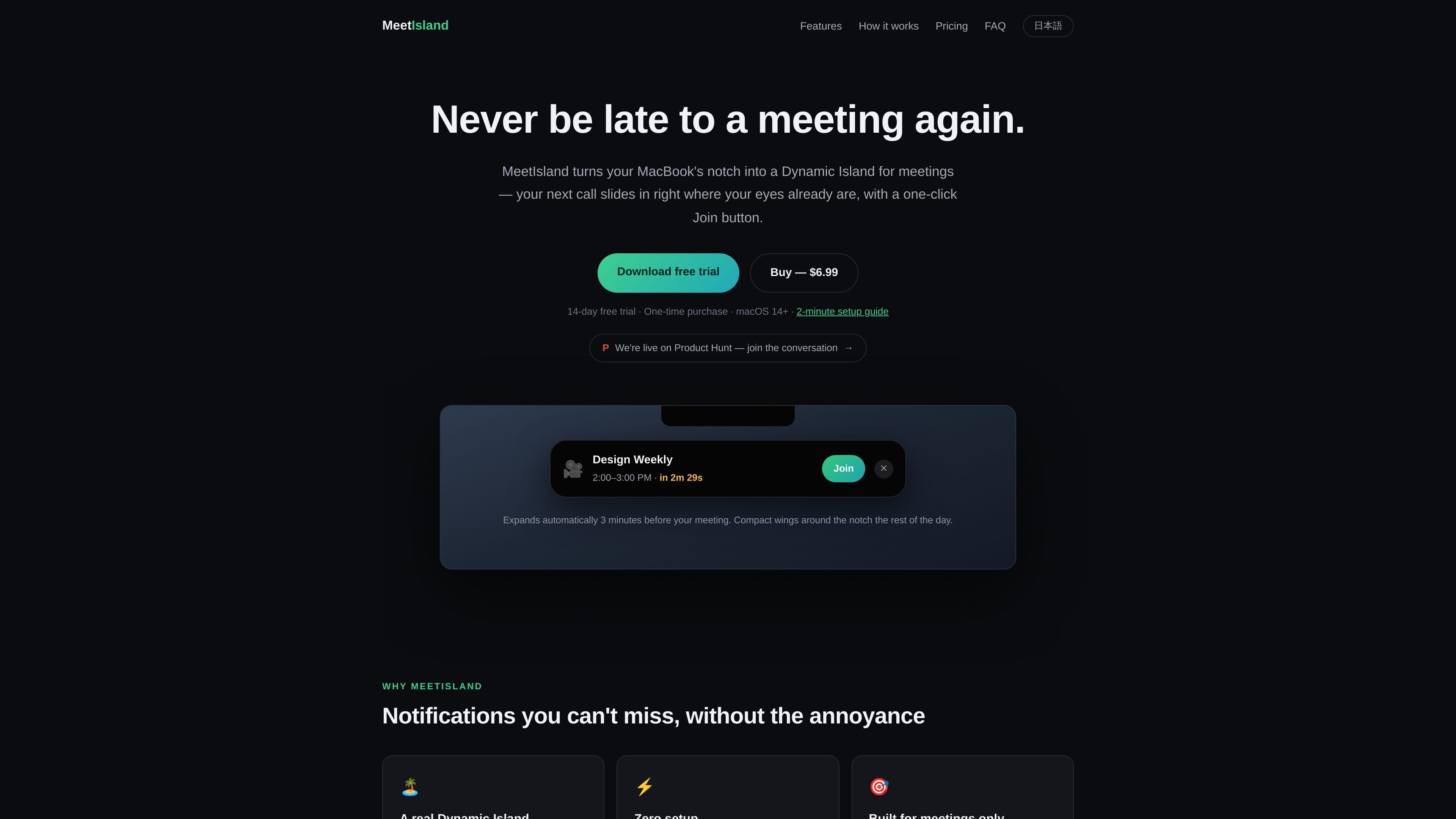
Shows a compact meeting indicator around the Mac notch and expands into a full card when the meeting is about to start. On displays without a notch, it uses a small virtual island at the top edge instead.
MeetIsland is a macOS meeting reminder app built around the notch. It keeps your next meeting visible in a compact “island” state, then expands into a larger card with a Join button when it is time to act.
The app reads calendars already synced to macOS, so it works with calendars available through Internet Accounts such as Google, iCloud, and Exchange. It is focused on meeting reminders and quick access to join links, rather than broad calendar management.
Shows a compact meeting indicator around the Mac notch and expands into a full card when the meeting is about to start. On displays without a notch, it uses a small virtual island at the top edge instead.
Uses macOS Calendar sync rather than a separate account connection. If Calendar.app can see your Google, iCloud, or Exchange calendars, MeetIsland can read those meetings too.
Opens supported meeting links with one click from the expanded card, currently for Google Meet and Zoom.
Shows a live countdown that changes color as the meeting start time approaches, turning amber and then red.
After the meeting starts, the card continues to show how late you are for 10 minutes, helping you notice missed starts.
The app is notarized by Apple and can be launched by dragging it to Applications and granting calendar access.
Use MeetIsland if you want meetings to appear where you already look near the notch, instead of checking a menu bar list.
If your calendar is already synced through macOS Internet Accounts, you can launch the app and start using it without connecting another service.
When a meeting is about to begin, the card expands with a Join button so you can open Google Meet or Zoom quickly.
On displays without a notch, the app still places the meeting indicator at the top center, which keeps the same workflow on external monitors or notchless Macs.
For users who care about local handling of calendar data, the app keeps event details on the Mac and only offers opt-in anonymous usage statistics.
MeetIsland reads your calendars locally through macOS EventKit. On first launch, it asks for calendar access and then uses the calendars already available in macOS System Settings → Internet Accounts, such as Google, iCloud, and Exchange.
Yes. If your Mac or display does not have a notch, MeetIsland shows a small virtual island pill at the top center of the screen and keeps the same Join-button workflow.
MeetIsland automatically detects Google Meet and Zoom links. The site says Teams link detection is on the roadmap.
The homepage says the app has a 14-day free trial and a $6.99 one-time purchase. After the trial, the meeting list in the menu bar keeps working, but island notifications pause until you enter a license key.
The privacy policy says calendar contents stay on your Mac. Optional anonymous usage statistics can be shared only if you opt in, and they are limited to event counts and app/macOS version information.

Liam is an AI copilot for managing inboxes, writing replies, prioritizing email, and scheduling meetings. It is offered free for individuals, with custom pricing for teams and enterprise.

Goldfish is an AI memory app for macOS that helps you reply, write, summarize, and continue using the context already on your Mac. It stores memory locally and writes in your tone.

Biji는 혁신적인 도구와 기능을 통해 생산성을 향상시키기 위해 설계된 다목적 플랫폼입니다.

Gemma AI is a phone call reminder app that calls you with scheduled reminders instead of push notifications. It helps people who want a more direct way to stay on schedule, with Google Calendar sync and conversational call interactions.

Tactiq is an AI note taker for Google Meet, Zoom, and Microsoft Teams that transcribes meetings live and turns them into summaries, action items, and follow-up outputs. It is built around a Chrome extension and supports team workflows through sharing and integrations.

garden-md is an open-source Node.js CLI that turns meeting transcripts into a local company wiki. It links entities across transcripts, keeps the original text intact, and renders the result as a browsable wiki.