
Target-Specific Benchmarking
Paste a target URL and benchmark against the site you actually need to scrape, so the results reflect real page behavior rather than a generic test endpoint.

ScrapeOps Proxy Tester benchmarks 20+ proxy providers against a target URL and returns a ranked report with success rate, latency, and cost estimates. It is designed for web scraping teams comparing proxy APIs, residential, datacenter, and unblocker options.
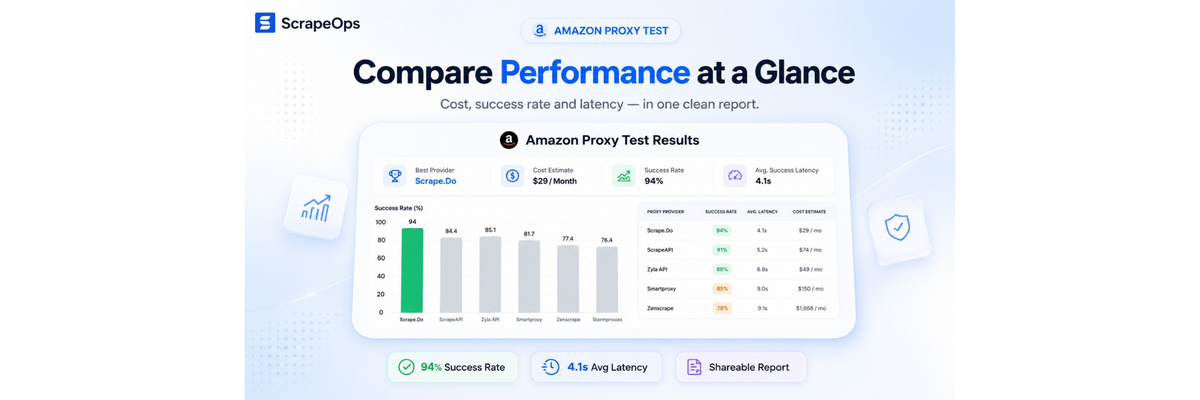
ScrapeOps Proxy Tester is a proxy benchmarking tool for web scraping teams that want to compare residential, datacenter, proxy API, and unblocker providers against a specific target URL. Instead of testing in isolation, it uses the page you plan to scrape so the results are tied to your actual use case.
The workflow is simple: enter a target page, let the service benchmark multiple providers and supported configurations, then receive a ranked report by email. The report focuses on the practical signals people use when choosing a proxy setup for scraping, including success rate, latency, and estimated cost.
The site positions the tester as a way to reduce the effort of building and maintaining your own comparison workflow. It also highlights that the benchmark validates responses, tracks pricing differences, and compares providers across the configurations they support.
Paste a target URL and benchmark against the site you actually need to scrape, so the results reflect real page behavior rather than a generic test endpoint.
The tester runs requests through 20+ proxy providers and checks the configurations they support, including residential routing, JavaScript rendering, and anti-bot options.
Reports include validated responses, which means a response is only counted as successful when it is not a ban page, CAPTCHA, or error page.
The report surfaces success rate, average success latency, bandwidth or API credit usage, best plans, and cost per million to help compare performance and unit economics together.
A ranked benchmark report is delivered by email after the run, making the output easy to review without building a comparison workflow yourself.
The page says the benchmark can be run in three steps and does not require a credit card, which lowers the barrier to testing a real target.
Teams can test the page they actually need to scrape and compare which provider gets valid responses most consistently on that domain.
When both technical reliability and spend matter, the report helps compare latency, success rate, bandwidth or credit usage, and estimated cost side by side.
If your scraper depends on JavaScript rendering or anti-bot features, the tester can compare providers on the configurations they support.
For projects that use different provider types, the tool can help compare proxy APIs, residential proxies, datacenter proxies, and unblockers in one benchmark.
If you do not want to build and maintain an in-house benchmark system, the tester provides a ready-made comparison workflow and a report delivered by email.
The page describes a free side-by-side proxy benchmark with no credit card required. It is designed to compare proxy providers against a real target URL and return a custom report by email.
You enter the target page you want to scrape, and the tester benchmarks 20+ proxy providers against that specific URL. The result is a ranked report with success rate, latency, and cost estimates.
The rendered page says the benchmark report includes validated responses, success rate, average success latency, bandwidth or API credit usage, best plans, and cost per million.
The source mentions support for residential routing, JavaScript rendering, anti-bot options, and provider types including proxy APIs, residential, datacenter, and unblocker proxies.
The source does not describe team accounts, shared workspaces, or API access for the tester itself, so those details should be confirmed separately from the product pages.

ByteAsk is a terminal-first AI coding agent for C and C++ that edits repositories and verifies changes with the real compiler, debugger, sanitizers, and tests before showing a diff. It offers a free tier plus paid plans, with editor connectors and zero-retention handling described in the source.

Manta AI is an autonomous web app testing tool for teams that want to map application behavior, catch regressions, and generate tests without writing scripts or maintaining selectors. It works from a URL and supports plain-English test flows, run results with screenshots, and scheduled or deployment-triggered checks.

Mindcase is a web data API and console for extracting structured data from websites and major online platforms. It helps users retrieve clean rows of data through prompt or API access, with prepaid per-record billing.

Epherem is a static security scanner for web apps built with AI coding tools such as Lovable, Bolt, v0, Replit, Cursor, and Claude Code. It checks source files and dependencies for common security mistakes, then provides categorized findings and suggested fixes without running the app.

CreateOS Sandbox is an isolated compute environment for running code and agent workloads inside Firecracker micro-VMs. It is designed for workflows that need machine-level isolation, private networking between sandboxes, and programmatic control through SDK, CLI, or MCP.

GitBot is a local browser-based workspace for creating reusable coding bots powered by Claude Code, Codex, or OpenCode. It helps developers run those agents across repository folders with persistent threads and configurable permissions.