
One canvas for many agents
Zoku runs multiple coding-agent CLIs as live terminals on one canvas, so you can compare output and keep several agents active at the same time.

Zoku is a Mac app for orchestrating coding-agent CLIs by voice on a shared canvas. It helps developers run, steer, and monitor multiple agents at once without switching between separate chat windows.
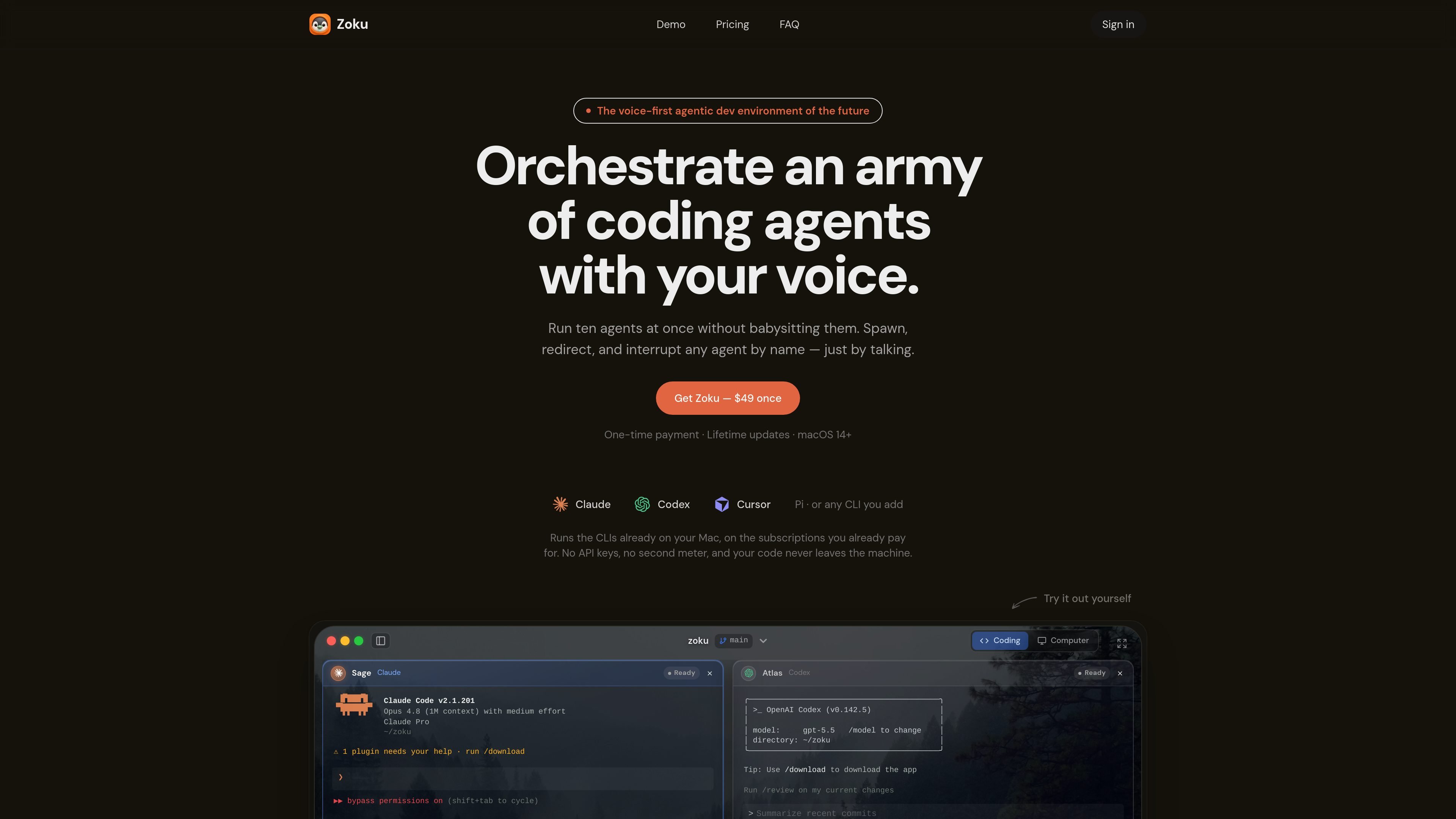
Zoku is a Mac-only voice-first environment for coordinating coding agents. It runs agent CLIs side by side on a single canvas and lets you manage them by speaking commands instead of typing into separate chat windows.
The product is built for people who want to keep several agent sessions moving at once without losing track of them. Zoku can spawn agents, redirect work, interrupt the right one by name, and organize each session into its own git worktree so parallel work stays separated.
Zoku runs multiple coding-agent CLIs as live terminals on one canvas, so you can compare output and keep several agents active at the same time.
You can address agents by name and use voice to spawn, redirect, or interrupt them, which reduces tab switching and manual pane hunting.
The app creates a git worktree per agent and names the branch or worktree from the spoken request, helping each agent work in isolation.
Zoku shows agent states such as Working, Done, and Needs you from the agent’s own hooks, and it can surface spoken status even when the window is closed.
Claude, Codex, Cursor, and Pi are configured out of the box, and you can add other CLIs with your own launch command and interrupt key.
On-device speech transcription uses Parakeet, which keeps voice commands local on the Mac and avoids a separate voice-service dependency for the canvas experience.
Use Zoku when you want several agents working in parallel on the same codebase and need a single place to monitor their progress.
Use it when you need to tell a specific agent to change direction, run tests, or summarize a diff without hunting for the right terminal.
Use the app when each agent needs its own branch or worktree so experiments and fixes do not overwrite one another.
Use it when you want status updates from the agent itself, including cues such as Working, Done, or Needs you.
Use the browser demo or download flow to evaluate the Mac experience before purchasing, especially if you want to see the canvas and voice interaction together.
Zoku is a Mac app that runs coding-agent CLIs side by side on one canvas and lets you control them by voice. It can spawn, redirect, interrupt, and check agent status without switching between chat windows.
No. Zoku launches the agent CLIs already on your Mac, so it does not require you to enter AI provider API keys or manage a second token meter for the core app. Optional Cloud credits only apply to the hosted voice companion.
Claude, Codex, Cursor, and Pi ship configured, plus a plain terminal. You can also add other CLIs by providing a launch command, the words to say when spawning it, and the interrupt key.
Zoku requires macOS 14 or later, and on-device voice needs Apple Silicon. The app also asks for Microphone and Accessibility access on first launch.
You can use the live canvas demo on the website and download the Mac app from the download page. The source notes that cardless trial codes are distributed during campaigns, but there is no free tier.

ByteAsk is a terminal-first AI coding agent for C and C++ that edits repositories and verifies changes with the real compiler, debugger, sanitizers, and tests before showing a diff. It offers a free tier plus paid plans, with editor connectors and zero-retention handling described in the source.

CreateOS Sandbox is an isolated compute environment for running code and agent workloads inside Firecracker micro-VMs. It is designed for workflows that need machine-level isolation, private networking between sandboxes, and programmatic control through SDK, CLI, or MCP.

hob is an independent workspace for coding agents that keeps agent sessions, terminals, history, and follow-up work organized around the tools and providers you already use. It is aimed at developers who want local control over routing, history, and workspace structure rather than a bundled model stack.

Manta AI is an autonomous web app testing tool for teams that want to map application behavior, catch regressions, and generate tests without writing scripts or maintaining selectors. It works from a URL and supports plain-English test flows, run results with screenshots, and scheduled or deployment-triggered checks.

Redline is a budgeting tool for Claude Code that paces sessions to stay within time, token, cost, or plan-percentage limits. It uses Claude Code’s native hooks and statusline to help sessions finish with a usable result instead of stopping abruptly.

SonOf connects to your repo and PM tool, audits the codebase and surrounding product context, and turns approved work into shipped tickets with senior engineering review. It is aimed at founders and engineering leaders who need backlog help without hiring a full team immediately.