

GitHub Issue Focus
GitHub Issue Focus is a Chrome extension that filters automated GitHub issue and PR timeline updates so you can focus on discussion and key context.
What is GitHub Issue Focus?
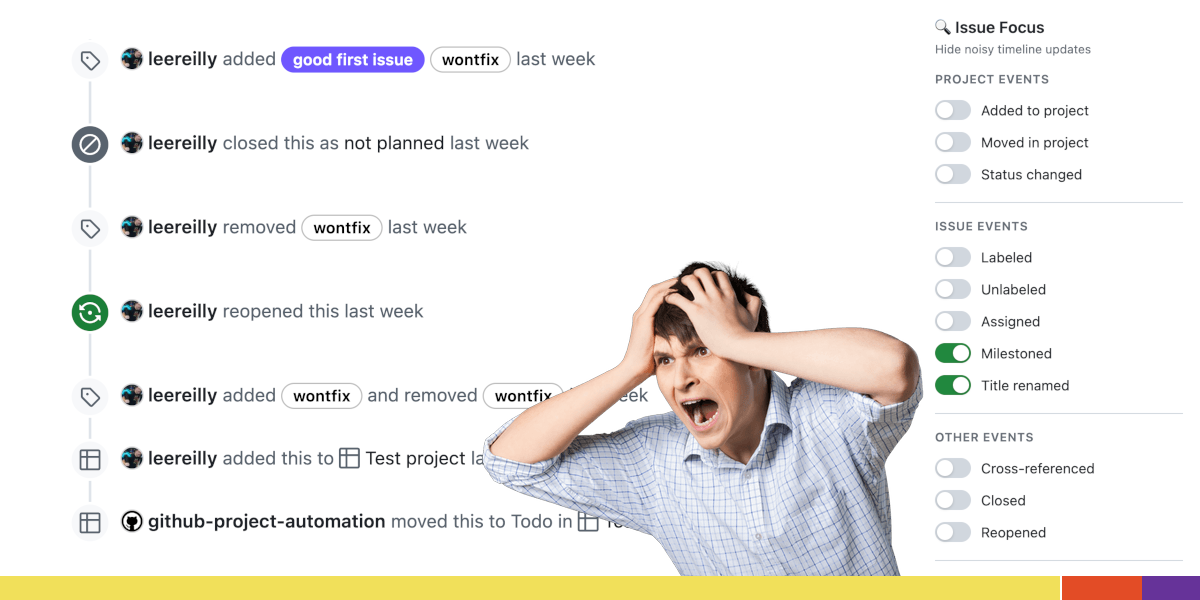
GitHub Issue Focus is a Chrome extension that cleans up noisy GitHub issue and pull request timelines. It filters out selected automated timeline events so you can more easily follow the parts of an issue that reflect discussion and key changes.
Instead of showing a long list of routine updates (such as project/status changes or label churn), the extension hides configurable event types while leaving other items visible. It runs in your browser by modifying the visual presentation of GitHub issue pages based on your preferences.
Key Features
- Filters GitHub issue/PR timeline events: Hide repetitive automated updates so the timeline is easier to scan.
- Event-level controls (customizable visibility): Choose which event types to hide or show.
- Instant effect on page: Changes apply immediately to all open GitHub issue pages.
- Runs locally in your browser: Processing happens on-device, and it modifies page content to hide selected events.
- Privacy-focused behavior: The project states there is no tracking, no analytics, and no data collection; settings are stored locally in Chrome extension storage.
Supported event types called out in the project’s configuration include (by default):
- Hidden by default: “added to project”, “moved in project/status”, “status changed” (project status field changes), “labeled”, “unlabeled”, “assigned”, “milestoned”, “title renamed”, and “cross-referenced”.
- Kept shown by default (listed as “shown”): cross-referenced mentions (mentions from other issues/PRs) and “closed” / “reopened” issue events.
How to Use GitHub Issue Focus
- Install the extension from the Chrome Web Store.
- Open a GitHub issue or pull request in Chrome.
- Use the extension icon in your Chrome toolbar to toggle which timeline events you want to hide.
- Adjust the filter preferences as needed; changes apply immediately to all open GitHub issue pages.
If you prefer installing from source, the repository also documents “Developer Mode” installation: clone/download the repo, enable Developer mode in chrome://extensions/, then use “Load unpacked” and select the gh-issue-cleaner-upper folder.
Use Cases
- Triage a busy repository’s issues: When an issue timeline is dominated by automated “added to project” and label/status updates, filter those events to focus on actual discussion.
- Review pull requests with frequent automation: Reduce timeline clutter so comments and meaningful references are easier to locate during code review.
- Follow decision-making without timeline churn: Hide routine automation like assignments/milestones/title edits when you want to read the reasoning in comments and cross-references.
- Adjust visibility to match your workflow: If you care about lifecycle changes (such as closed/reopened) but not project/status field changes, configure the event types accordingly.
FAQ
-
Does GitHub Issue Focus require any setup after installation? The project states it works automatically and requires no setup; you can use the toolbar icon to toggle which timeline events are hidden.
-
Where are the filter preferences stored? Settings/preferences (which timeline events are hidden) are stored locally using Chrome’s extension storage and are not accessible to the developer or third parties.
-
Does the extension track or collect user data? The repository’s privacy policy states it does not collect, store, transmit, or share personal data, and it does not use analytics or tracking tools.
-
What does the extension change on GitHub pages? It modifies the visual presentation of issue pages by hiding selected timeline events based on your preferences.
-
Can I install it from source? Yes. The repository describes a “Developer Mode” path: clone/download, enable Developer mode in
chrome://extensions/, and use “Load unpacked” for the specified folder.
Alternatives
- Other Chrome extensions that modify or curate GitHub views: Look for extensions focused on filtering or decluttering GitHub issue/PR elements by hiding specific activity types.
- Custom browser-side scripts (e.g., user styles or user scripts): A user script can be tailored to hide certain timeline event patterns, trading convenience for self-managed maintenance.
- Built-in GitHub filters and notification preferences: For some workflows, adjusting what GitHub shows or what you receive can reduce noise, though it won’t provide the same event-by-event timeline hiding described here.
- Browser “readability” or content-filter tools: General-purpose page filtering can help reduce distracting elements, but it may not be as precise as event-type-aware timeline filtering for GitHub issues.
Alternatives

FounderStackHub
FounderStackHub uses an always-on AI agent to scan, verify, and match startup perks like cloud credits, AI-tool credits, and SaaS discounts to your stack.

Elvixs
Elvixs is an AI job outreach tool for freshers and students—find HR contacts, generate AI cold emails, send from Gmail, and track opens.

Gossipic
Gossipic tracks how often your brand is mentioned in AI answers, analyzes sentiment, benchmarks competitors, and creates daily action plans. Start 7-day free trial.

SnapSub: Subscriptions Hub
SnapSub: Subscriptions Hub centralizes recurring services so you can track what you pay, upcoming billing dates, and get reports to review spending.

Abakada
Abakada is the Philippines’ curated directory of free, open-source tools—1,000+ verified listings across 45+ categories for students & educators.

Been There Global
Been There Global shares real stories from real travellers to help you “know before you go” and plan trips with more confidence.