

PopTask
PopTask is a mini macOS menu bar task manager for quick capture, live deadline countdowns, and AI-assisted scheduling and breakdown.
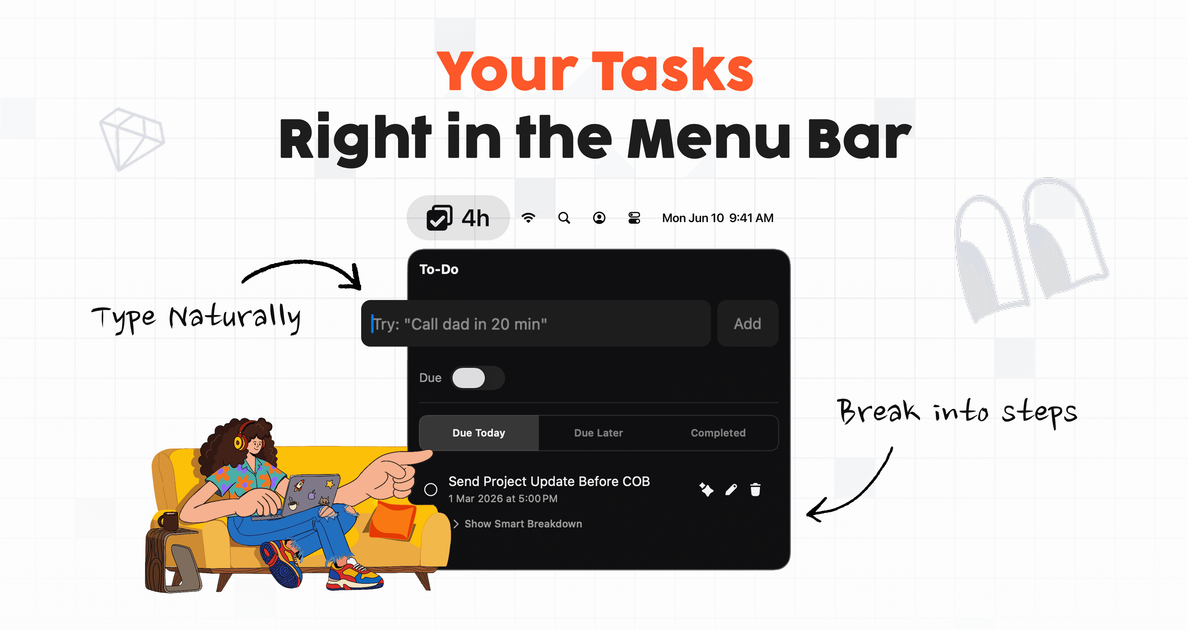
What is PopTask?
PopTask is a mini, lightweight task manager that runs in the macOS menu bar. It lets you add and manage tasks without switching away from your current app, and it resolves “messy” natural-language inputs (for example, “tomorrow 9am” or “in 20 min”) into a scheduled task.
Its core purpose is to keep task capture and time awareness close to where you work: tasks can be added in one click from the menu bar, live countdowns and overdue alerts help you stay oriented, and AI-assisted breakdown turns larger tasks into smaller, checkable subtasks.
Key Features
- Menu bar task capture: Add, edit, snooze, and complete tasks directly from the macOS menu bar without leaving your current app.
- Natural-language scheduling: Type tasks in plain language (e.g., “Call dad in 20 min,” “dentist Friday at 2pm,” “submit report eod.”) and PopTask extracts the title and scheduling details.
- On-device vs cloud AI handling: Most straightforward inputs resolve on your Mac without a network call; more complex cases (such as recurring tasks or vague dates) are handled via cloud AI using GPT-4o-mini in the background.
- Live deadline countdowns and alerts: PopTask displays live countdown timers next to tasks and triggers native macOS notifications at the due time or earlier based on a preferred offset.
- Smart task sorting: Tasks auto-sort into Due Today, Due Later, and Completed, with overdue items surfacing to the top.
- AI task breakdown into steps: Use an AI action on a task to generate 3 actionable subtasks, each with its own checkbox and progress tracking.
- Smart snooze and recurring support: Smart snooze helps you postpone tasks, and AI scheduling supports recurring task extraction.
How to Use PopTask
- Start PopTask and use the menu bar interface to open task input.
- Type a task naturally, such as “tomorrow 9am,” “in 20 min,” or “dentist Friday at 2pm.”
- Review the parsed result (including date/time/recurrence details) and confirm to create the task.
- Manage tasks from the menu bar by snoozing, completing, and letting PopTask keep items organized into Due Today / Due Later / Completed.
- For larger tasks, select a task and use the AI breakdown action to generate 3 checkable subtasks.
Use Cases
- Last-minute reminder capture: You can quickly enter “in 20 min” while working, then rely on live countdowns and native macOS notifications to prompt you at the right time.
- Planning by conversational dates: When you remember something like “tomorrow 9am” or “Friday at 2pm,” you can type it directly; PopTask parses the schedule and keeps the task visible in the menu bar.
- Reducing missed deadlines: Overdue tasks move to the top, while tasks are grouped into Due Today and Due Later, helping you triage what needs attention now.
- Turning an unclear task into steps: If you write “plan birthday party,” you can trigger AI breakdown to create three focused subtasks with individual checkboxes and progress tracking.
- Handling more complex or recurring details: For inputs involving recurrence or ambiguous timing, PopTask uses cloud AI (GPT-4o-mini) to interpret and schedule the task in the background.
FAQ
Does PopTask work without network access?
For many common inputs (such as “tomorrow 9am” or “in 20 min”), PopTask resolves the scheduling locally on macOS without making a network call. More complex cases can use cloud AI in the background.
What kinds of task text does PopTask understand?
It supports natural-language entries including common abbreviations and slang (examples provided include “tmrw,” “eod,” “mtg”) and non-English phrases (examples include “kal subah” and “mañana”).
How does PopTask alert me about deadlines?
It shows live countdown timers next to tasks and fires native macOS notifications at the due time or earlier based on a preferred offset.
Can I snooze tasks?
Yes. The product includes Smart Snooze, and you can snooze tasks directly from the menu bar.
Does PopTask support recurring tasks?
Yes. The scheduling flow includes AI extraction of date, time, and recurrence when applicable.
Alternatives
- Standalone calendar apps: Use a calendar for time-based reminders and notifications, but you typically need to switch contexts and schedule with calendar-specific UI rather than quick menu bar capture.
- General to-do list apps: These support task entry and reminders, but may rely more on tags, folders, or project views rather than a menu bar workflow centered on Due Today / Due Later.
- Local note/task widgets: If you want lightweight task capture on the desktop, widget-based approaches can stay visible, though they may not provide AI date parsing or AI step breakdown as described for PopTask.
- Time-blocking or habit planners: These tools focus on structured planning and recurring routines; PopTask is positioned more around quick natural-language capture, countdown awareness, and menu bar management.
Alternatives

Gemma AI
Gemma AI is a smart application that calls you directly with personalized, intelligent voice reminders to ensure you never miss important tasks, appointments, or deadlines.

Planndu: Daily Task Planner
Planndu is an intuitive productivity application designed to help users organize tasks, manage projects, build routines, and enhance focus using tools like AI generation and a built-in Pomodoro timer.
MealTime
MealTime is your personal, offline-first recipe companion designed to help you save, organize, plan meals, and generate smart grocery lists, all while keeping your data private.

Biji
Biji is a versatile platform designed to enhance productivity through innovative tools and features.

LIAM
LIAM is an AI copilot that drafts email replies, organizes your inbox with auto-labels and prioritization, and schedules meetings from your calendar.

ClawTick
ClawTick is a CLI-first AI agent automation platform for scheduling webhook tasks on cron with monitoring, alerts, retries, and execution logs.