

YouTube Transcript Generator
Instantly convert any YouTube video into accurate text transcripts with timestamps. Supports direct audio transcription for videos without captions and offers multiple export formats.
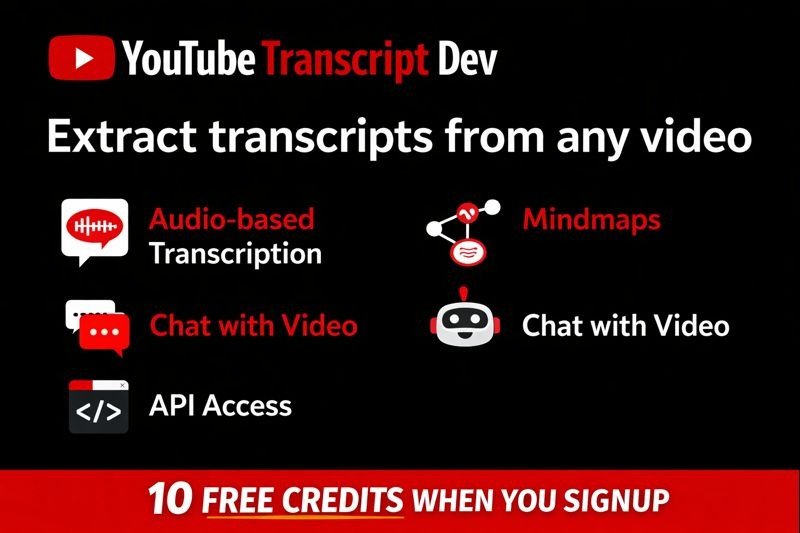
What is YouTube Transcript Generator?
YouTube Transcript Generator is a powerful, AI-driven online tool designed to convert YouTube videos into accurate text transcripts. Whether a video has existing captions or not, this service can extract the spoken content, providing valuable text-based data in seconds. It's built for speed, reliability, and ease of use, making it an essential tool for content creators, marketers, researchers, developers, and anyone looking to leverage the information within YouTube videos.
With a user-friendly interface, the platform simplifies the process of obtaining video transcripts. Users only need to paste a YouTube URL, and the generator handles the rest, delivering high-quality transcripts that can be used for a variety of purposes. The service is trusted by thousands of users worldwide and offers a generous free tier to get started, making advanced transcription accessible to everyone.
Key Features
- Direct Audio Transcription: Transcribes directly from the video's audio track using advanced AI speech recognition, achieving up to 95% accuracy even on videos without captions.
- AI-Powered High Accuracy: Leverages cutting-edge AI to ensure precise transcription, minimizing errors.
- Multilingual Support: Capable of processing and transcribing videos in over 100 languages.
- Interactive Viewer: Watch YouTube videos with real-time, synchronized subtitle overlays. Customize appearance and click any line to jump to that video moment.
- Mind Map Generation: Visualize video content as interactive mind maps, aiding comprehension and study.
- Chat with Transcript: Ask questions about the video content and receive instant AI-powered answers, enabling a conversational interaction with the video's information.
- Smart Summaries: Generates concise, AI-powered summaries of videos, allowing users to grasp key takeaways quickly.
- Playlist Support: Extract transcripts from all videos within a playlist by simply pasting the playlist URL.
- Instant Translation: Translate extracted transcripts into over 50 languages with a single click.
- Lightning Fast Extraction: Obtain accurate transcripts in under 2 seconds.
- Free to Start: Extract up to 10 YouTube transcripts for free without requiring a credit card.
- AI-Ready Output: Generates clean, structured transcripts optimized for use in AI workflows like GPT and Claude.
- Multiple Export Formats: Download transcripts in industry-standard formats including TXT, JSON, SRT, and VTT.
- Word-Level Timestamps: Provides precise timestamps down to the word for easy navigation and editing.
- Developer API: Offers a REST API for seamless integration of transcription services into custom applications.
How to Use YouTube Transcript Generator
Getting started with YouTube Transcript Generator is remarkably simple and requires no complex setup:
- Paste URL: Copy the URL of the YouTube video you want to transcribe and paste it into the provided input field on the website.
- Extract Transcript: Click the 'Extract' button. The tool will instantly fetch and process the video's audio.
- Transform Content (Optional): Utilize the AI-powered features like summaries, mind maps, or chat to gain deeper insights from the transcript.
- Export: Download the generated transcript in your preferred format (TXT, JSON, SRT, VTT).
For playlist transcription, simply paste the playlist URL, and the tool will process all videos within it.
Use Cases
- Content Creators: Repurpose video content into blog posts, articles, social media updates, or podcasts. Analyze audience engagement by understanding video content structure.
- Marketers: Analyze competitor videos, extract keywords for SEO, generate marketing copy, and track industry trends by transcribing and summarizing relevant videos.
- Students & Researchers: Quickly grasp the core concepts of lectures or documentaries, create study notes, and cite sources accurately using precise timestamps.
- Writers & Journalists: Transcribe interviews, gather information for articles, and verify facts from video sources efficiently.
- Developers: Integrate video transcription capabilities into applications using the provided REST API, enabling automated content analysis or accessibility features.
FAQ
-
How does YouTube Transcript Generator extract YouTube transcripts? YouTube Transcript Generator uses advanced AI speech recognition technology. It can either access existing captions provided by the uploader or, more powerfully, transcribe directly from the video's audio track if no captions are available.
-
What if a video doesn't have subtitles available? No problem. The tool is specifically designed to handle videos without captions. It transcribes directly from the audio stream, ensuring you can still get a text version of the content.
-
How many transcripts can I extract with the free plan? The free plan allows you to extract up to 10 YouTube transcripts without any cost and without requiring a credit card. You can upgrade to a paid plan for higher limits and additional features.
-
What formats can I download transcripts in? You can download your transcripts in several industry-standard formats: TXT (plain text), JSON (structured data), SRT (subtitles), and VTT (web video text tracks).
Alternatives

FounderStackHub
FounderStackHub uses an always-on AI agent to scan, verify, and match startup perks like cloud credits, AI-tool credits, and SaaS discounts to your stack.

Elvixs
Elvixs is an AI job outreach tool for freshers and students—find HR contacts, generate AI cold emails, send from Gmail, and track opens.

Gossipic
Gossipic tracks how often your brand is mentioned in AI answers, analyzes sentiment, benchmarks competitors, and creates daily action plans. Start 7-day free trial.

SnapSub: Subscriptions Hub
SnapSub: Subscriptions Hub centralizes recurring services so you can track what you pay, upcoming billing dates, and get reports to review spending.

Abakada
Abakada is the Philippines’ curated directory of free, open-source tools—1,000+ verified listings across 45+ categories for students & educators.

Been There Global
Been There Global shares real stories from real travellers to help you “know before you go” and plan trips with more confidence.