
Parallel agent tasks
Run Codex, Claude Code, Grok, OpenCode, Kimi Code, or Antigravity on independent tasks in separate Git worktrees. Define dependencies between tasks and follow their progress from one workspace.

Jackalope is a desktop workspace for running Codex, Claude Code, Grok, OpenCode, Kimi Code, and Antigravity coding agents in parallel Git worktrees. It helps developers carry project context across tasks, use connected tools, and review related changes together; users provide their own agent CLIs and provider accounts.
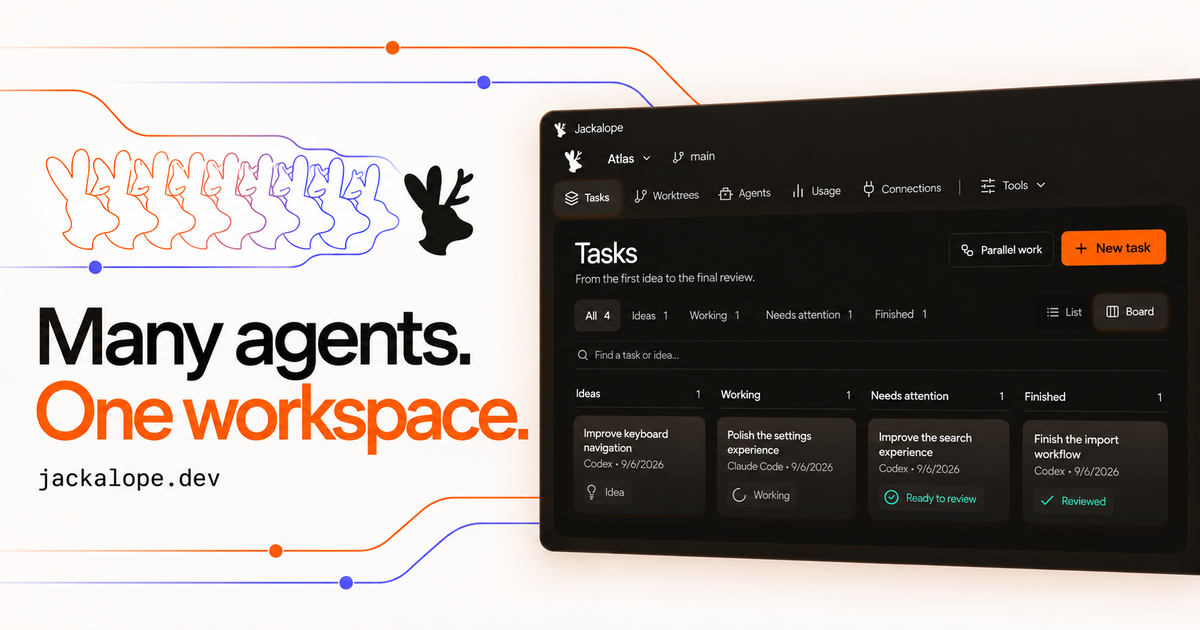
Jackalope is a desktop workspace for running supported AI coding-agent CLIs in parallel. It gives each task its brief, agent, account, Git worktree, questions, and result, so independent implementation, debugging, and exploration work can be tracked without managing a collection of terminal tabs.
The workspace also connects project guidance, dependency exploration, agent communication, tool access, recurring checks, and code review. It is intended for local projects: repositories and task workspaces stay on the computer, while model access and any provider-side handling of code or context remain subject to the selected agent account and connected-tool policies.
Run Codex, Claude Code, Grok, OpenCode, Kimi Code, or Antigravity on independent tasks in separate Git worktrees. Define dependencies between tasks and follow their progress from one workspace.
Save project instructions and lessons once, then match relevant guidance and project defaults to new prompts. You can adjust the selected context and inspect what the agent received.
Browse a codebase map, follow resolved file dependencies, and inspect related files while reviewing a change. The map helps select what to check next but does not replace tests.
Read task results beside their original briefs, combine related patches, request another pass, and keep checks tied to the code they tested before deciding what enters the project.
Use a separate browser session for each task to navigate pages, fill forms, capture screenshots, and check accessibility. On Windows, an explicitly approved app window can be controlled with clicks, typing, and scrolling; MCP connections add project tools.
Schedule checks and chores, or trigger a run when committed code changes on a local branch. Each run has its own history; Jackalope must be open and the computer awake, and change checks use no model calls.
Assign separate agents to implementation and settings or documentation work, give each task its own worktree, then combine related patches for review instead of manually reconciling terminal sessions.
Give a stubborn bug its own task, preserve the original brief and project guidance, and continue the same attempt with a correction while keeping its account and history attached.
Explore a codebase before changing it by tracing resolved file dependencies and inspecting related files. Use the map to decide which areas and checks deserve attention next.
Run browser checks, accessibility inspections, local checks, or an approved Windows application as part of an agent task, with each browser session separated from the others.
Schedule repeat checks or launch them only after committed local-branch changes, then inspect each run in its own history and review the resulting status.
Jackalope runs installed supported coding-agent CLIs and does not include model access. You need a supported agent CLI and its provider account; subscription requirements, usage limits, and charges come from the provider.
Jackalope is designed as a desktop workspace for local projects. Repositories and task workspaces live on your computer, although agents may send code and context to their providers under your account settings. Connected tools have their own data policies.
The current native adapters are Codex, Claude Code, Grok, OpenCode, Kimi Code, and Antigravity. Support differs by agent: all six implement tasks, continuation, and review, but tools, account behavior, usage reporting, and routing support vary.
Yes. You can create named account profiles, choose project defaults, and keep work and personal agent accounts organized. Profiles organize sign-ins and settings but do not isolate an agent's local file access.
The product is currently presented as coming soon. You can join the waitlist without payment; after verifying your email, you receive a referral link, and approved members receive five Instant Access Passes to share. Public pricing has not been announced.

ByteAsk is a terminal-first AI coding agent for C and C++ that edits repositories and verifies changes with the real compiler, debugger, sanitizers, and tests before showing a diff. It offers a free tier plus paid plans, with editor connectors and zero-retention handling described in the source.

Ghost é um assistente de IA para terminal, para conversar, gerar código e executar tarefas no prompt. Traz modelos gratuitos, funciona no Linux, macOS e Windows e é open source.

Vi3ecode is a maintained development environment for working with AI coding agents. It keeps project context, terminal, Git, memory, flows, review, and communication connected around the agent you already use.

Lucid Train is a local-first AI coding harness that turns repository code into architecture diagrams and uses those diagrams as specifications for coding agents. It is available as a desktop app and a lightweight Rust CLI, and it can run with local models or your own API keys.

CreateOS Sandbox is an isolated compute environment for running code and agent workloads inside Firecracker micro-VMs. It is designed for workflows that need machine-level isolation, private networking between sandboxes, and programmatic control through SDK, CLI, or MCP.

hob is an independent workspace for coding agents that keeps agent sessions, terminals, history, and follow-up work organized around the tools and providers you already use. It is aimed at developers who want local control over routing, history, and workspace structure rather than a bundled model stack.