
Automatic stroke analysis
Guides rear-camera capture with a live skeleton overlay and motion heat map, detects a visible stroke, and ends recording automatically.

Pickle Sensei is an iPhone app for analyzing pickleball technique through rear-camera video and on-device pose tracking. It helps players review strokes, receive targeted coaching cues, practice with guided drills, and monitor individual progress.
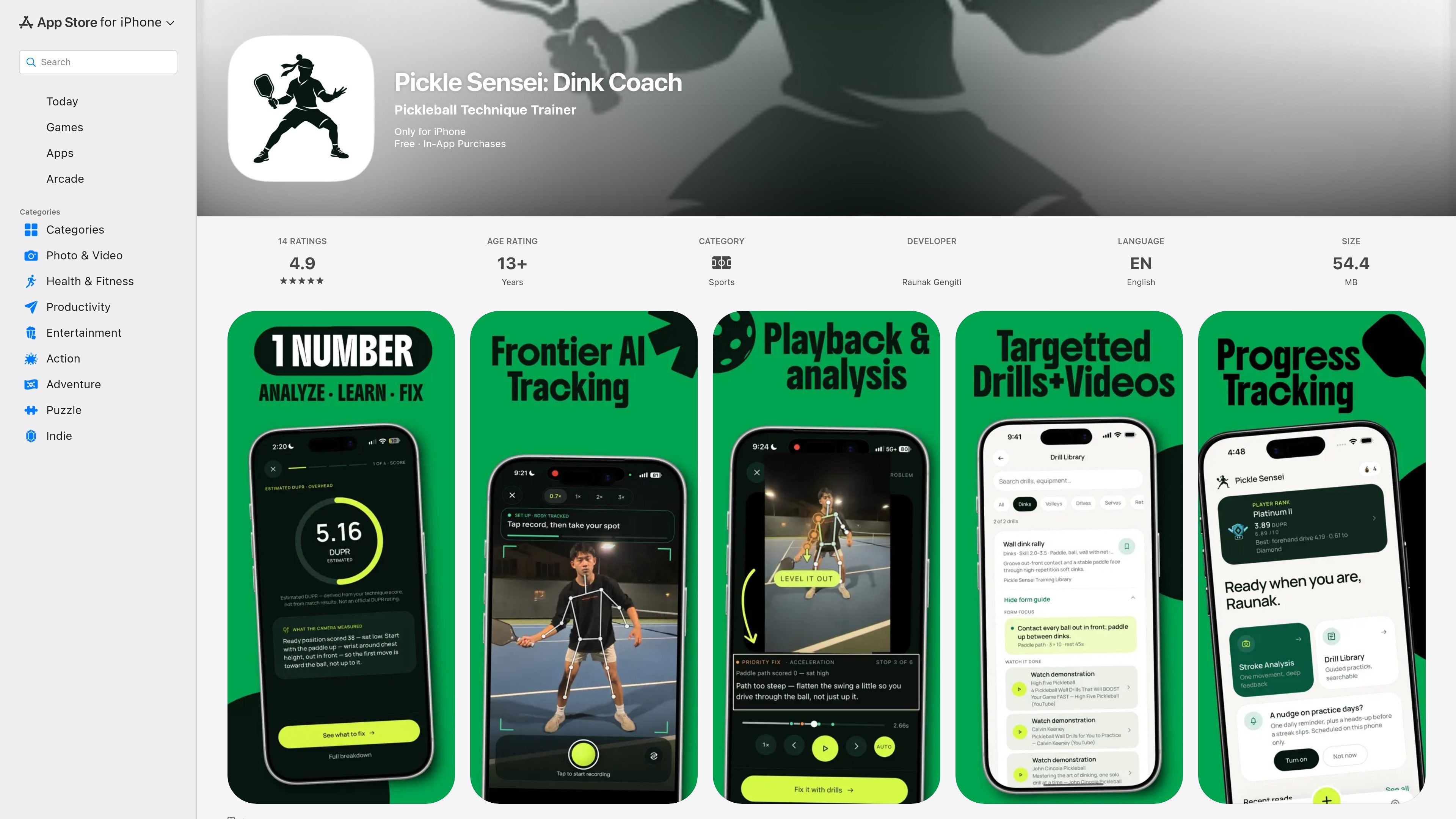
Pickle Sensei is an iPhone pickleball technique trainer that uses the phone's rear camera and on-device body-pose tracking to review individual strokes. Users position the phone side-on at waist height, record a stroke, and receive a computer-generated technique assessment rather than an official player rating.
The app is intended for focused individual practice across serves, returns, drives, dinks, third-shot drops, volleys, and overheads. Its workflow combines automatic capture, slow-motion form review, prioritized corrections, guided drills, and progress records so players can work on a specific technical issue and compare attempts in the same session. Video clips remain in the app's private storage on the device and are not uploaded, according to the product description.
Guides rear-camera capture with a live skeleton overlay and motion heat map, detects a visible stroke, and ends recording automatically.
Returns an estimated player rating, a secondary technique score out of 10, checkpoint scores from 0 to 100, and coaching cues when an attempt is successfully scored.
Replays the user's clip in slow motion with the pose skeleton overlaid, pausing at key phases and providing a cue at each stop.
Ranks measured faults by priority, connects each fault to a corrective cue, and identifies checkpoints that are already performing well.
Supports repeat analysis of the same stroke in one session, progress trends by stroke, practice volume, active days, personal bests, streaks, and achievements.
Includes more than 40 guided drills across dinks, drives, third-shot drops, serves, volleys, and footwork, with attributed coaching videos. Users can also import an existing stroke clip from the phone.
Set the phone beside the court, capture a serve or return, and use the technique score and checkpoint feedback to identify a specific adjustment for the next repetition.
Record repeated dinks, drives, drops, volleys, or overheads in one session to compare attempt-by-attempt changes without switching to a separate shot-selection workflow.
Use slow-motion form review and the prioritized fault list to study where a stroke breaks down, then follow a prescribed drill from the library.
Review stroke-specific score trends, practice volume, active days, and personal bests to maintain a longer-term individual training record.
Bring an existing compatible stroke clip from the iPhone into the app when recording at the court is not the preferred workflow.
Pickle Sensei is designed for iPhone and uses the rear camera. The app guides users to place the phone side-on at waist height, with a translucent outline indicating where to stand.
Tap record and perform a visible stroke. On-device pose tracking detects the stroke and stops the clip automatically, then returns scores and coaching cues when the attempt can be scored.
The app covers serves, returns, forehand and backhand drives, dinks, third-shot drops, volleys, and overheads.
The app includes one lifetime free rating per sign-in identity. Pickle Sensei Pro provides unlimited ratings through monthly, yearly, or lifetime purchase options. The listed US prices are $7.99 monthly, $59.99 yearly, and $159.99 lifetime; local pricing may differ.
Video and pose tracking are processed on the device, and clips remain in the app's private storage on the phone rather than being uploaded. The developer's App Store privacy disclosure separately indicates that some account, purchase, contact, identifier, and diagnostic data may be handled.

Teloframe is an AI-powered football coaching platform for building tactics, editing drills, planning sessions, and managing player development in one workspace. It includes a Free tier plus Pro and Club plans for coaches and analysts who need more collaboration and team features.

LeanUp is an AI calorie tracker and meal-planning app for logging meals, tracking macros, and getting personalized nutrition guidance. It supports barcode scanning, photo-based food recognition, manual search, and recipe reuse.

TrakMac is a voice-first macro tracking app for fitness-focused users on iOS. It estimates calories and macros from spoken meal descriptions, then helps users log food and stay aligned with their training goals.

Padel Chess is a web-based learning platform for improving padel tactical skills through puzzle-based practice. It helps players work on positioning, shot selection, and decision-making in realistic court scenarios.

Kilo is an AI-assisted fitness coach for consistent lifters and hybrid athletes. It delivers programs, workouts, logging, check-ins, and context-aware adjustments through iMessage, with a focused web link for structured workout entries.

PitchHighway helps singers learn songs with real-time pitch feedback, guided drills, and free browser tools for range testing, warm-ups, key finding, and note practice. It works in the browser and on iPhone and iPad.