
Palette construction
Build a brand palette from a primary color and extend it with light and dark variants shown in the studio interface.

abha is a color palette studio for building brand colors and previewing them in a live demo environment. It supports palette construction from a primary color, image extraction, and multi-surface visual testing.
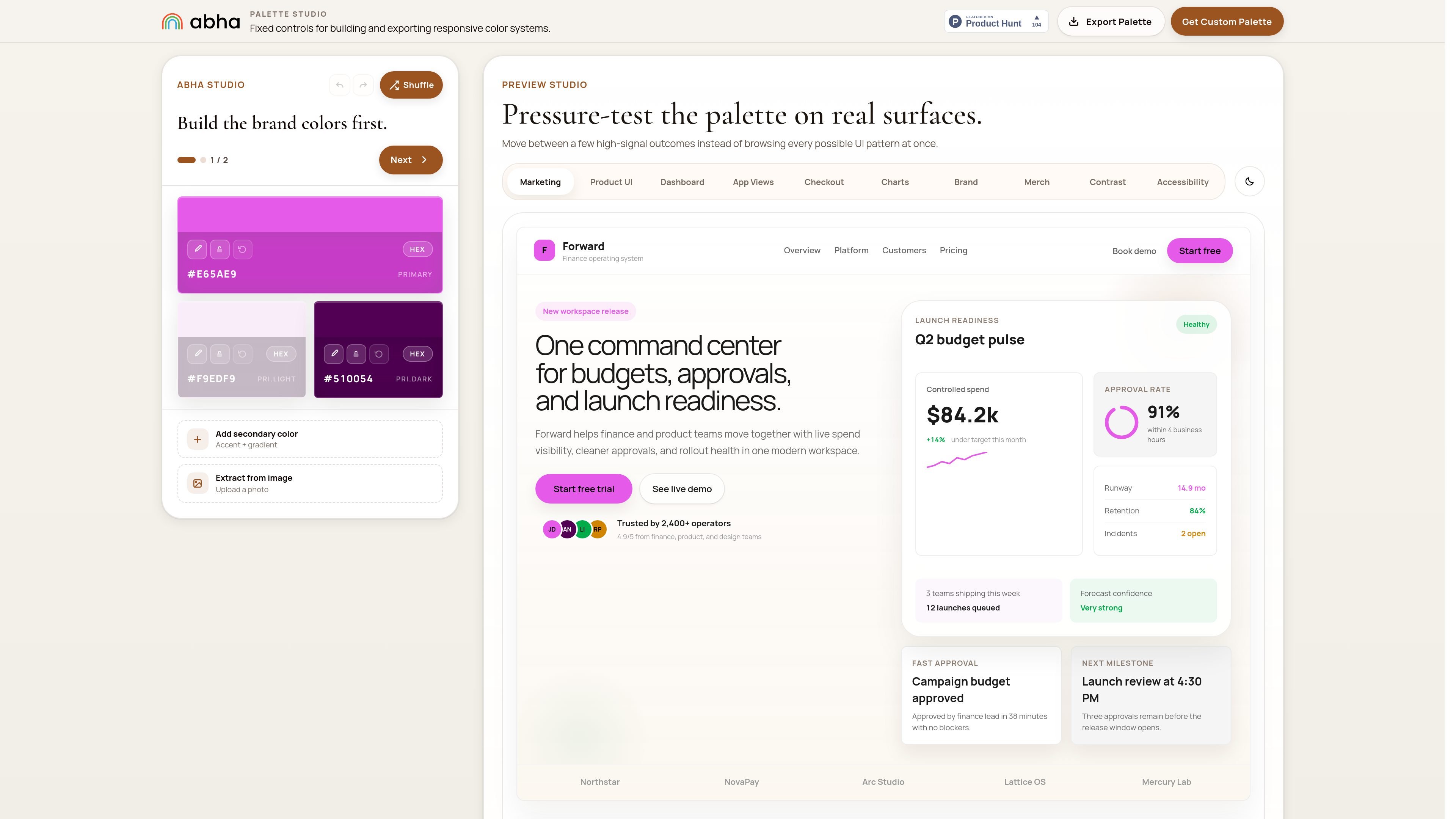
abha is a color palette studio with a live demo environment for building and testing brand colors. The homepage positions it as a tool for generating a complete palette and previewing that palette across multiple surface types.
The interface centers on a palette builder with primary, light, and dark colors, plus options to add secondary colors, accent and gradient treatments, or extract colors from an uploaded image. It is aimed at checking how a palette reads before it is applied to real pages or product screens.
Build a brand palette from a primary color and extend it with light and dark variants shown in the studio interface.
Add secondary color, accent, and gradient choices to round out the palette beyond the base brand color.
Generate or refine colors by extracting them from an uploaded photo, which can help anchor the palette in a real image.
Preview the palette inside a live demo environment so you can see how the colors read on different UI surfaces.
Move between multiple presentation contexts, including marketing, product UI, dashboard, app views, checkout, charts, brand, merch, contrast, and accessibility.
Tune the palette directly in the studio interface with shuffle and next-step controls for iterating through color options.
A brand or product designer can start from a primary color and generate supporting light and dark variants before the palette is used in a larger system.
A team can upload a photo and use the extracted colors as a starting point for a more grounded palette direction.
Before finalizing a palette, a designer can compare it against marketing pages, product UI, checkout, and dashboard-like surfaces to see whether the colors still read clearly.
A solo maker or small team can use the free Starter tier for basic workspace and export needs, then move to Pro or Scale if they need permissions, automations, or reporting.
The site text shows a palette builder with controls for primary, secondary, accent, and gradient colors, plus an option to extract colors from an uploaded image. The public page does not document a full setup flow beyond using those controls in the studio.
The homepage shows the palette being pressure-tested on a set of preview surfaces such as marketing pages, product UI, dashboard, app views, checkout, charts, brand, merch, contrast, and accessibility. That suggests the tool is meant to preview a palette across multiple interface contexts.
The collected page text does not document team features beyond the studio UI itself. The presence of shared product surfaces and a pricing page suggests a product intended for ongoing use, but the source does not confirm collaboration details such as roles, invites, or approvals.
Yes. The pricing page shows three plans: Starter at $0 per month, Pro at $19 per month, and Scale at $49 per month.
The source does not state export formats, design-tool integrations, or file outputs. It only confirms basic exports on the Starter plan and advanced exports on the Pro plan.

Pixelcut is an AI photo editor for creating and editing product images, social content, and video assets. It offers free and paid plans, plus mobile app and browser access for individual users and teams.

Petalica Paint is a web service for automatically coloring line art and tracing line drawings from photographed images. The home page says it can be used under the stated terms for commercial and noncommercial work, but it is scheduled to end on 2025-07-31 at 16:00 JST.

PixelDrive is a bulk image generation API for creating many on-brand images from one template through a browser editor, REST API, CSV batch, or MCP. It suits teams that need repeatable image output with cacheable renders and usage-based pricing.

Wearvue AI generates personalized outfit previews from a photo, lets users refine the style for an occasion, and surfaces similar real products to shop. It is aimed at people who want to preview outfit ideas before buying and compare them with shoppable alternatives.

Upscale.media is an AI image upscaling and enhancement tool from Pixelbin that enlarges low-resolution or pixelated images and improves clarity in the browser. It offers free individual image use, paid credit plans, and team-oriented workflows such as bulk processing and API integration.

imgcook is a design-to-code tool that converts design drafts into front-end code. It supports plugin-based and developer workflows for Sketch, Photoshop, VS Code, and CLI usage.