UStackUStack
Amazon Alexa Tablets icon

Amazon Alexa Tablets

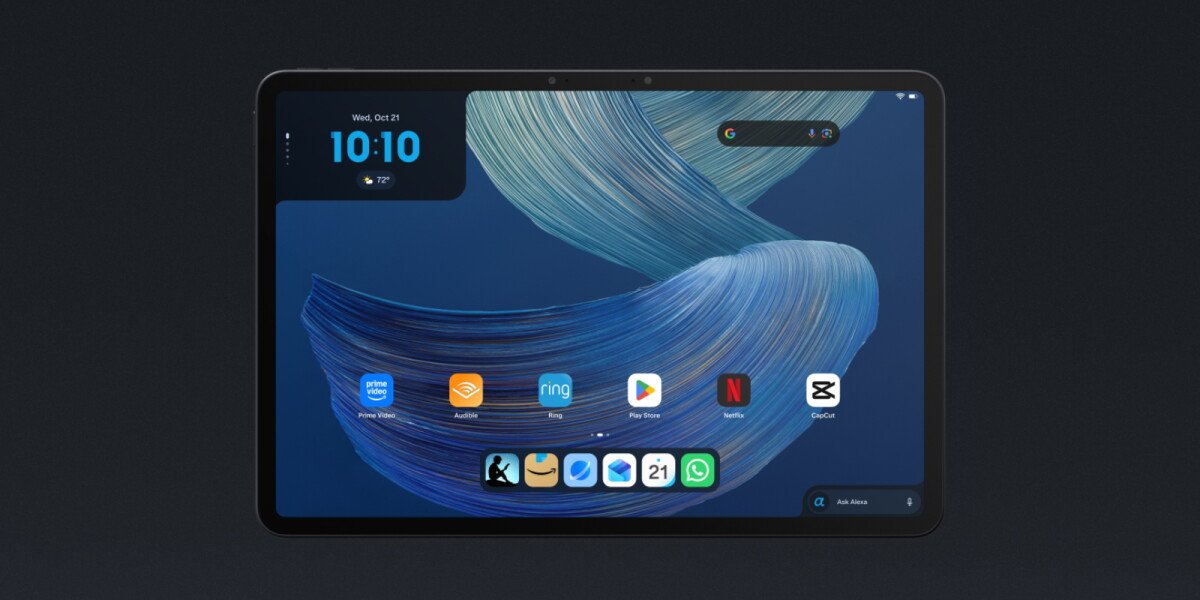
Amazon Alexa Tablets are Android tablets in three sizes with Alexa+ built in, full Google Play Store access, and Amazon apps for reading, entertainment, productivity, and assistant-supported tasks. The lineup includes the 12 Pro, 11, and 8, with the 12 Pro adding optional pen and keyboard accessories.

Amazon Alexa Tablets

Android tablets with Alexa+ built in

Amazon Alexa Tablets are an Android tablet lineup consisting of the Amazon Alexa Tablet 12 Pro, Amazon Alexa Tablet 11, and Amazon Alexa Tablet 8. They combine aluminum construction, high-resolution displays, built-in Amazon experiences, and access to the full Google Play Store. The lineup is designed for reading, streaming, app use, and—on the 12 Pro—more demanding multitasking and accessory-supported work.

Alexa+ is integrated into the tablet experience rather than being limited to a separate app. Users can invoke it by voice or with the Ask Alexa button for questions, recommendations, smart-home control, and task assistance. Optional screen-aware help can interpret visible content, while live sessions allow a continuous conversation. Privacy controls keep On-Screen Intelligence off by default and show an indicator when Alexa is active.

Key features

Aluminum construction and high-resolution displays

Each model uses an aluminum unibody design and offers a high-resolution display. The 12 Pro has a 12-inch, 280 PPI display with a 120Hz refresh rate and 3:2 aspect ratio; it is also available with a precision-etched Nanomatte anti-glare display.

Alexa+ built into the tablet

Alexa+ is available from the tablet interface through voice or the “Ask Alexa” button. It can answer questions, suggest next steps, control compatible smart-home devices, and provide personalized responses based on the signed-in user’s content and preferences.

In-context screen assistance

With On-Screen Intelligence enabled, Alexa+ can read page content, extract relevant details, help compare information, add dates to a calendar, and follow changing context during a shared-screen live session.

Distraction-free Kindle reading

The Kindle app can switch into a reading-focused mode that silences notifications, reduces blue light, offers three display themes, and provides up to 20 hours of reading battery life. On supported devices, users can annotate books with the Pro Pen and sync annotations across Kindle apps and Kindle Scribe.

Android and Google Play access

The lineup runs Android and supports the full Google Play Store, including apps such as YouTube, Netflix, Gmail, and Google Docs. Amazon apps include Prime Video, Kindle, Audible, Amazon Music, Amazon Quick, and Amazon Luna.

12 Pro productivity accessories

The 12 Pro includes optional productivity accessories. Its USI 2.0 Pro Pen has 4,096 pressure levels, tilt detection, magnetic docking, and wireless charging; the Pro Keyboard attaches magnetically without Bluetooth pairing and supports multi-window work.

Practical use cases

  • Reading and annotation

    Open the Kindle app to silence notifications, reduce blue light, choose a reading theme, and read for up to 20 hours on a charge. On pen-supported setups, highlights and handwritten notes can sync with other Kindle apps and Kindle Scribe.

  • Everyday productivity

    Use Google Play apps such as Gmail, Google Docs, and other Android software for everyday communication, documents, and browsing. On the 12 Pro, the optional keyboard and trackpad support side-by-side windows and switching between work and personal profiles.

  • Entertainment and gaming

    Use the 12 Pro for 4K streaming, graphic-intensive games, and multi-window multitasking, with quad Dolby Atmos speakers and up to 16 hours of stated video playback. The other models also provide access to streaming and entertainment apps through Amazon and Google Play.

  • Hands-free planning and research

    Ask Alexa+ about visible content while researching, browsing trails, checking schedules, or viewing recipes and products. It can extract details, suggest next steps, and—when relevant—help add dates to a calendar or find an item on Amazon.

  • Household assistance

    Use Alexa+ for personalized recommendations, smart-home control, and natural conversations. In the U.S., Prime members receive full Alexa+ access at no additional cost, while non-Prime users can use the limited chat tier or subscribe for unlimited access.

Pros and Cons

Pros

  • Three tablet sizes provide different screen and portability options.
  • Full Google Play Store access is available alongside Amazon’s built-in apps.
  • Alexa+ supports voice access, live conversations, personalization, and optional screen-aware assistance.
  • The 12 Pro offers a 120Hz display, up to 16GB of RAM, Wi-Fi 6E, Dolby Atmos speakers, and optional pen and keyboard accessories.
  • The Kindle experience adds reading-focused settings and up to 20 hours of reading battery life.

Cons

  • The most advanced display, performance configuration, and productivity accessories described in the source are specific to the Amazon Alexa Tablet 12 Pro rather than the entire lineup.
  • On-Screen Intelligence requires an explicit opt-in, and Alexa+ capabilities and access vary by account tier in the U.S.

FAQ

What software and apps do Amazon Alexa Tablets support?

The lineup runs Android and includes access to the full Google Play Store, alongside built-in Amazon apps such as Prime Video, Kindle, Audible, Amazon Music, Amazon Quick, and Amazon Luna.

How do I use Alexa+ on an Amazon Alexa Tablet?

Alexa+ is built into every tablet. Users can say “Alexa” or tap the “Ask Alexa” button for help without leaving their current activity. Live sessions support continuous conversation without repeating the wake word between questions.

Can Alexa+ see what is on the tablet screen?

On-Screen Intelligence is disabled by default. Users must opt in before Alexa can view screen content, and a visual indicator appears whenever Alexa is active. The feature can be disabled in Settings.

Which tablet supports the Pro Pen and Pro Keyboard?

The Amazon Alexa Tablet 12 Pro supports an optional Pro Pen and Pro Keyboard. The pen supports handwriting, annotations, sketches, and PDF markup, while the keyboard enables multi-window work and includes a trackpad.

How much does Alexa+ cost in the U.S.?

Alexa+ is included at no additional cost for Prime members in the U.S. Non-Prime customers can use a limited free text-based Alexa+ chat experience through Alexa.com and the Alexa app, or subscribe to the full experience for $19.99 per month.

Quick Facts

Category
Android tablets
Models
Amazon Alexa Tablet 12 Pro, Amazon Alexa Tablet 11, Amazon Alexa Tablet 8
Assistant
Alexa+ built in
App platform
Full Google Play Store access plus Amazon apps
12 Pro display
12-inch, 280 PPI, 120Hz, 3:2 aspect ratio
Alexa+ U.S. access
Included with Prime; free limited chat tier and $19.99/month full subscription for non-Prime customers
Amazon Alexa Tablets - AI Tool, Features, Use Cases & Alternatives | UStack