
Browser CAD workflow
Draw plans in a browser-based CAD interface with primitives, object snap, layers, user coordinate systems, editing tools, and full Undo/Redo. DXF and glTF/GLB files are supported for import and export where applicable.

Anthroposcaper is a browser-based tool for generating parametric 3D urban and architectural environments from drawn or DXF-imported 2D plans. It helps architects, visualization artists, landscape designers, urban planners, and game developers apply tags and reusable 3D templates to repeated scene elements.
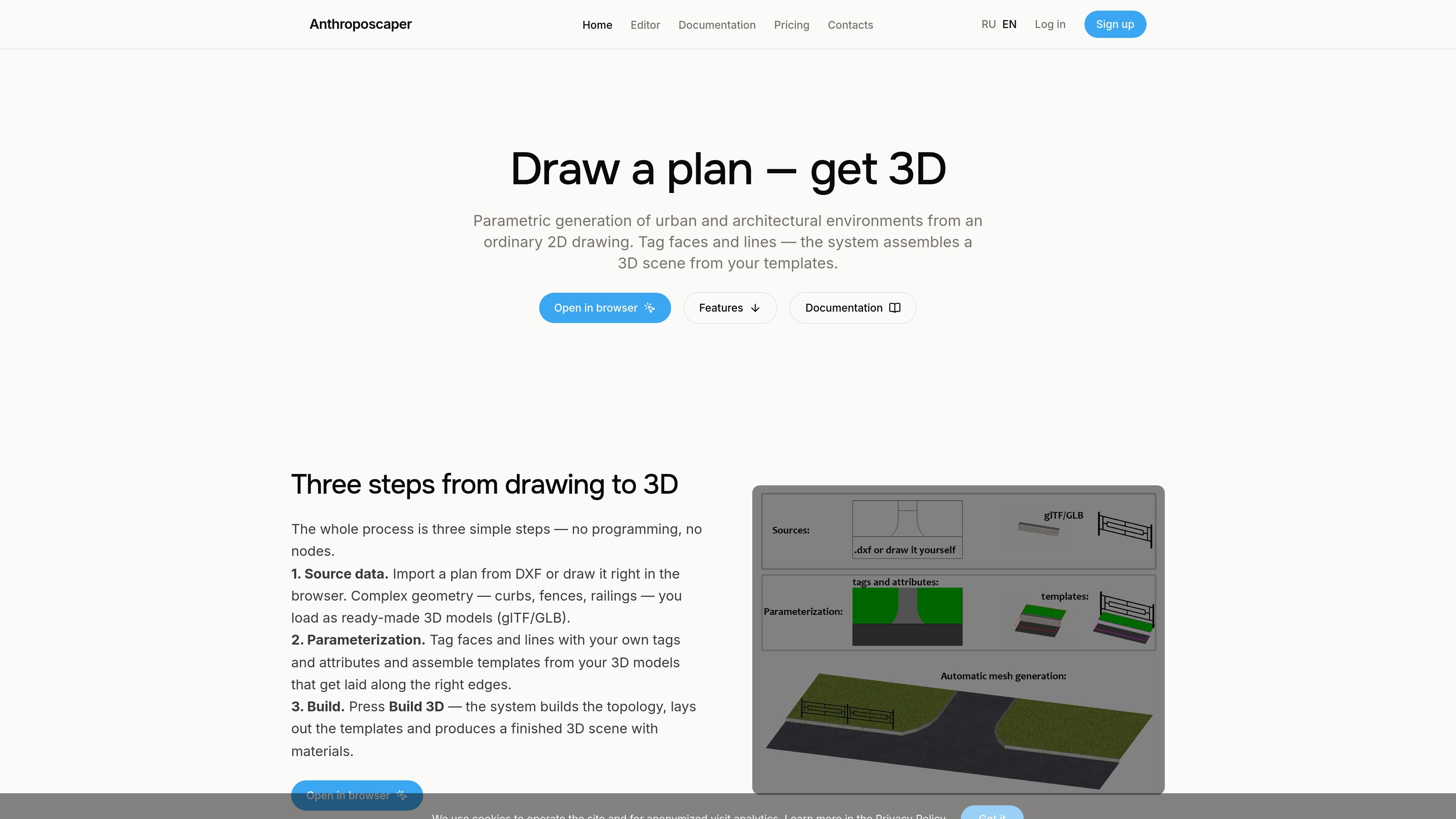
Anthroposcaper is a browser-based parametric modeling application for turning 2D urban and architectural plans into 3D environments. Users can draw a plan directly in the editor or import a DXF, while topology is derived automatically from the intersections of lines. Faces and edges can then be described with tags, attributes, and reusable classes rather than visual programming nodes or code.
The 3D result is assembled from rules and templates made with the user’s own models. After configuration, Build 3D produces a scene with materials, textures, and junction geometry; edits to the source or a template can be recomputed across the result. The workflow is aimed at repeated environmental elements such as roads, sidewalks, curbs, fences, railings, paths, lawns, and terrain.
Draw plans in a browser-based CAD interface with primitives, object snap, layers, user coordinate systems, editing tools, and full Undo/Redo. DXF and glTF/GLB files are supported for import and export where applicable.
Regions are inferred from line intersections using automatic topology. Source objects remain intact rather than being split or merged, and edits can trigger a reactive rebuild.
Attach custom tags and attributes to faces, edges, and objects. Tags expand into user-defined classes containing properties such as materials, textures, heights, and slopes.
Create reusable templates from imported 3D models and configure their placement context, repetition, and deformation. The system lays matching elements along relevant edges.
Generate a scene with materials, textures, and junction geometry by selecting Build 3D after configuring the plan and rules.
Keep projects, imported assets, and build results on the local device. Export a self-contained .asprj file for saving or moving a project between locations.
Create district or site concepts from a drawn or imported plan, using tags and attributes to describe roads, open areas, and other regions before generating a 3D scene for review or visualization.
Build reusable paths, lawns, curbs, fences, and related site elements from templates, then apply them repeatedly along the appropriate faces and edges of a landscape plan.
Prepare environment scenes for rendering by combining a 2D layout with materials, textures, and custom GLB/glTF elements that need to repeat along streets or boundaries.
Construct game environments with repeated roads, barriers, and other urban elements from a structured plan, allowing shared tags or templates to be adjusted across the scene.
Anthroposcaper runs in a web browser without installation. You can draw a plan in the editor or import one from DXF, then assign tags and attributes, configure templates, and select Build 3D.
The editor derives faces and edges from line intersections, applies the tags, attributes, and templates you define, and generates a 3D scene with materials. Changes trigger a background rebuild.
Yes. Complex elements such as curbs, fences, and railings can be imported as GLB/glTF models and configured as templates that are laid along matching edges.
Projects are stored locally in the browser and can be exported as self-contained .asprj files containing the drawing, imported textures, meshes, materials, and class sets. The documentation recommends regularly saving to disk because browser storage can be lost when site data is cleared or when using another browser or device.
The Free plan includes all editor features for personal and noncommercial projects. Pro 1 costs 990 ₽ for one month and Pro 12 costs 9,900 ₽ for twelve months; both add commercial use, and the pricing page states that subscriptions do not renew automatically.

DeepMotion is a web-based AI motion capture and 3D animation platform with Animate 3D for video-to-animation and SayMotion for text-to-animation. It helps creators and teams generate motion in a browser and export results in common production formats.

sizeless is a digital-twin and automated documentation workflow for civil engineering and utility construction. Its SiteScan app turns guided iPhone Pro video captures of trenches and house connections into 3D point clouds, DWG/DXF as-built plans, and GIS-oriented pipe-route models.
Atlasly is an AI site analysis and feasibility tool for architects, real estate developers, and urban planners. It helps users assess planning constraints, walkability, and urban context in a web app or through MCP-connected AI assistants.

anyCreature is a GitHub project that turns a short text order into a game-ready 3D creature. It compiles a single JSON spec into a skinned GLB with animation, vertex colour, ambient occlusion baking, and an offline showroom viewer.

模袋云 — это доступное онлайн-программное обеспечение для моделирования вилл.

Vizcom — AI-платформа для дизайнеров и команд, превращающая эскизы в фотореалистичные 3D-рендеры. Итерации, визуализация и рабочие процессы для команд.