
FlashLoom and linked sources
Create flashcards from highlighted PDF text without retyping, with each card connected to the passage that supplied its context.

BrainLoom is a local-first learning and knowledge workspace that combines PDF annotation, source-linked flashcards, FSRS v6 spaced repetition, notes, and visual canvases. It is designed for students, researchers, and independent learners who want to study and organize knowledge while retaining links to original source material.
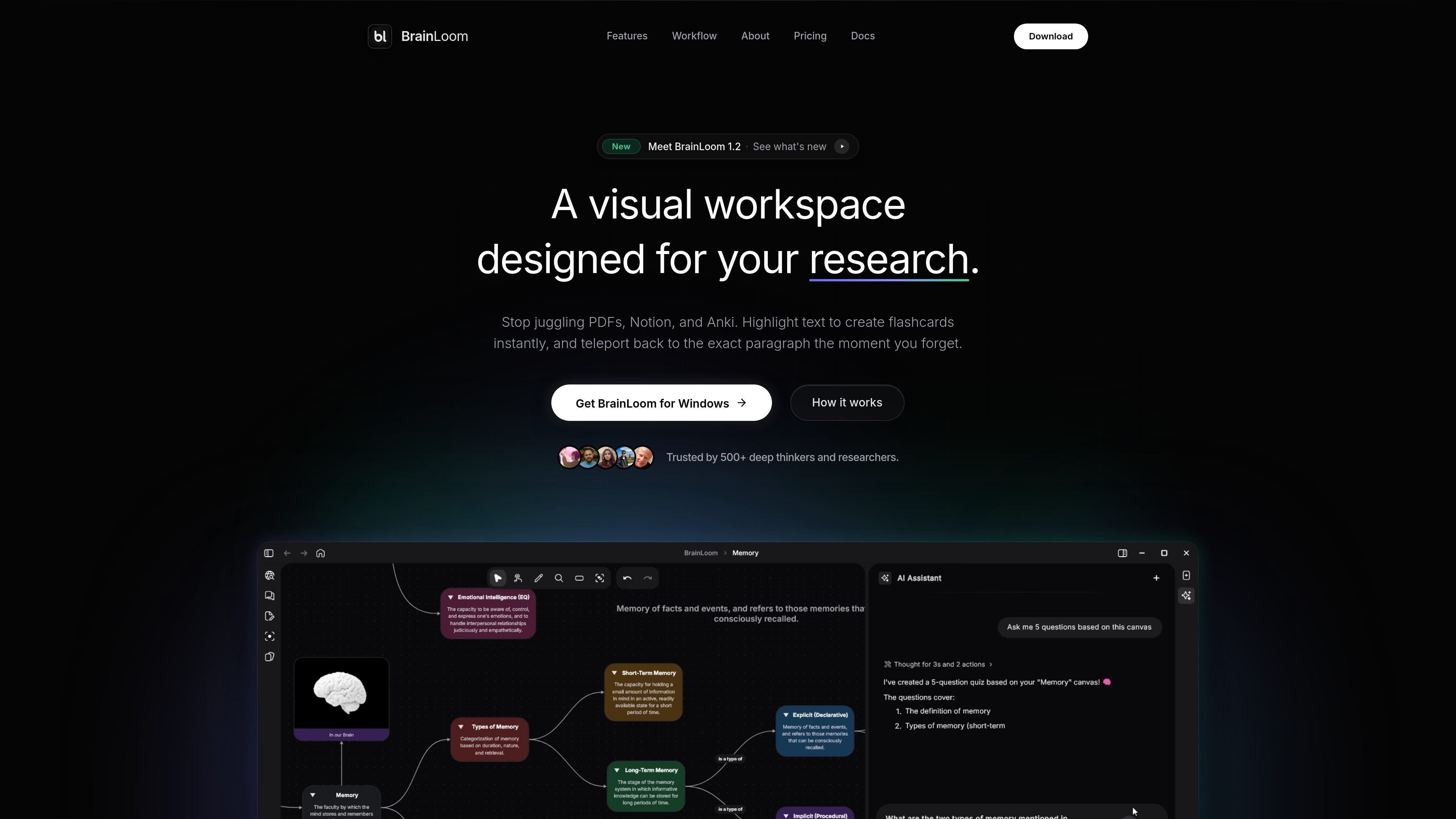
BrainLoom is a local-first learning and knowledge workspace for turning source material into connected notes and recall practice. It combines PDF and document annotation, flashcards, FSRS v6 spaced repetition, project organization, and an infinite canvas in one application.
Its central workflow preserves the relationship between a flashcard and the material behind it: a highlighted PDF passage can become a card, and later review can return to the original paragraph. The product is positioned for people who study, research, or build a personal knowledge system and want review activity to retain its source context. AI features include local-model and BYOK options, visual flashcard generation, and vault-aware retrieval on eligible plans.
Create flashcards from highlighted PDF text without retyping, with each card connected to the passage that supplied its context.
Review cards with the FSRS v6 algorithm, swipe left or right to grade recall, and view forgetting-curve, retention-forecast, and streak information.
Place flashcard decks, notes, and other nodes on an infinite canvas, then connect ideas or annotate them with freehand and stylus input.
Use AI to detect labels on anatomy charts and maps and generate visual flashcards through image occlusion.
Organize work into workspaces and projects, with a mastery lifecycle that tracks topics from Idea through In Progress to Mastered.
Use local AI options including Ollama and LM Studio or a bring-your-own-key setup; Pro and Lifetime plans also list vault-aware retrieval-augmented generation and semantic search capabilities.
Highlight important passages in study PDFs, convert them into flashcards, and use FSRS v6 reviews to build a recurring recall routine without losing the original context.
Use image occlusion to turn labeled anatomy charts or maps into visual recall exercises, then review the resulting cards alongside related notes.
Arrange cards, notes, and connected concepts on the infinite canvas to map relationships while researching a subject or developing a personal knowledge base.
Keep work or hobby learning in projects, use mastery stages to identify what is still in progress, and return to source passages when a later review exposes a gap.
Work with local AI through Ollama or LM Studio, or connect a preferred model through BYOK, for workspace actions and—on eligible plans—vault-aware retrieval.
BrainLoom is a local-first learning and knowledge workspace that combines PDF and document annotation, notes, flashcards, spaced repetition, and visual canvases. Its linked-source workflow connects a flashcard to the passage from which it was created.
FlashLoom turns a highlighted passage in a PDF into a flashcard, while Linked Source lets you return to the original source paragraph when reviewing it. The site describes this as a way to preserve context around recalled information.
Yes. The Free plan includes FSRS v6 spaced repetition, local AI chat using a bring-your-own-key setup, and limited AI workspace actions. The pricing page also lists Ollama and LM Studio as supported local model options.
The Free plan is limited to one workspace, three projects, five canvases, and five PDFs. Pro removes those workspace, project, canvas, and PDF limits and adds encrypted cloud sync; the Lifetime license includes unlimited workspaces, canvases, and PDFs but does not include cloud sync.
The pricing page lists native builds for macOS, Windows, Linux, iOS, and Android. The Lifetime license is valid on up to three personal devices, while the Free plan is listed for one device and Pro for three devices.

GameGrad turns PDF study material into quiz questions that appear inside arcade games, so users can practice active recall while they play. It offers a free tier with one PDF and a Pro plan with more uploads, more questions, and answer explanations.

recall is an AI flashcard app that turns reading and notes into study cards through Claude, ChatGPT, or another MCP client. It uses one-time lifetime access pricing and spaced repetition review.

BeFreed is a personalized audio learning app that turns books and other knowledge sources into narrated listening experiences. It helps people learn on demand through interactive audio, voice selection, and built-in learning tools.

Goldfish is an AI memory app for macOS that helps you reply, write, summarize, and continue using the context already on your Mac. It stores memory locally and writes in your tone.

Lasso is an ecommerce product data platform for enriching catalog records, processing supplier files, generating product content, and monitoring competitors. It combines a web app with a REST API, SDK, and MCP server for teams and developers.

ArtDeck is a visual reference board app for iPhone, iPad, and Mac that lets artists collect mixed reference material on one canvas and study it with ToolBox lenses. It works offline, supports optional iCloud sync, and is sold as a one-time purchase with no account required.