
Markdown-first experiment files
Each flag, holdout, staged rollout, or A/B test is represented as a single `.md` file in `dif/`, making the configuration readable, diffable, and easy to review in pull requests.

Dif.sh manages feature flags, A/B tests, holdouts, and staged rollouts as Markdown files in your repo. It uses a CLI to scaffold, validate, build, and conclude experiments, with Dif Cloud available for shared metrics and decision review.
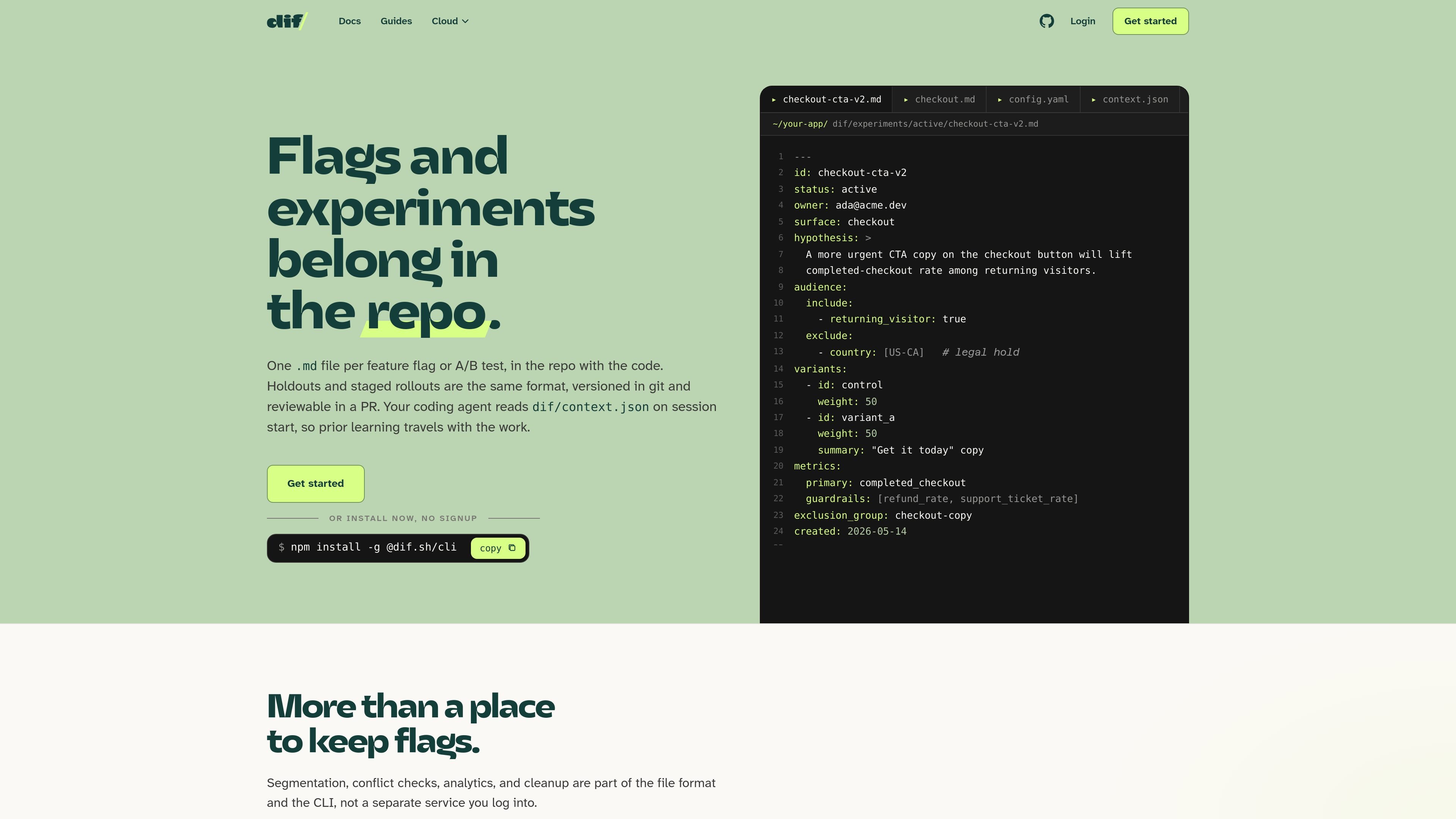
Dif.sh is a developer tool for feature flags, A/B tests, holdouts, and staged rollouts that live in your repository as Markdown files. The core workflow is built around a small CLI, a `dif/` folder checked into git, and generated runtime artifacts that your app can import.
The product is designed for teams that want experiment definitions, rollout rules, and experiment history to stay close to code review. The local workflow runs from the terminal, while Dif Cloud adds a shared live view of metrics, confidence intervals, and decision proposals for teams that want centralized analysis without moving the source of truth out of the repo.
Each flag, holdout, staged rollout, or A/B test is represented as a single `.md` file in `dif/`, making the configuration readable, diffable, and easy to review in pull requests.
`dif init`, `dif new`, `dif validate`, `dif build`, `dif qa`, and `dif conclude` cover the full lifecycle from scaffolding to cleanup without leaving the terminal.
`dif build` compiles active experiments into a typed client and `dif/context.json`, so the app can render variants locally while the agent reads the shared experiment context on session start.
Audience rules are declared in config and resolved at runtime from user attributes such as country, plan, or returning_visitor, rather than from a committed customer list.
Build-time checks catch conflicts, missing tests, invalid frontmatter, and exclusion-group collisions before changes reach production.
Dif Cloud adds team-facing metrics, lift calculations, confidence intervals, and pull-request-based decision proposals while keeping git as the source of truth.
Store active experiments in `dif/experiments/active/`, review them in pull requests, and keep concluded work in the repo for later reference.
Draft, validate, and compile an experiment before rollout so conflicts, missing tests, and invalid frontmatter fail in CI rather than in production.
Use audience attributes such as country, plan, or returning_visitor to target a variant without committing a customer list to the repository.
Generate `dif/context.json` and let coding agents read the current experiment state on session start so prior learnings carry into the next change.
Use Dif Cloud when a team wants exposure counts, lift over time, confidence intervals, and a proposed decision written back as a pull request.
Dif.sh is set up from the repo root with the CLI. The docs show `dif init` creating the `dif/` workspace, then `dif new`, `dif validate`, `dif build`, and `dif qa` as the main workflow. The CLI is designed to run in a repo and does not open a browser or require logging in for the core local workflow.
The source pages describe two layers: the CLI and SDK stay free, while Dif Cloud is a paid service for shared metrics, lift calculations, and a team view of experiments. The pricing page shown in the collected text did not contain plan details, but the Cloud page states that $50 a month includes 1 million events and every seat.
Dif.sh stores experiments as Markdown files in a `dif/` folder checked into git. Active experiments live under `dif/experiments/active/`, concluded experiments move to `dif/experiments/concluded/`, and surfaces and context are tracked alongside them in the repo.
Dif Cloud reads the repository and turns each Markdown experiment into a live view with exposures, lift, confidence intervals, and a ready-to-conclude flag. It also writes proposed decisions back as pull requests so the repo remains the source of truth.
The docs indicate support for the npm wrapper, which works anywhere Node 18+ runs, and the SDK and framework packages require Node 20.6+. The shell installer is available for macOS and Linux, and Homebrew is also supported on macOS and Linux.

Exodus is a free developer tool that audits an application repository, compares its current deployment with a Google Cloud Run design, and creates an ordered migration plan for a coding agent. It also helps plan new products for Cloud Run with architecture and cost estimates.

OpenFlags is an open-source, self-hosted feature flag platform for modern JavaScript teams. It supports local evaluation, targeted rollouts, and controlled launches while keeping flag data in your own infrastructure.

ByteAsk is a terminal-first AI coding agent for C and C++ that edits repositories and verifies changes with the real compiler, debugger, sanitizers, and tests before showing a diff. It offers a free tier plus paid plans, with editor connectors and zero-retention handling described in the source.

Epherem is a static security scanner for web apps built with AI coding tools such as Lovable, Bolt, v0, Replit, Cursor, and Claude Code. It checks source files and dependencies for common security mistakes, then provides categorized findings and suggested fixes without running the app.

CreateOS Sandbox is an isolated compute environment for running code and agent workloads inside Firecracker micro-VMs. It is designed for workflows that need machine-level isolation, private networking between sandboxes, and programmatic control through SDK, CLI, or MCP.

GitBot is a local browser-based workspace for creating reusable coding bots powered by Claude Code, Codex, or OpenCode. It helps developers run those agents across repository folders with persistent threads and configurable permissions.