
Quick check-ins
Members can quickly signal that they are okay by tapping the hand button, choosing a Knuffling, and selecting how they feel.

Knuff is a family and social check-in app for sharing quick updates with people in private Bubbles. It helps families, friends, and small groups see how members are doing without requiring routine calls or continuous location tracking.
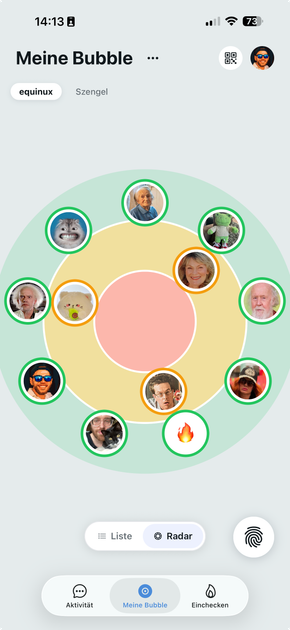
Knuff is a check-in and communication app for families, friends, neighbors, and other small groups. Members of a private Bubble can quickly show how they are doing, while the Bubble view indicates how recent each person's check-in is. The central purpose is to provide reassurance without requiring a phone call or a long status message every time.
A check-in starts with the hand button in a Bubble or Knuff Chat. Users choose a Knuffling and indicate how they feel, then can add text, media, a voice message, a poll, or their current location. Knuff is designed for voluntary updates rather than continuous location tracking, and it can be used alongside existing messengers. Core functions are free, while optional extras and fixed-term Passes are sold separately without automatic subscription renewal.
Members can quickly signal that they are okay by tapping the hand button, choosing a Knuffling, and selecting how they feel.
A Bubble map shows how recent members' check-ins are: recent check-ins remain in the green area, while older ones move toward the center and red area.
Check-ins can be expanded with a personal message, photo, video, voice message, group poll, or current location when that context is useful.
Create separate Bubbles for family, friends, neighbors, colleagues, football teams, roommates, or school friends, with visibility limited to each Bubble's members.
Members can use Knuff Chat for communication, and the site describes gentle nudges and call-back requests for reconnecting when a conversation is needed.
The site describes optional connected buttons and motion sensors that can send a check-in when using a phone is difficult, including in some senior-care situations.
A person living alone can send a daily sign of life without a call or continuous monitoring. The site also describes reminders, gentle nudges, and optional connected buttons or motion sensors for situations where phone use is difficult.
Family members can use a shared Bubble to answer the basic question of whether everyone is okay, then use chat, a call-back request, or a longer conversation when needed.
A child or teenager can check in after arriving at school, walking home, cycling locally, or visiting a friend. They can choose whether to include their location instead of being tracked continuously.
People who live or work apart can share a brief update, photo, video, or voice message without turning every status check into a phone call.
Separate Bubbles can support groups such as roommates, school friends, colleagues, or football teams, keeping updates organized by context.
Knuff is a check-in and communication app in which people in the same Bubble can indicate how they are doing. It is intended to complement, rather than necessarily replace, messaging apps such as WhatsApp or iMessage.
A member taps the hand button in a Bubble or Knuff Chat, chooses a Knuffling, and can indicate how they feel. The check-in can also include a message, photo or video, voice message, group poll, or current location.
Knuff is available for iPhone and iPad running iOS 16 or later, as well as Android smartphones. The site also links to the App Store and Google Play.
The core functions are free for users. Additional items such as Knufflings, Bubble designs, and some features can be purchased in the Knuff Shop. The service says it does not use subscriptions; Passes have a fixed validity period and do not renew automatically.
No. Check-ins are visible only to members of the Bubble in which they were created. Knuff supports voluntary location sharing, but the safety use case specifically describes checking in without continuous background tracking.

MacSpoof — смена MAC-адреса в macOS: меняйте или рандомизируйте Wi‑Fi MAC, чтобы переподключаться и меньше светить идентификатор в публичных сетях.

DemoTV is an audience-ranked station for discovering and comparing independent product demos. Founders can submit videos, embed approved demos on their websites, collect viewer inquiries and optionally commission demo production or labelled promotion without buying ranking.

Ship It: Idle Dev Tycoon is an iPhone incremental simulation game about building apps, managing a software studio, and selling it for lasting progression benefits. It supports offline play, automated builds, adviser collection, and optional in-app purchases.

NomNak — бесплатное приложение для iPhone, где находят рестораны по рекомендациям друзей, сохраняют места, ведут food passport и ищут по городам.

CAPTA is a mobile GPS waypoint app for quickly saving, organizing, and revisiting locations. It supports offline use, camera-based coordinate capture, optional cross-device synchronization, and GPX export for fishermen, explorers, and field professionals.

Ctrl+Shift+3 is a calm, text-first community platform with a chronological feed, profiles, RSS, and private groups called Clicks. It is built for reading, posting, and joining smaller communities without algorithmic ranking or vanity counts.