UStackUStack
LaunchReel icon

LaunchReel

LaunchReel is a Claude Code plugin that edits talking-head recordings and creates product launch videos from a repository or running app. It adds cuts, captions, zooms, visuals, music and voiceover, with a Studio for frame-specific revisions and 16:9 or 9:16 export.

LaunchReel

AI-assisted video editing for talking-head recordings and product launches

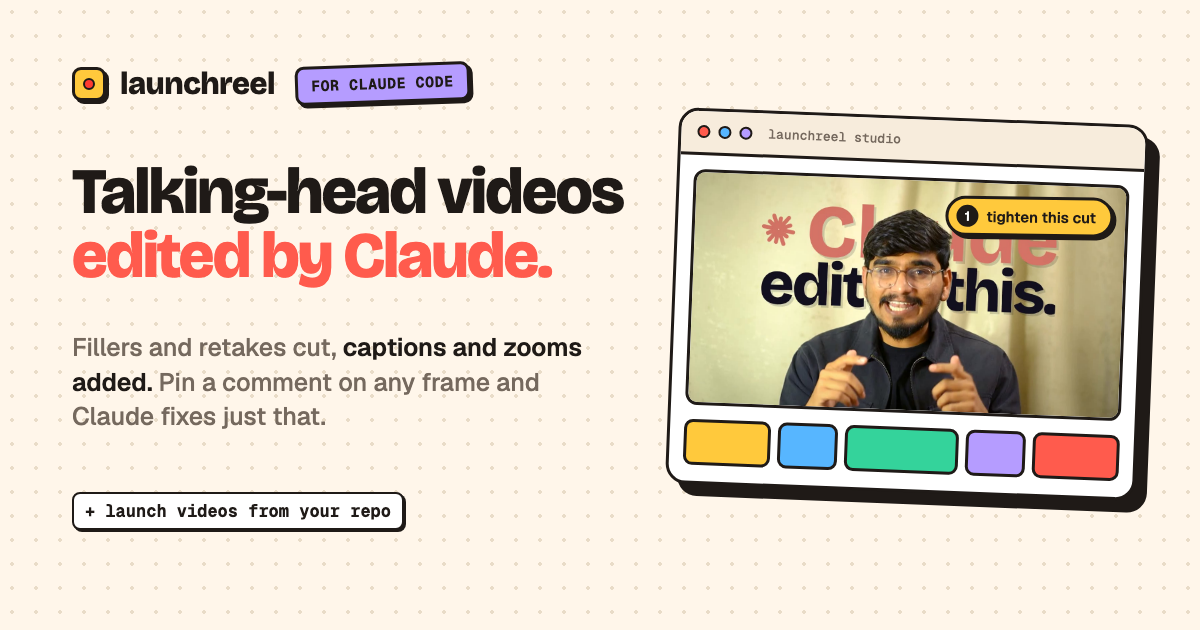
LaunchReel is a Claude Code plugin for turning talking-head recordings and product information into short videos. Claude handles the first edit: it transcribes the recording, cuts fillers, pauses and retakes, adds captions and zooms, and can build visuals around the spoken script. For product launches, it can read a repository and create scenes for the real app, rather than relying only on a generic template.

The companion Studio provides a review and revision surface while the video is being built. Users can attach comments to specific frames for Claude to address, make small visual edits directly, add original music or voiceover, and export landscape or portrait versions. A separate template generator is available for users who want a narrated, music-backed video without using Claude Code.

Features

Talking-head editing

Transcribes a recording, identifies fillers, pauses and retakes, and selects the stronger takes for a shorter edit. The workflow supports recordings up to 5 minutes on Creator and 10 minutes on Pro; the free trial supports up to 2 minutes.

Captions, zooms and supporting visuals

Adds captions, punch-ins and visual treatments based on the spoken content, including illustrations such as timelines, maps and screen recordings when requested.

Frame-level Studio review

The Studio opens while Claude builds the video. Review the result, pin a comment to an exact frame for a targeted fix, or directly change text, color, font and clip length for smaller revisions.

Repo and product-aware launch videos

Creates launch videos from a product repository and can inspect a live or localhost app to rebuild real screens as motion. Users can specify a duration, feature, audience, tone or visual reference.

Music and narration

Adds an original score composed to the scene timing and supports voiceover, a user recording, or no narration. Template videos also let users choose an AI narrator, their own recording or no voice.

Multi-format export

Exports landscape 16:9 and portrait 9:16 versions. The portrait workflow re-lays out scenes, and exports are available in 1080p on every paid plan, with 2K and 4K on Pro and Team.

Use cases

  • Editing a talking-head reel

    Record a presentation or explanation on a phone or webcam, then ask Claude to remove verbal filler and weak takes. Use frame comments to request focused changes before exporting a finished reel.

  • Creating a product launch video

    Run LaunchReel in an application repository and ask it to make a launch video. Claude can inspect the code and a live or localhost app, then write scenes around the actual product interface.

  • Explaining one product feature

    Make a short feature announcement by naming a feature from the code or UI, setting a duration, and directing the style or audience. This suits a single release, pricing-page video or social post rather than a broad product tour.

  • Generating a video without Claude Code

    Choose a template, describe the product or paste a script, then select an AI narrator, personal recording or no voice. The browser renders a music-backed MP4 for landscape or portrait distribution.

Pros and Cons

Pros

  • Combines conversational editing with a visual Studio for frame-specific feedback and direct small changes.
  • Can use a repository or running app as the basis for launch-video scenes and product screens.
  • Supports talking-head cleanup, captions, zooms, visual explanations, music and voiceover in one workflow.
  • Offers 16:9 and 9:16 outputs, with portrait scenes re-laid out rather than simply cropped.

Cons

  • The Claude Code workflow requires Claude Code and Node 20 or later; setup details beyond those requirements are not fully documented on the supplied pages.
  • Claude’s work uses the user’s own Claude plan, so the editing workflow is subject to that plan’s usage rather than being fully separate.
  • The free video has a small watermark and end screen, and 2K/4K export is limited to Pro and Team plans.

FAQ

What do I need to use LaunchReel?

LaunchReel requires Claude Code and Node 20 or later. To install it, add the `gajanansr/launchreel-plugin` marketplace in Claude Code, then install `launchreel@launchreel` and run the commands one at a time. The site also offers template generation for people who are not using Claude Code.

How does the talking-head editing workflow work?

For a talking-head project, give Claude Code a recording and an editing instruction. LaunchReel transcribes the recording, removes selected fillers, pauses and retakes, then adds captions, punch-ins and visuals. The Studio opens during the build so you can review and revise the result.

Can I make changes without rerunning the whole edit?

Yes. The Studio lets you pin a comment to an exact frame so Claude can fix that location, and small changes such as wording, color, font or clip length can be made directly in the Studio without another prompt. You can then render or export the project.

What formats and resolutions are available?

LaunchReel supports 16:9 landscape and 9:16 portrait output. Claude re-lays out scenes for portrait rather than simply cropping them. The free video can be exported in 1080p with a small watermark and an end screen; Creator includes 1080p, while Pro and Team include 2K and 4K export.

Is there a free trial and how are videos counted?

The first full video is free and includes every feature, with a 1080p export that has a small watermark and end screen. Paid plans are billed monthly in USD, can be canceled at any time, and count a project rather than each fix or re-render as a separate video. The site lists Creator, Pro and Team plans, with limits and prices shown on its pricing section.

Quick Facts

Category
Video Editing; Developer Tool
Platform
Claude Code plugin with browser-based Studio
Setup
Claude Code and Node 20+
Primary workflows
Talking-head editing, product launch videos, and template-based videos
Output
16:9 or 9:16; 1080p, with 2K and 4K on Pro and Team
First video
One full video free, with 1080p watermark and end screen

Альтернативы LaunchReel