
Project feeds
Publish project updates with attached files and discuss them in the project feed, keeping posts, files, and conversations together.

Project Feed is a project management and collaboration workspace for teams that need to plan work, share updates, and review media files. It combines tasks, docs, canvases, client portals, and location- or time-based feedback in one workspace.
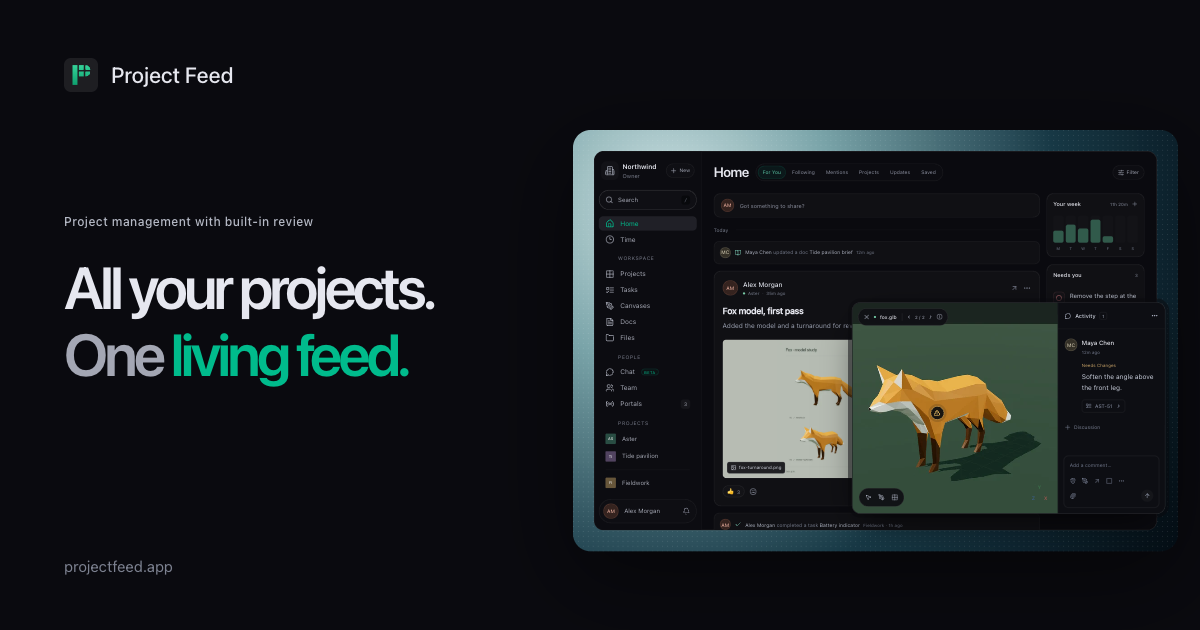
Project Feed is a project management workspace that combines project feeds, task tracking, shared documents, canvases, chat, and file review. Teams can post progress updates, attach working files, discuss changes, and keep follow-up work connected to the project context.
Its review tools are designed for visual and time-based feedback: comments can be pinned to 3D model surfaces, image details, video frames, or audio ranges, while sprite sheets can be inspected frame by frame. Review comments can be replied to, marked resolved, and linked to assigned tasks, giving teams a way to move from feedback to tracked work.
Publish project updates with attached files and discuss them in the project feed, keeping posts, files, and conversations together.
Create tasks, assign work, use subtasks, set statuses and priorities, and link changes back to review feedback across projects.
Review images, video, audio, 3D models, PDFs, Rive files, and sprite sheets. Pin comments to a surface, detail, frame, or time range, draw marks where supported, and update review status.
Edit shared documents and comment on specific passages, or arrange project files, references, notes, and tasks on a canvas.
Select updates and files for client review in a portal. Clients can respond there while the team replies from the original post.
Use the REST API, pf CLI, MCP, and signed webhooks to read or write workspace data, automate project events, or connect compatible agents. Slack and Discord notifications are available on Pro and Enterprise.
Post a build, render, model, or recording to a project feed, collect review comments at the relevant frame or location, and assign fixes without separating discussion from the work item.
Use a shared canvas for references and a task list for measured changes, then keep the brief, attachments, and progress updates in the same project workspace.
Publish selected updates and files to a client portal so clients can review the chosen version and respond, while the internal team continues the discussion from the original post.
Track bugs and follow-up work from gameplay clips or other project media by linking feedback to tasks and assigning each fix to a teammate.
Create posts or manage workspace data from scripts and CI jobs, receive signed project-event webhooks, or connect a compatible agent through MCP.
Project Feed provides a workspace with projects, feeds, tasks, docs, canvases, files, chat, and client portals. You can add a project and invite your team, then share updates and files for discussion or review.
You can upload images, video, audio, 3D models, PDFs, Rive files, and sprite sheets. Review tools support comments tied to a point, frame, or time range, plus drawing marks where supported.
Yes. Client portals let you choose which updates and files clients can review. On the Free plan, the portal is Project Feed-branded; Pro and Enterprise include unlimited client portals without that branding.
Workspace owners can start one 14-day Pro trial without a card. Data remains in place when the trial ends. The Free plan includes three editors and three active projects, while viewers and clients are free on every plan.
The REST API and CLI can read and write workspace data, and MCP can connect a compatible agent using workspace permissions. Webhooks deliver signed project events. Slack, Discord, and custom webhooks are listed on Pro and Enterprise.

Biji - это универсальная платформа, разработанная для повышения продуктивности с помощью инновационных инструментов и функций.

runevr is a connected workspace for creative teams that combines boards, media review, chat, recordings, drive, calls, and AI agents in one room-based environment. It is designed to reduce tool switching and keep project context together.

BotBoard is a task-management layer for AI agents that helps teams assign work, track progress, and review output. It supports CLI, MCP, and HTTP connections for tools like OpenClaw, Codex, Claude Code, and Cursor.
Work Life Panda is a task, calendar, notes, and coordination app for individuals, families, groups, and small teams. It combines existing calendars with to-dos, shared spaces, item-specific chats, and on-device AI task capture across mobile and web.
HackathonHost is white-label hackathon and game jam management software for organizers running hackathons, game jams, demo days, and related competitions. It combines registration, team building, judging, live control, certificates, and analytics in one hosted workspace.

hob is an independent workspace for coding agents that keeps agent sessions, terminals, history, and follow-up work organized around the tools and providers you already use. It is aimed at developers who want local control over routing, history, and workspace structure rather than a bundled model stack.