
Prompt-to-page drafting
Start from a short prompt or brief, then refine the result in a visual editor using section-based pages instead of a blank canvas.

SlateHut is a website builder that turns a short business description or prompt into editable, section-based pages. It combines generation, visual editing, hosting, forms, and CMS-style publishing in one dashboard for small businesses, creators, and agencies.
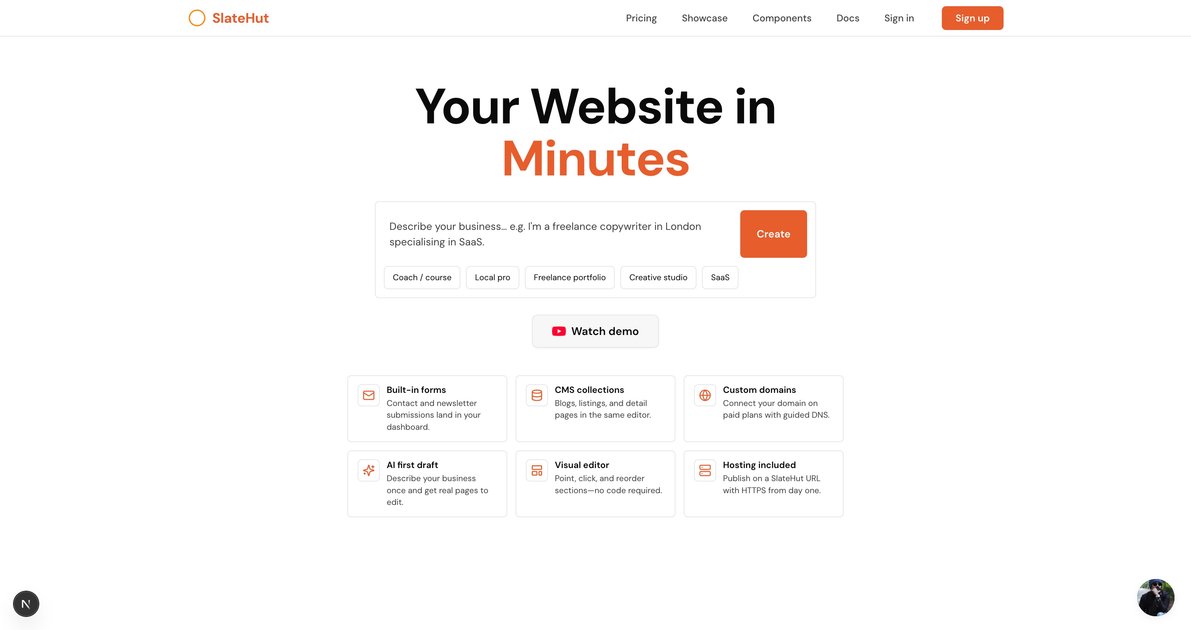
SlateHut is a website builder that turns a short business description or prompt into editable, section-based pages. It is designed to help users launch a site quickly, then keep editing copy, images, layout, forms, and structured content in one dashboard.
The product combines generation, visual editing, hosting, forms, and CMS-style publishing. The site positions SlateHut for small businesses, freelancers, creators, and agencies that want a published site with their own domain, responsive layouts, and fewer separate tools to manage.
Start from a short prompt or brief, then refine the result in a visual editor using section-based pages instead of a blank canvas.
Edit copy, images, layout, and other section fields directly in the dashboard without handing work off to a developer.
Publish on SlateHut hosting with HTTPS included on paid plans, and connect a custom domain when you are ready.
Collect inquiries in the same workspace with built-in contact and newsletter forms and per-site submission storage.
Manage structured content such as blogs and directories on plans that include CMS-style blocks, with a REST API using bearer keys on Launch and Pro plans and API/MCP support on Agency.
Choose from a block library that includes common sections like heroes, features, FAQs, pricing, testimonials, forms, and CMS blocks.
A local business can describe what it sells and where it is based, then publish a credible site with a contact form and later connect a custom domain when ready.
An agency can generate client-ready drafts from briefs, manage multiple properties in one workspace, and automate site creation as volume grows.
A freelancer, creator, or coach can start from a prompt, use the section library to shape a landing page, and publish without developer handoffs.
A team can maintain structured pages such as blogs or directories and update content in the dashboard instead of rebuilding the site each time.
A marketer can use the block library to assemble a launch page, FAQ, testimonial, and lead capture flow quickly from reusable sections.
No. The free plan includes one site on a SlateHut subdomain, and the source says no credit card is required to explore it.
Yes. On paid plans, you can add your domain in the editor, paste the DNS records at your registrar, and SlateHut verifies it with HTTPS.
Form submissions go to the dashboard for that site, so you can review inquiries without adding a separate form tool.
Yes. The source says generated layouts are responsive, and you can preview changes before publishing.
The source says the free tier is for one site on a SlateHut subdomain, while paid plans add custom domains and higher limits; manual editing is available in the dashboard even after AI limits are reached.

Make Real is a Next.js app that turns hand-drawn wireframes into working HTML prototypes using the tldraw SDK and AI models. It helps users sketch on a canvas, generate code, and review the result in an embedded preview.

Wowable is an AI website builder that turns Google Maps listings, social profiles, screenshots, and other public business details into a website you can preview, edit, and publish. It includes a free preview tier, with paid plans for custom domains and growth features.

Fronty is an AI-powered web app that converts screenshots and image files into HTML and CSS, then lets you refine and publish the result with a no-code editor and hosting. The pricing page says it is free for now, but no paid plan details are provided.

Prompty Town is a web product that turns a link into a building in a small internet city. It appears to let users buy a tile, add a prompt, and publish the result alongside other buildings.

beehiiv is a newsletter platform for creators, publishers, and brands that want to build, grow, and monetize email newsletters and websites from one place. It offers a free Launch plan, plus paid tiers for more advanced growth, monetization, and support features.

FigPrompt is an AI tool for creating production-ready Figma plugins from a written description. It helps Figma users move from idea to plugin logic without writing code.