
AI image to video
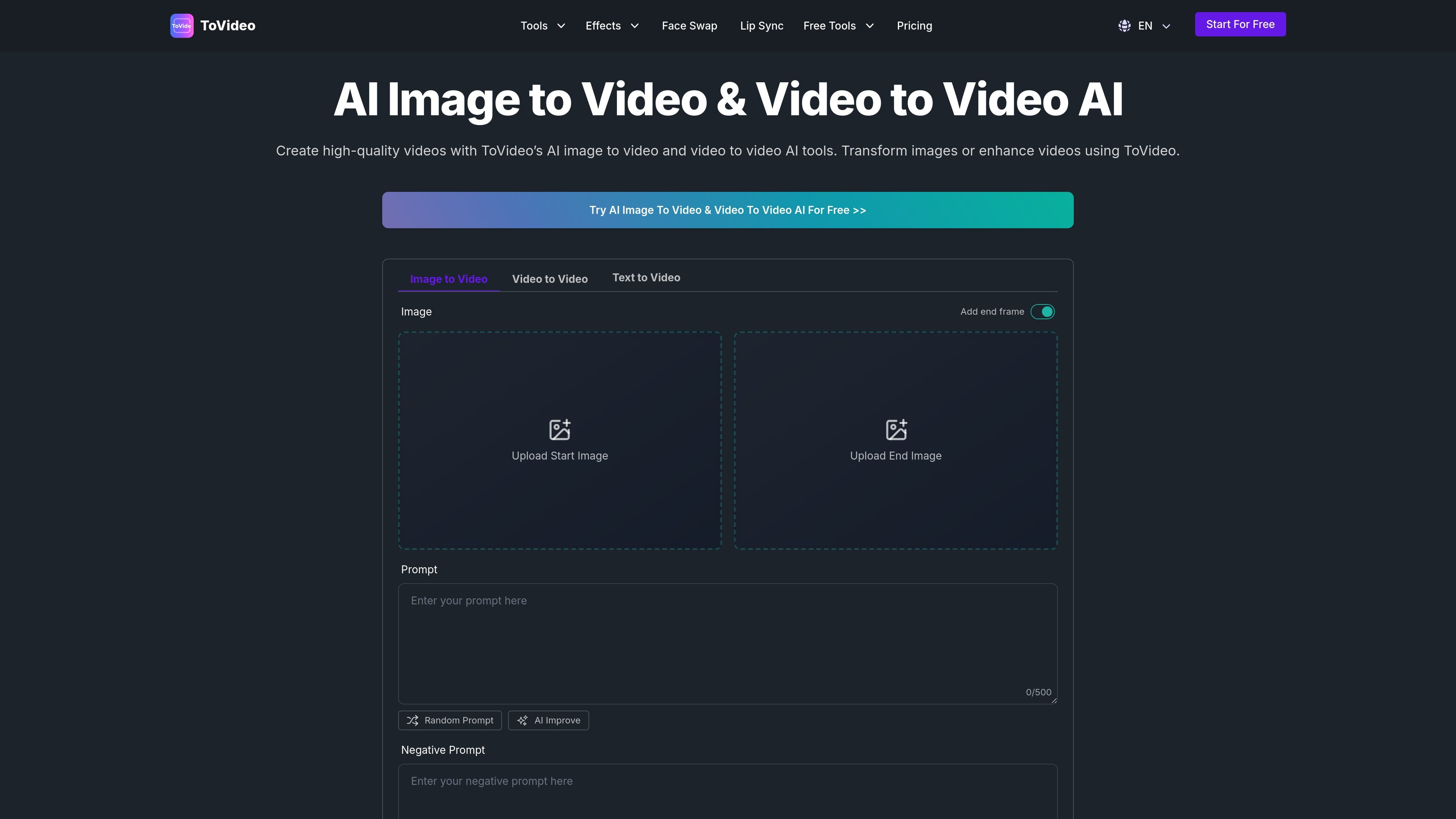
Turn static images into videos using ToVideo’s image-to-video flow. The page shows inputs for a start image, an optional end frame, a prompt, AI improve, and a negative prompt.

ToVideo is a web-based AI video tool for turning images, video clips, or text into generated videos. It also includes face swap, lip sync, and consistent character features for creators working on social, marketing, and storytelling content.
ToVideo is an AI video creation tool focused on image-to-video, video-to-video, and text-to-video workflows. The product pages describe it as a way to upload an image or clip, add a prompt or enhancement settings, and generate a finished video without a traditional editing timeline.
Beyond the core conversion tools, ToVideo also includes face swap, lip sync, consistent character, and character animation features. The site positions it for creators who want to turn still images, written ideas, or existing footage into shareable video content for social media, marketing, storytelling, and personal projects.
Turn static images into videos using ToVideo’s image-to-video flow. The page shows inputs for a start image, an optional end frame, a prompt, AI improve, and a negative prompt.
Transform existing footage with video-to-video editing. The site says you can change style, adjust length, add AI effects, and upgrade quality.
Generate videos directly from a written script. The text-to-video feature is described as creating scenes, backgrounds, and dynamic visuals that match the input text.
Swap faces in images and videos for character-driven or playful content. The product description emphasizes realistic, high-quality results from AI face swapping.
Align lip movement with speech, singing, or voiceovers. The lip sync feature is presented as useful for animated explainers, music videos, and marketing clips.
Keep a character’s appearance, style, and expressions consistent across scenes. The site describes this as useful for series, branded videos, and animated storytelling.
Turn product shots, portraits, or still campaign visuals into short videos for social platforms or landing pages. The site specifically mentions social media content creation and product promotion.
Convert a script into a simple animated video with scenes and backgrounds that match the text. This fits explainers, tutorials, and storytelling content.
Refresh existing footage by changing style, adding effects, or adjusting motion and length. The product frames this as a way to repurpose clips without rebuilding them from scratch.
Create greeting videos or character-driven messages using face swap and lip sync. The site calls out personalized greetings and messages as a use case.
Keep recurring characters visually stable across multiple scenes in branded series or animated stories. This is useful when the same character needs to look consistent from video to video.
ToVideo provides a browser-based workflow where you upload an image or video, choose how you want it enhanced, and generate a downloadable result. The page also shows text-to-video, face swap, lip sync, consistent character video, and character animation tools as part of the product.
The source pages describe image-to-video, video-to-video, and text-to-video workflows. The page text does not specify supported export formats, resolution options, or duration limits.
The site positions ToVideo for social media content, product promotion, and personalized greetings or messages. It also mentions storytelling, explainers, tutorials, and marketing clips as suitable uses.
The rendered pages show prompts such as start image, end image, prompt, AI improve, and negative prompt for the image-to-video flow, but they do not provide detailed plan limits or full output controls.
The pricing page is present, but the provided source text does not include specific plan names, prices, or free-tier limits. The product appears to offer a free entry point from the main call to action, but the exact pricing structure is not visible in the captured text.

VIDEOAI.ME is an AI video generator for making spokesperson-style videos, ads, explainers, and social content from a script. It is aimed at founders, marketers, agencies, and creators who want to produce videos without filming.

艺映AI is a free AI video creation tool for generating video from text, images, or existing footage. It is positioned for short-form social content, promotional clips, and stylized AI video projects.

讯飞绘镜 (iFlytek Huijing) — это платформа для создания видео на базе ИИ, которая быстро и эффективно преобразует творческие идеи в сценарии, раскадровки и динамические видеоролики.

Topview AI is a web-based AI video creation platform for social ads, ecommerce creatives, avatar videos, and short drama workflows. It combines channel-based templates, prompt-driven generation, reference uploads, and storyboard-based production tools.

EbSynth is VFX software for creative video transformations, retouching, and rotoscopy. It lets users edit keyframes and propagate those changes across a video for tasks like stylized animation, cleanup, and colorization.
MIRA vision develops synthetic-data-driven AI for pathology image analysis in medical diagnostics. Its website positions the product for teams that need privacy-compliant training data, automatic annotations, and controlled data generation.