editGPT icon

editGPT

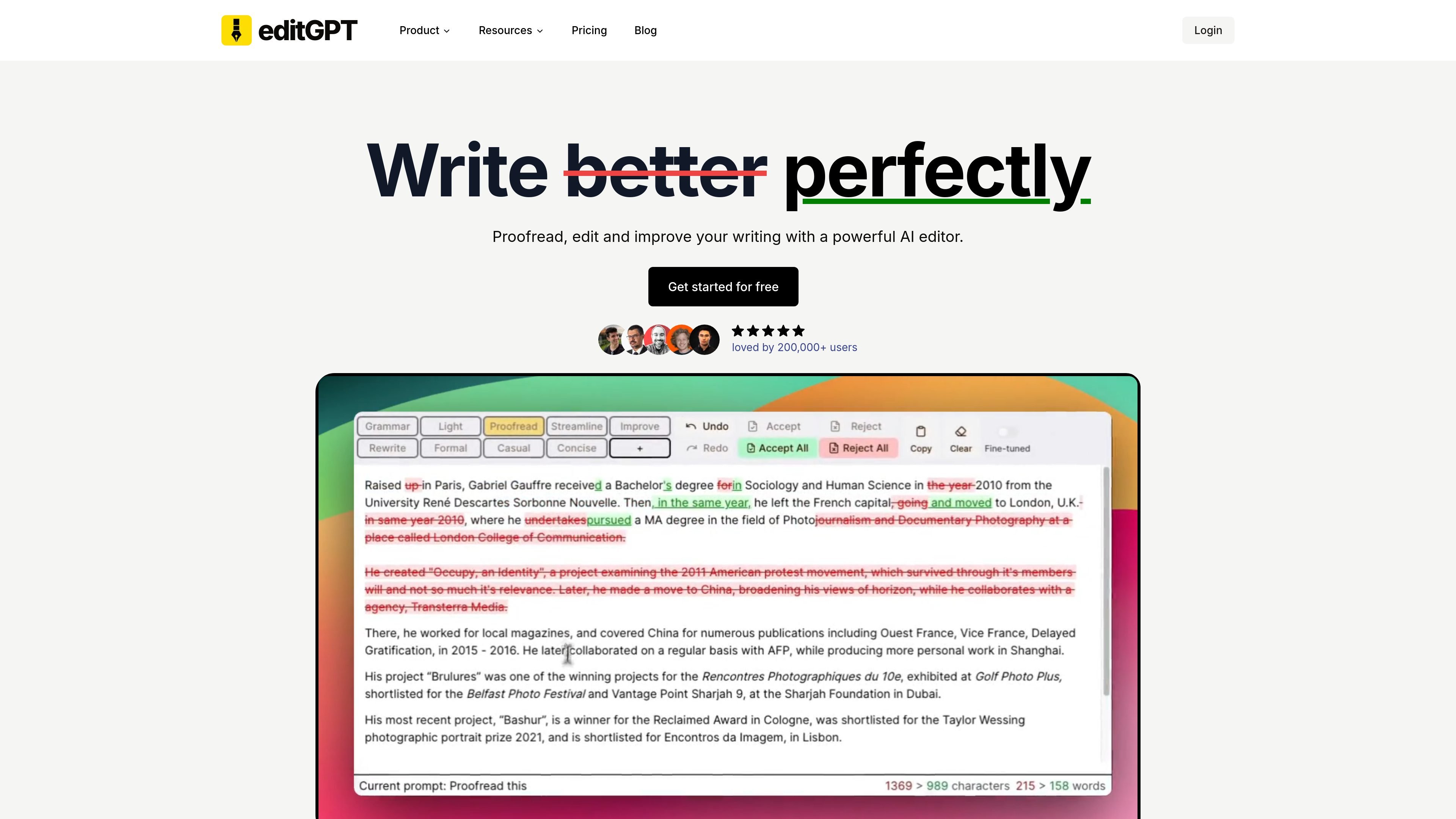
editGPT is an AI writing and editing tool that helps users proofread, rewrite, and track changes with ChatGPT. The site positions it for students, editors, authors, and other professionals who work with written content.

editGPT

What editGPT is

editGPT is an AI writing and editing tool built around ChatGPT. Its homepage describes the product as a way to proofread, edit, and track changes to content, and the site navigation frames it as a set of writing-focused utilities rather than a single-purpose checker.

The product surface shown in the site includes AI Proofreader, AI Rewriter, Text Splitter, Text Improver, AI Detector, AI Writing Editor, Writing Assistant, Track Changes AI, and Transcript SRT Proofreader. The login page also indicates account access through email or Google sign-in, and the site states that students, editors, authors, and professionals use editGPT to improve their writing.

Core capabilities shown on the site

AI proofreading

EditGPT positions itself around proofreading content with ChatGPT assistance, making it useful for catching and refining surface-level issues in drafts.

Rewriting and writing help

The site lists AI Rewriter and Writing Assistant capabilities, indicating support for reshaping and improving text rather than only correcting errors.

Text handling tools

Text Splitter and Text Improver are listed as product areas, suggesting support for breaking text into manageable parts and polishing draft quality.

Tracked edits

Track Changes AI is named on the site, pointing to an editing workflow that preserves visibility into what was changed.

Specialized review tools

AI Detector and Transcript SRT Proofreader appear in the site navigation, showing that the product extends beyond general prose editing to specific review tasks.

Practical ways to use editGPT

  • Polishing written drafts

    Use the product to review drafts for grammar, wording, and clarity, then make edits with ChatGPT assistance while keeping track of changes.

  • Revising awkward copy

    Use the rewriting and text improver tools when you need to reshape a paragraph, tighten phrasing, or make a draft read more cleanly.

  • Working with long text

    Use the text-splitting workflow for longer passages that need to be broken into smaller parts before editing or rewriting.

  • Reviewing edits transparently

    Use Track Changes AI when you want an editing pass that shows what changed instead of only returning a final cleaned-up version.

  • Proofreading transcripts and subtitles

    Use the Transcript SRT Proofreader for subtitle or transcript files that need proofreading in a more specialized editing workflow.

Pros and Cons

Pros

  • Combines proofreading, rewriting, and tracked editing in one product surface.
  • Uses ChatGPT as the core editing engine, according to the product description.
  • Covers several writing workflows beyond general proofreading, including text splitting and transcript subtitle proofreading.
  • Provides a clear audience focus on students, editors, authors, and professionals.
  • Offers simple account access options through email or Google sign-in.

Cons

  • The captured pricing page does not reveal actual plan names, prices, or feature limits.
  • The source pages do not describe integrations, export formats, or team collaboration features in detail.

FAQ

What does editGPT do?

editGPT is designed to proofread, edit, and track changes to content using ChatGPT. The site also shows product areas such as AI Proofreader, AI Rewriter, Text Splitter, Text Improver, AI Detector, AI Writing Editor, Writing Assistant, and Track Changes AI.

How do users access editGPT?

The site does not provide a detailed step-by-step setup flow on the pages captured here. The login page indicates users can continue with email or sign in with Google.

Who is editGPT for?

Based on the source pages, editGPT is aimed at students, editors, authors, and professionals who want help improving writing and reviewing text.

What kind of editing work does it support?

The source content suggests editGPT is focused on proofreading, rewriting, editing, and tracking changes. It does not provide a detailed export or document workflow on the captured pages.

Does editGPT list pricing details?

A pricing page exists, but the captured page text does not expose actual plan names, prices, or limits. The source only shows that pricing information is available on the site.

Quick Facts

Category
AI writing editor
Source domain
editgpt.app
Primary use
Proofreading, editing, and tracking changes
Noted users
Students, editors, authors, and professionals
Access
Email login or Google sign-in
Pricing status
Pricing page exists, but no plan details were visible in the captured text

editGPT 替代品

ProWritingAid icon

ProWritingAid

ProWritingAid is a writing assistant for storytellers that offers grammar checking, style editing, paraphrasing, and story analysis inside popular writing apps. It includes a free plan, paid tiers, and tools for chapter critique, manuscript review, and collaborative editing.

Rubriq icon

Rubriq

Rubriq 是一款面向科研写作的 AI 学术论文润色与翻译工具,支持个人订阅、机构方案和论文查重相关服务。它帮助研究人员在上传稿件后快速生成带修订痕迹的可审阅文档。

MagickPen icon

MagickPen

MagickPen is an AI writing tool that generates drafts, templates, and polished text from a topic prompt. It supports configurable roles, languages, tones, and formats, with access across Web, Chrome, Windows, and Mac.

Hugogen icon

Hugogen

Hugogen is an AI collaboration workspace for docs, design, video, and chat. It helps teams turn meeting notes, briefs, and sales data into brand-consistent drafts, decks, social posts, and short videos.

Mutiny icon

Mutiny

Mutiny is an AI agent for creating branded, customer-facing GTM content such as ABM pages, meeting recaps, business cases, deal rooms, and pitch decks. It helps sales, marketing, and ABM teams generate personalized assets from brand and account data without waiting on design.

Paperpal icon

Paperpal

Paperpal 是一款面向学术写作的 AI 工具,提供文献阅读、语言润色、引用、查重、AI 检测和投稿前检查。它适合需要在英文论文和学术材料上进行写作、修改与合规自检的学生、研究人员和教师。