
DICOM study viewing and organization
Open and organize DICOMDIR files, discs, folders, ZIP archives, multi-frame studies and local archive content, then search studies and manage series.

OmniDICOM is a DICOM viewer and metadata editor for macOS and Windows research and education workflows. It supports local study review, MPR and 3D visualization, measurements, DSA, metadata editing, PACS/DICOMweb transfer, and image or video export.
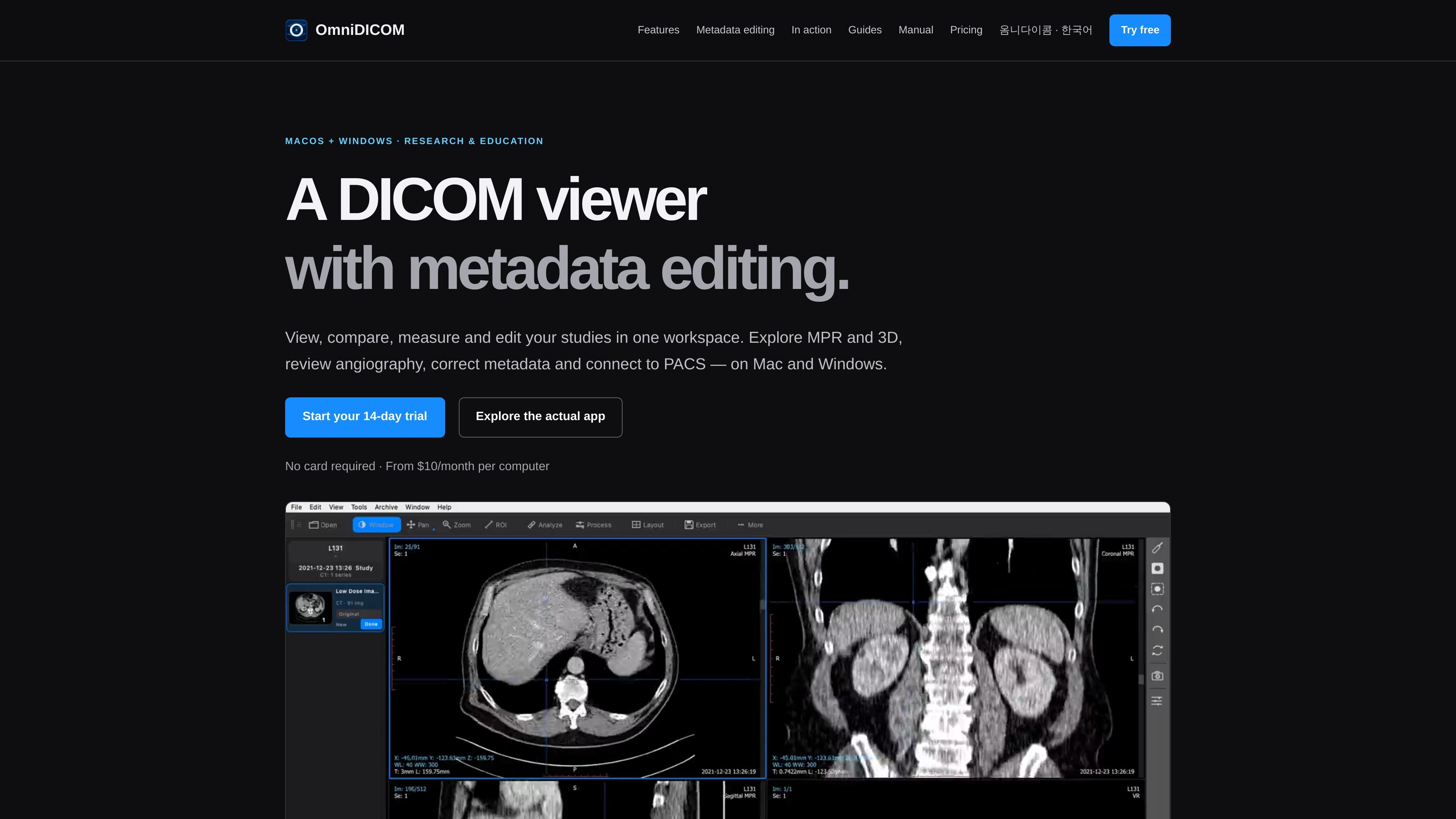
OmniDICOM is a DICOM viewer and metadata editor for macOS and Windows, intended for medical-image viewing, review and secondary review in research and educational settings. It opens local studies and DICOM media, supports comparison and measurement, and provides tools for examining image volumes and dynamic sequences.
The application keeps image viewing and processing local while allowing users to transfer studies to destinations they choose, such as a PACS. Basic includes the main viewer, metadata editing, measurements, MPR, 3D, DSA, PACS and export; Professional adds a processing workspace and quantitative analysis. OmniDICOM is not a medical device and is not intended for diagnosis, primary interpretation or clinical decision-making.
Open and organize DICOMDIR files, discs, folders, ZIP archives, multi-frame studies and local archive content, then search studies and manage series.
Compare studies with window presets, zoom, pan, synchronized navigation, side-by-side layouts, cine playback and adjustable playback speed.
Inspect tags by name or value, edit supported top-level values, and save changes across the files in a selected series. Sequences, pixel data and overlay data remain read-only.
Measure distances, angles and regions of interest, inspect region statistics, and manually calibrate studies when usable pixel spacing is unavailable.
View axial, coronal and sagittal reslices, MIP and volume rendering; use volume cutting, PET-CT fusion overlays and DSA mask subtraction for supported studies.
Transfer studies through PACS and DICOMweb, export DICOM and common image formats, create MP4 or WMV movies, and use Professional filter chains, histograms, profiles and time-intensity curves.
Open CT or MRI studies from folders, discs, ZIP archives or a local archive, compare series, synchronize navigation and inspect multiplanar or volume-rendered views during research review.
Play angiographic runs, choose or align a mask, and apply DSA subtraction tools to examine vascular sequences. Cine controls support frame-by-frame review and speed adjustment.
Correct supported top-level tags such as a patient ID or series description in a controlled research workflow, then verify the saved values on a working copy before downstream use.
Query or transfer studies through configured PACS or DICOMweb services, retrieve selected data for local review, and send results to a chosen destination.
Use Professional processing filters and quantitative tools to generate derived series, inspect histograms or time-intensity curves, and export numerical results as CSV for further research.
OmniDICOM runs on macOS 13 or later on Apple silicon Macs, and on 64-bit Windows 10 or 11. The current Mac installer does not support Intel Macs.
The trial is free for 14 days and starts the first time the app is opened. The first launch requires an internet connection. Trial image exports and copies carry a watermark.
Yes. OmniDICOM can find, retrieve, send and receive studies through PACS and supports C-FIND, C-MOVE, C-GET, C-STORE, QIDO-RS and WADO-RS workflows.
Yes. It can export DICOM files, PNG, JPEG and BMP images, and MP4 or WMV movies. Export can apply to the current image, a series or all open series.
Metadata editing writes changes directly into the original files of the selected series and does not create a backup. Work on a copy when the original metadata must be preserved. Sequences, pixel data and overlay data are read-only.

Malyatko is a baby tracker for logging feeding, sleep, growth, teething, and milestones in one app. It works on iPhone, Apple Watch, and widgets, with no sign-up, offline use, and family sharing through iCloud.

MIRA vision develops synthetic-data-driven AI for pathology image analysis in medical diagnostics. Its website positions the product for teams that need privacy-compliant training data, automatic annotations, and controlled data generation.

Dyson Oral care centers on the CameraJet™ electric toothbrush with flosser, a camera-guided toothbrush that aims to precision-floss between teeth while you brush. The range also includes accessories, non-foaming toothpaste, and low-foaming mouth rinse.

Renight is a sleep-focused app that plays Monaural Beats before bed. It is aimed at people who want to improve the quality of limited sleep and wake up feeling more refreshed.

KeptWell is an AI medical document hub for families navigating serious illness. It helps people upload records, track changes, share a family view, and ask questions with citations back to the source material.

Soonr Health is a preconception health optimization app for couples preparing for pregnancy. It combines shared lifestyle tracking, cycle-based fertility guidance, and optional hormone measurements to help partners prepare together.