

Ada | Digital Twin
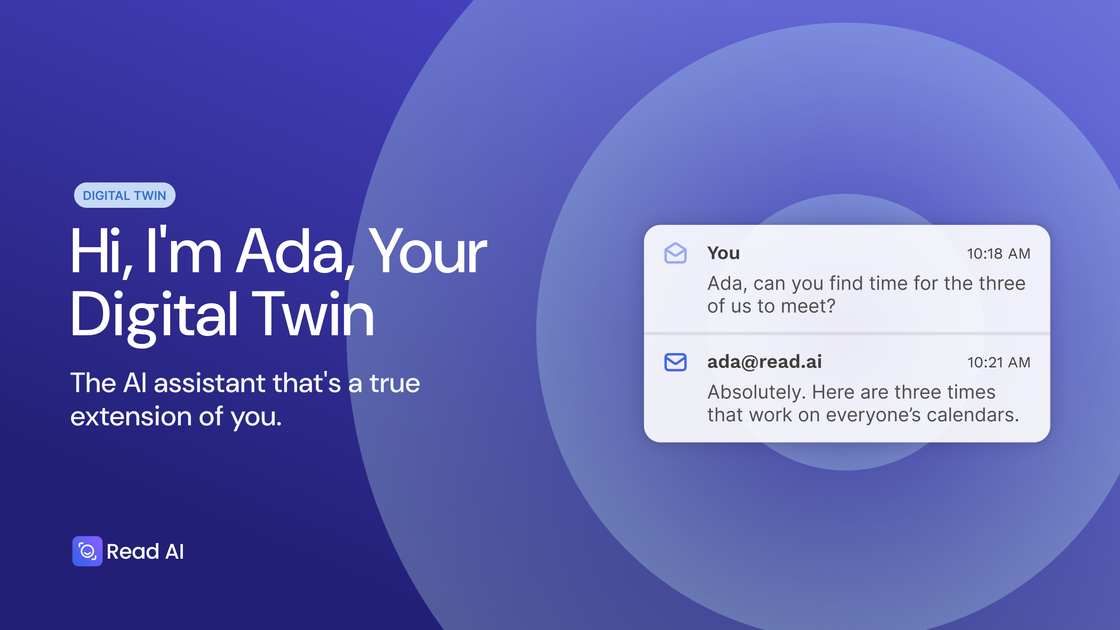
Ada is your Personal AI Digital Twin designed to work alongside you, handling administrative tasks, scheduling, and proactive actions directly from your inbox to extend human capability.
What is Ada | Digital Twin?
What is Ada | Your Personal AI Digital Twin for Work?
Ada, powered by Read AI, is not just another AI assistant or chatbot; it is positioned as your personal AI Digital Twin. This advanced technology is designed to function as an extension of you, learning your preferences, workflow, and context to proactively manage administrative burdens. Built on sophisticated Digital Twin technology, Ada aims to amplify your impact by taking over time-consuming tasks, ensuring nothing falls through the cracks, and freeing up significant mental bandwidth for strategic work.
This digital extension integrates seamlessly into your daily communication channels, primarily your inbox, allowing it to manage complex workflows like scheduling, follow-ups, and data entry without requiring constant manual oversight. The core philosophy behind Ada is to augment human capability rather than replace it, offering a reliable partner that knows you, learns from you, and works autonomously on your behalf, making it an essential tool for modern professionals drowning in administrative overhead.
Key Features
- Proactive Actions & Follow-Through: Ada turns conversations and meeting outcomes into immediate, actionable tasks, ensuring momentum is maintained after discussions conclude.
- Intelligent Scheduling & Conflict Resolution: Effortlessly book meetings, coordinate availability with prospects or colleagues, and automatically resolve calendar conflicts without tedious back-and-forth emails.
- Automated CRM Updates: Based on meeting context, emails, and messages, Ada intelligently suggests and applies necessary updates to your Customer Relationship Management (CRM) system, maintaining data hygiene automatically.
- Post-Meeting Momentum: After any meeting, Ada takes the initiative to schedule next steps, send necessary invites, and ensure all agreed-upon action items are logged and followed up on.
- Scheduled Contextual Updates: Set up personalized tracking schedules, and Ada will deliver curated insights and necessary information directly to your inbox exactly when you need it.
- Knowledge Base Insights (Ada Answers): Get quick, synthesized answers and insights drawn from your accumulated knowledge base and past communications.
- Cross-Platform Availability: Access Ada via desktop and mobile applications, ensuring support across major operating systems (Windows, MacOS) and integration with essential communication platforms (Zoom, Google, Outlook, Slack).
How to Use Ada | Digital Twin
Getting started with Ada involves integrating it with your primary communication and scheduling tools. Once integrated, the primary interaction model is conversational, often initiated directly through email or a dedicated interface.
- Onboarding & Integration: Sign up and connect Ada to your calendar (Outlook/Google), email client, and potentially your CRM. This allows Ada to understand your current schedule and context.
- Delegation via Conversation: Begin delegating tasks conversationally. For example, you can instruct Ada via email: "Ada, please schedule a follow-up with John next week regarding the Q3 proposal," or "Ada, update the CRM status for the Acme Corp deal to 'Negotiation'."
- Proactive Monitoring: Allow Ada to monitor your communications. After a meeting ends, Ada will proactively suggest or execute scheduling for next steps or update records based on the discussion transcript.
- Review and Refine: Periodically review Ada's actions, especially regarding CRM updates or complex scheduling, to ensure it is learning your preferences accurately. The system is designed to learn from these interactions to become more effective over time.
Use Cases
- Managers & Executives: Utilize Ada to manage complex executive calendars, ensure critical follow-ups from high-level meetings are executed, and surface contextual summaries of past decisions before new meetings begin, maximizing time for strategic planning.
- Sales & Client-Facing Professionals: Never miss a critical follow-up or action item. Ada automates scheduling with prospects, ensures CRM hygiene is maintained instantly post-call, and handles the administrative load of pipeline management.
- Project Managers & Knowledge Workers: Leverage Ada to capture commitments made during stand-ups or planning sessions, automate reminders for task owners, and schedule necessary follow-up checkpoints to keep projects on track.
- Anyone with a Heavy Meeting Load: Professionals spending excessive time coordinating meetings can offload the entire process—from initial outreach to conflict resolution and final confirmation—to Ada, reclaiming hours previously lost to calendar management.
- Post-Vacation Catch-Up: When returning from leave, use Ada to quickly synthesize missed communications, summarize key decisions made in your absence, and schedule necessary catch-up sessions.
FAQ
What is a digital twin in this context? A digital twin, as defined by Read AI, is an AI entity built to be a true extension of you. It learns your context, preferences, and workflow to autonomously handle administrative tasks, manage scheduling, and ensure follow-through, effectively multiplying your capacity.
How does Ada protect my privacy and data? Ada is built with privacy principles at its core, designed to extend human capability without compromising sensitive information. Users should review the specific Privacy Policy linked on the site for detailed architecture and data handling commitments.
Does Ada work with my existing tools? Yes, Ada is designed for integration. It supports major platforms including Zoom, Google Workspace, Microsoft Outlook, and Slack, and is available across Windows and MacOS, ensuring it fits into existing professional toolsets.
Who benefits most from using Ada? Anyone burdened by administrative overhead, heavy meeting schedules, or the need for meticulous follow-up benefits most. This includes Managers, Sales Professionals, Project Managers, and Executives who need to maximize focus on high-value strategic work.
How do I get started with Ada? You can get started by engaging with the platform, often by saying "Hi Ada" or by downloading the desktop/mobile applications. The process involves connecting your primary work accounts (email/calendar) to allow the twin to begin learning and assisting you.
Alternatives

Gemma AI
Gemma AI is a smart application that calls you directly with personalized, intelligent voice reminders to ensure you never miss important tasks, appointments, or deadlines.

Planndu: Daily Task Planner
Planndu is an intuitive productivity application designed to help users organize tasks, manage projects, build routines, and enhance focus using tools like AI generation and a built-in Pomodoro timer.
MealTime
MealTime is your personal, offline-first recipe companion designed to help you save, organize, plan meals, and generate smart grocery lists, all while keeping your data private.
dumppp
The fastest way to capture thoughts to Notion with a 0.5s launch time, eliminating friction and enhancing productivity.

Biji
Biji is a versatile platform designed to enhance productivity through innovative tools and features.

Prompty Town
Prompty Town is an innovative platform that allows users to transform their links into virtual buildings, creating a unique and engaging way to share and interact with content.