

Bezel
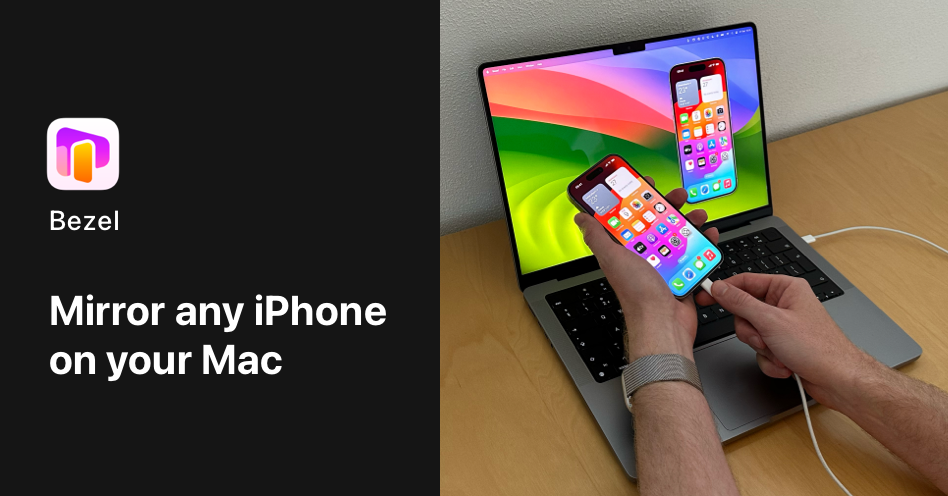
Bezel is a native macOS application designed to seamlessly mirror any iPhone or iPad screen onto a Mac, ideal for professional presentations, recordings, and demos.
What is Bezel?
What is Bezel?
Bezel is the premier native macOS application engineered to mirror the screen of any iPhone, iPad, or even Apple TV directly onto your Mac desktop. Developed by nonstrict.eu, Bezel solves the common challenge developers, marketers, and presenters face: how to display mobile content clearly and professionally alongside desktop applications or during recordings. It offers unparalleled flexibility, allowing users to connect devices either wirelessly via AirPlay or directly through a USB cable, ensuring a stable and low-latency connection for critical tasks.
This tool goes far beyond basic screen sharing by providing a complete toolkit for content creation. Users can capture high-resolution screen recordings complete with realistic device bezels and custom backdrops, making demos look polished and ready for immediate sharing. Loved by over 5,400 professionals, Bezel transforms the process of showcasing mobile experiences from a cumbersome technical hurdle into a seamless, impressive presentation.
Key Features
Bezel is packed with features designed for professional content creators and presenters:
- Flexible Mirroring Options: Connect instantly via AirPlay for wireless convenience or use a USB cable for the most stable connection.
- Universal Device Support: Mirrors any iPhone, iPad, Apple TV, and even iPod Touch, supporting devices across different iCloud accounts.
- Professional Recording & Capture: Create beautiful, one-click screen recordings automatically framed with the device's bezel and a customizable background.
- High-Quality Screenshots: Capture crisp, high-resolution screenshots of your mirrored device.
- Audio Mirroring: Includes support for mirroring audio from the connected device.
- Presentation Focus: Features a Full Screen Mode that takes over the entire Mac screen, eliminating distractions for the audience.
- Advanced Display Controls: Includes Always-on-Top pinning, auto-rotation synchronization with the device, and options for true-to-life or pixel-perfect sizing.
- Customization: Offers auto-matching bezels and colors, as well as the ability to set custom bezel colors for branding consistency.
- Native macOS Experience: Built as a native application, ensuring smooth performance and integration with the macOS environment.
- Pro Features: Options for removing watermarks and unlimited mirroring capabilities are available for Pro users.
How to Use Bezel
Getting started with Bezel is designed to be intuitive and fast, minimizing setup time so you can focus on your content:
- Installation: Download and install the native Bezel application on your Mac.
- Connection Setup: Choose your connection method. For wireless mirroring, ensure your iPhone/iPad and Mac are on the same Wi-Fi network and initiate the AirPlay connection from your iOS device.
- Wired Connection (Optional): For the most reliable connection, plug your iPhone directly into your Mac using a compatible USB cable.
- Mirroring & Configuration: Once connected, the device screen will appear in the Bezel window. Use the in-app controls to select your desired bezel style, background, and sizing (e.g., physical size for 1:1 viewing).
- Recording/Presenting: Activate Full Screen Mode for presentations, or use the built-in recording function to capture high-quality video demos complete with the polished bezel framing.
Use Cases
Bezel is an essential utility for various professional workflows:
- Product Demos & Stakeholder Reviews: Seamlessly showcase new app features or complex workflows to clients, investors, or internal teams without fumbling with simulator windows or low-quality screen shares.
- Creating Marketing & Tutorial Videos: Produce polished, professional video content for YouTube, onboarding guides, or social media that clearly displays the mobile interface within a branded frame.
- Design and UX Testing: Designers can view their mobile designs at true 1:1 physical scale on their Mac monitor, ensuring accurate visual representation and testing responsiveness in a real-world context.
- Live Presentations & Webinars: Presenting on stage or in a webinar where the mobile app is the focus. Bezel ensures the screen is large, clear, and distraction-free for the entire audience.
- Bug Reporting and Documentation: Quickly capture high-fidelity screenshots or short video clips of bugs occurring on a physical device for detailed reporting to engineering teams.
FAQ
Q: Does Bezel require the iPhone and Mac to be on the same network for AirPlay mirroring? A: Yes, for wireless AirPlay mirroring to function correctly, both the iOS device and the Mac must be connected to the same Wi-Fi network.
Q: Can I mirror my screen if I am logged into different iCloud accounts on my devices? A: Absolutely. One of Bezel's strengths is its ability to mirror devices regardless of their iCloud account status, unlike some simulator-based solutions.
Q: What is the difference between the free version and the Pro version? A: The Pro version typically unlocks premium features such as removing the watermark from recordings and potentially offering unlimited mirroring sessions or advanced customization options.
Q: Is Bezel compatible with the latest iOS versions and new iPhone models? A: Bezel is a native macOS app that is actively maintained to support the latest iOS releases and new hardware, ensuring compatibility right after major Apple announcements.
Q: Can I use Bezel to record my screen while simultaneously showing my face via the Mac's camera? A: While Bezel focuses on the device mirroring, it integrates exceptionally well with other tools like Detail on macOS, allowing you to combine your camera feed and the mirrored iPhone screen for comprehensive video production.
Alternatives

Beautiful.ai
Beautiful.ai is an AI-powered presentation maker that helps users create professional, client-ready slide decks quickly and effortlessly.

Biji
Biji is a versatile platform designed to enhance productivity through innovative tools and features.

Slidesgo
Slidesgo offers a wide variety of free Google Slides themes and PowerPoint templates for presentations.

Prompty Town
Prompty Town is an innovative platform that allows users to transform their links into virtual buildings, creating a unique and engaging way to share and interact with content.

Planndu: Daily Task Planner
Planndu is an intuitive productivity application designed to help users organize tasks, manage projects, build routines, and enhance focus using tools like AI generation and a built-in Pomodoro timer.
MealTime
MealTime is your personal, offline-first recipe companion designed to help you save, organize, plan meals, and generate smart grocery lists, all while keeping your data private.