

Commentblocks
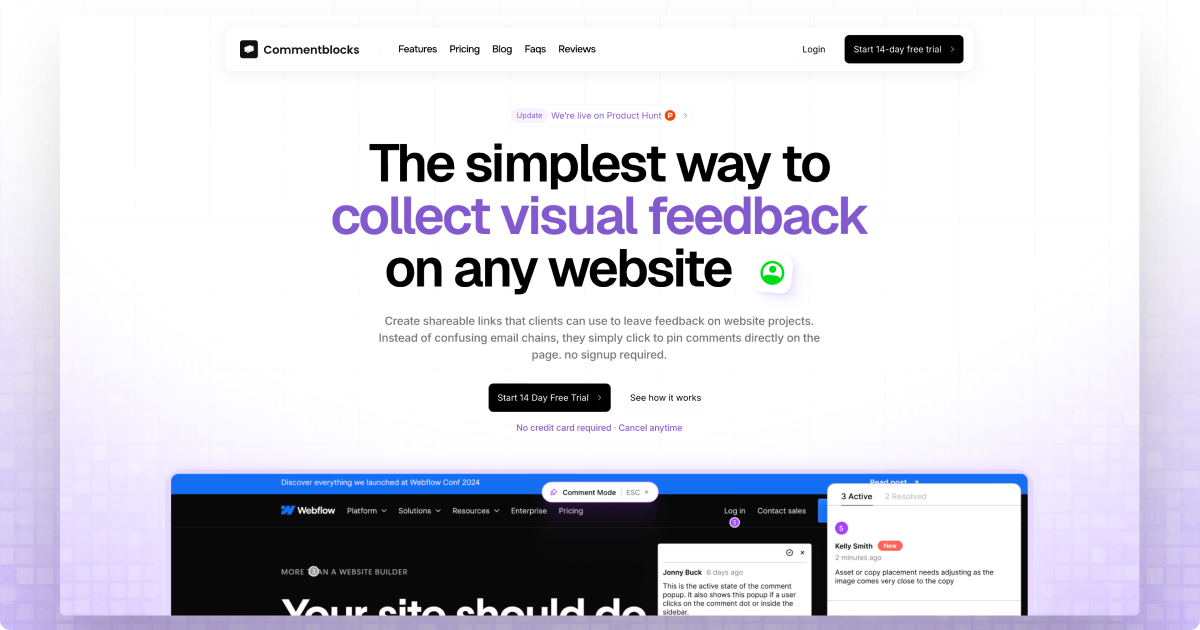
Commentblocks is a website feedback tool that allows agencies and teams to collect visual, point-and-click comments directly on any live website URL without requiring client signups or code installation.
What is Commentblocks?
What is Commentblocks?
Commentblocks is the definitive website feedback tool engineered specifically for digital agencies, freelancers, and web development teams who struggle with inefficient, confusing client review cycles. It eliminates the friction associated with traditional feedback methods—like confusing email chains, vague descriptions, or reliance on external annotation tools—by allowing clients to leave precise, visual comments directly pinned onto the live website or staging environment. The core value proposition is simplicity: you share a single, secure link, and clients can immediately start pointing and commenting exactly where changes are needed, drastically cutting down on revision rounds and boosting project velocity.
This platform is designed to remove all barriers to entry for client collaboration. There are no browser extensions to install, no code snippets to embed, and critically, no client signup required. This zero-friction approach ensures maximum client adoption, as users only need to click the link provided, see the live project, and start providing actionable feedback. By centralizing communication and visual context, Commentblocks transforms the often-painful QA and review process into a streamlined, efficient workflow.
Key Features
Commentblocks is packed with features tailored to streamline agency-client collaboration:
- Single Link Sharing: Generate one shareable link for any URL (live site or staging) where feedback can be collected.
- Zero Client Friction: Clients do not need to create an account or install any software; they simply click the link and start commenting.
- Visual Point-and-Click Comments: Feedback is pinned directly onto the relevant element on the webpage, ensuring instant clarity on what needs adjustment.
- Instant Setup: Get started immediately by pasting a URL—no code installation or complex setup required.
- Password Protection: For sensitive pre-launch projects, you can secure the feedback link with an optional password.
- Automated Context Capture: The system automatically captures essential browser information (like browser type and version) with each comment, saving time on debugging compatibility issues.
- Workflow Management: Reply to comments, discuss iterations with your team, and mark feedback items as resolved once complete.
- Scalable Pricing: Offers tiered plans designed for freelancers, growing agencies, and large enterprises, moving away from costly per-user fees for clients.
How to Use Commentblocks
Using Commentblocks follows a simple three-step process designed for maximum efficiency:
- Add any URL: Begin by pasting the specific website URL (staging, development, or live) into the Commentblocks interface. This action instantly generates a unique, shareable feedback link.
- Share with your client: Send this generated link to your client via email, Slack, WhatsApp, or any preferred communication channel. If the project is sensitive, enable optional password protection before sending.
- Collect visual feedback: The client clicks the link, views the website as intended, and uses the intuitive interface to pin comments directly onto the page elements they wish to discuss. You receive immediate email notifications, allowing you to review, discuss, reply, and ultimately mark the feedback as resolved, closing the loop efficiently.
Use Cases
Commentblocks is invaluable across several professional scenarios:
- Website Redesign QA: Agencies managing large website redesigns can use it to gather comprehensive feedback on layout, copy, and functionality across multiple pages simultaneously without overwhelming the client with complex tools.
- Staging Environment Reviews: Before deployment, developers can share a password-protected link to a staging site, allowing clients to approve final designs and catch bugs in a controlled environment.
- UX/UI Iteration Cycles: UX designers can quickly iterate on wireframes or early mockups by sending a link, ensuring that feedback like "move this button 10px left" is perfectly understood the first time.
- Content Approval: Marketing teams can use it to get precise sign-off on new landing page copy or image placements directly on the live page, avoiding confusion over document markups.
- Freelancer Project Management: Solo professionals can present polished, professional feedback collection methods to clients, enhancing perceived value and reducing administrative overhead.
FAQ
Q: Is client registration absolutely required to leave feedback? A: No. Commentblocks is specifically designed to eliminate client signups. Clients only need to click the link you provide to start commenting immediately, ensuring zero friction.
Q: Can I use Commentblocks on a website that isn't live yet? A: Yes. You can paste any URL, including staging environments or development servers, to collect feedback before the site goes public. You also have the option to add password protection for sensitive pre-launch reviews.
Q: What happens to my feedback history if I downgrade my plan? A: History retention varies by plan. Freelancer and Agency plans offer 30 or 90 days of history, respectively. The Enterprise plan includes unlimited comment history. If you downgrade, older comments outside the new retention limit may become inaccessible.
Q: Does this tool require me to install a browser extension or add code to my website? A: No. Commentblocks operates entirely via shareable links. There is no code installation required on your website, and the tool does not rely on any browser extensions for the client providing feedback.
Q: How does Commentblocks handle cross-browser compatibility issues during feedback? A: When a client leaves a comment, Commentblocks automatically captures the relevant browser and operating system information associated with that comment, helping you quickly diagnose if an issue is specific to a certain environment.
Alternatives

Prompty Town
Prompty Town is an innovative platform that allows users to transform their links into virtual buildings, creating a unique and engaging way to share and interact with content.

Biji
Biji is a versatile platform designed to enhance productivity through innovative tools and features.

Make Real
Draw a UI and make it real using the tldraw SDK.

beehiiv
beehiiv is an all-in-one newsletter platform providing integrated tools for email publishing, no-code website building, audience growth, and monetization for creators and brands.

Planndu: Daily Task Planner
Planndu is an intuitive productivity application designed to help users organize tasks, manage projects, build routines, and enhance focus using tools like AI generation and a built-in Pomodoro timer.
MealTime
MealTime is your personal, offline-first recipe companion designed to help you save, organize, plan meals, and generate smart grocery lists, all while keeping your data private.