

Dokably
Dokably is an all-in-one online collaboration platform integrating documents, task boards, whiteboards, and AI tools to streamline remote team workflows.
What is Dokably?
What is Dokably?
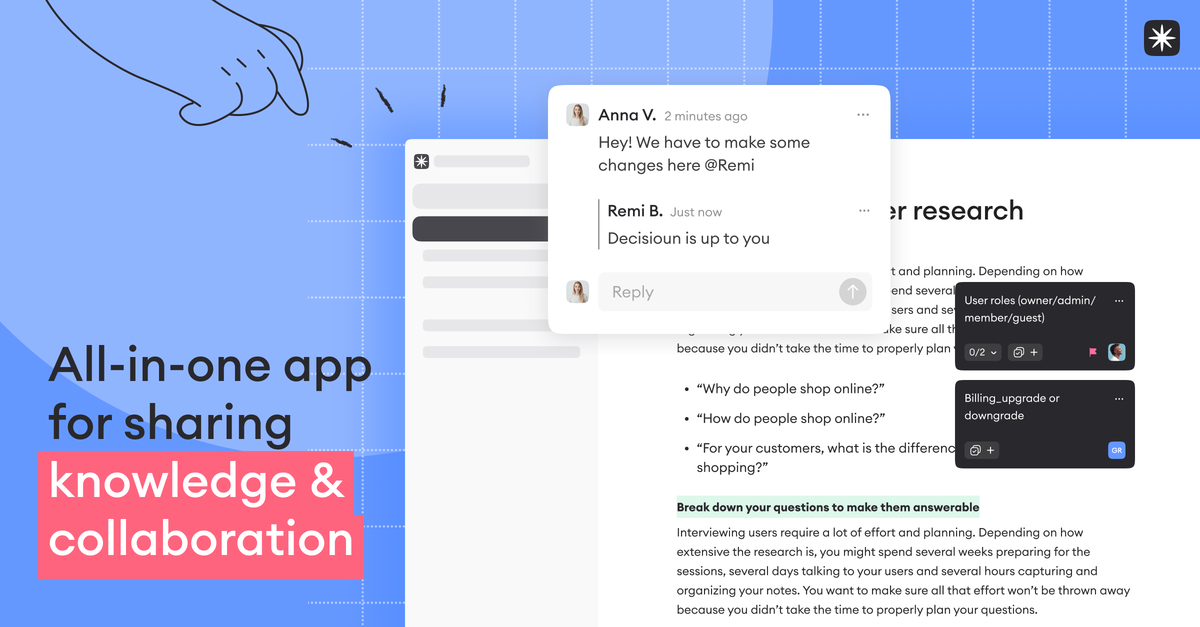
Dokably is a unified online collaboration platform designed specifically to eliminate the friction caused by juggling multiple applications for documentation, task management, and brainstorming. It centralizes docs, whiteboards, notes, and tasks into a single, cohesive workspace. By blending a rich editor with powerful organizational tools, Dokably allows remote teams to visualize ideas, plan projects, and share knowledge seamlessly, ensuring that all critical work artifacts live side-by-side without breaking the creative or planning flow.
This platform aims to make the daily working routine easy and joyful by providing structure and transparency across all team activities. Whether you are drafting complex product requirement documents, designing marketing strategies, or managing engineering wikis, Dokably offers the flexibility and power needed to keep everyone aligned and focused on what truly matters, supported by integrated AI capabilities.
Key Features
Dokably stands out by consolidating diverse work modalities into one intuitive environment:
- Unified Workspace: Connect and house docs, tasks, notes, and interactive whiteboards all within a single document structure, eliminating app switching.
- Rich Document Creation: Easily create beautiful documents, notes, diagrams, wikis, and more using an intuitive editor that supports endless styling options, blending markdown familiarity with drag-and-drop ease.
- Integrated Whiteboarding & Ideation: Visualize ideas directly within your workflow using integrated whiteboards. Design tables, sticky notes, graphs, and diagrams instantly to enhance team brainstorming.
- Flexible Task Management: Create and manage tasks directly alongside your documentation. Enjoy diverse data depiction views, including Kanban, List, and Table views, to build custom workflows.
- Real-Time Collaboration: Edit content simultaneously with teammates, leave contextual comments, tag users, review edit history, and manage secure sharing permissions.
- Dokably AI Assistant: Leverage built-in AI capabilities to ask questions about your workspace content, generate summaries, check spelling, rephrase text, or write project updates.
- Extensive Integrations: Sync Dokably with your favorite messaging apps, calendars, and other essential tools to maintain a centralized hub for all organizational data.
- Template Library: Jumpstart projects quickly using pre-built templates for common needs like Product Roadmaps, Meeting Notes, Mind Maps, and Engineering Wikis.
How to Use Dokably
Getting started with Dokably is designed to be straightforward, allowing teams to transition smoothly from disparate tools into a centralized system:
- Sign Up & Setup: Begin by creating an account (including a Free Forever plan option) and setting up your initial workspace.
- Create Core Content: Start by creating your first document. Use the rich editor to draft PRDs, meeting notes, or knowledge base articles. Utilize the styling options to format content exactly as needed.
- Integrate Visualization: When brainstorming or planning, switch seamlessly to the integrated whiteboard feature to sketch out flows, mind maps, or database structures directly adjacent to your written content.
- Manage Workflows: Embed tasks directly into your documents or dedicated task boards. Define workflows using Kanban or List views, assign ownership, and set deadlines.
- Collaborate Actively: Invite team members to collaborate in real-time. Use comments to discuss specific sections of text or design elements. Leverage the AI assistant for quick content refinement or information retrieval within your workspace.
- Connect External Tools: Configure necessary integrations to ensure data flows smoothly between Dokably and your existing communication or development tools.
Use Cases
Dokably is versatile, serving various roles and departments that require structured collaboration:
- Product Management: Build comprehensive product roadmaps, document user research, define feature specifications, and connect technical requirements directly to strategic planning documents, ensuring the entire team is aligned on the product vision.
- Marketing Teams: Develop and execute integrated marketing campaigns. Use whiteboards for initial creative brainstorming, draft content in docs, and assign follow-up actions to tasks, all tracked within one project space.
- Software Engineering & Documentation: Create and maintain living engineering wikis, detailed technical specifications, and architecture diagrams. The ability to embed tasks ensures that documentation updates are tied directly to development sprints.
- Remote Team Onboarding: Establish a central, organized hub for all new hire documentation, company policies, and training materials, making the onboarding process transparent and easily navigable.
- Consulting and Client Work: Quickly generate professional, visually rich client proposals, project plans, and final reports, utilizing templates to maintain brand consistency while collaborating securely with external stakeholders.
FAQ
Q: What is the starting price for Dokably? A: Dokably offers a "Free Forever" plan which includes unlimited doc usage for up to 3 members, along with 100 MB of file storage. Paid tiers start at $5.99 per user per month for expanded features and storage.
Q: Can I use Dokably if my team is not fully remote? A: Absolutely. While Dokably is optimized for remote and distributed teams by centralizing asynchronous work, its real-time collaboration features make it highly effective for co-located teams as well, offering a single source of truth regardless of physical location.
Q: How does the AI feature work? A: The Dokably AI assistant is integrated directly into the workspace. You can prompt it to perform actions like summarizing long documents, checking grammar and spelling, rephrasing sections for clarity, or generating status updates based on the content within your Dokably environment.
Q: What kind of views are available for task management? A: Dokably supports multiple ways to visualize your tasks, including Kanban boards for workflow visualization, List views for simple tracking, and Table views for detailed data sorting and filtering.
Q: Is it possible to share content outside of my organization? A: Yes, Dokably allows you to securely share documents and knowledge artifacts with external parties or clients, with granular control over permissions managed by the team administrator.
Alternatives

Biji
Biji is a versatile platform designed to enhance productivity through innovative tools and features.

Asana
Asana is a work management platform that helps teams organize, track, and manage their work efficiently, whether they are in the office or working remotely.

Planndu: Daily Task Planner
Planndu is an intuitive productivity application designed to help users organize tasks, manage projects, build routines, and enhance focus using tools like AI generation and a built-in Pomodoro timer.

Nolain OCR
Nolain OCR is an advanced Optical Character Recognition solution designed to accurately extract text and data from various document formats, streamlining document processing workflows.

GitBoard
GitBoard is a native macOS menu bar application designed to provide seamless, in-workflow access to GitHub Projects Kanban boards, allowing users to manage tasks without leaving their current application.
司马阅
司马阅 is a leading domestic enterprise-level AI document intelligence platform, focused on activating dormant data in enterprises and helping them create serious scenario-based AI employees.