

GitBoard
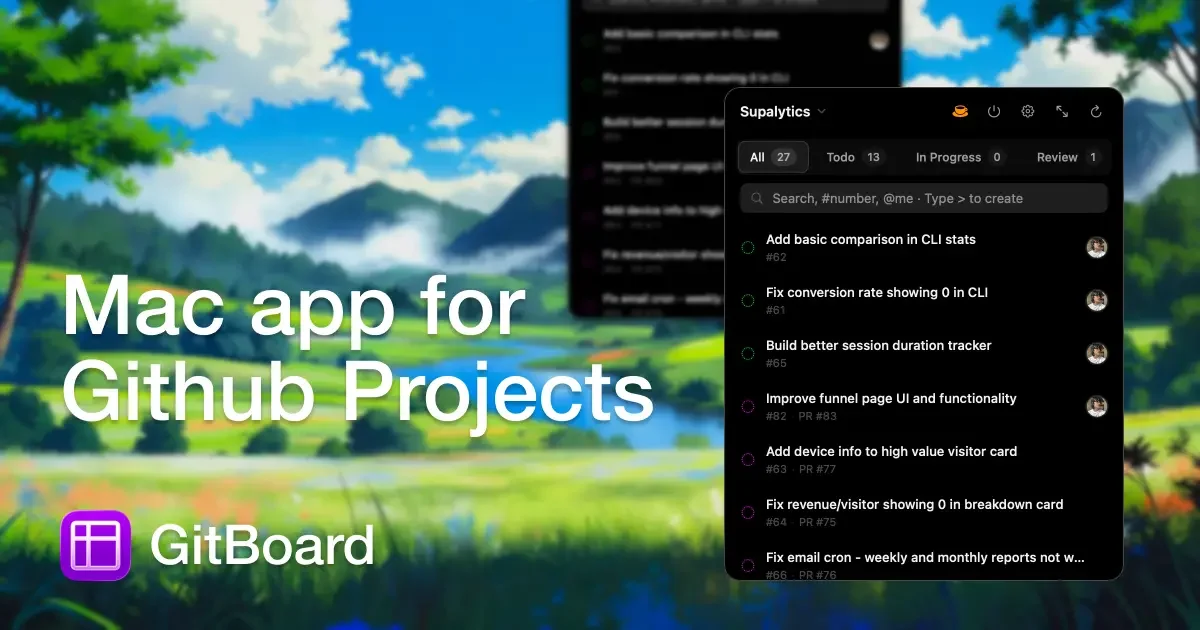
GitBoard is a native macOS menu bar application designed to provide seamless, in-workflow access to GitHub Projects Kanban boards, allowing users to manage tasks without leaving their current application.
What is GitBoard?
What is GitBoard?
GitBoard is a specialized, native application built exclusively for macOS users who rely heavily on GitHub Projects for task management. It elegantly integrates your Kanban board directly into your menu bar, offering immediate visibility and control over your development workflow. The core purpose of GitBoard is to eliminate context switching—the productivity killer that forces developers and project managers to constantly jump between their active work environment and the browser-based GitHub interface just to check status, update an issue, or create a new task.
By residing in the menu bar, GitBoard ensures that your project status is always just one click away. It supports essential project management actions like filtering by status (Todo, In Progress, Done), searching issues efficiently, and quickly creating new items inline. This focus on native performance and accessibility makes managing GitHub projects faster, smoother, and less disruptive to deep work sessions, making it an indispensable tool for modern macOS-based development teams.
Key Features
GitBoard is packed with features designed for efficiency and native integration:
- Menu Bar Access: Instant access to your Kanban board via a simple click on the menu bar icon, keeping your workflow uninterrupted.
- Status Filtering: Easily switch views between 'Todo', 'In Progress', and 'Done' columns to focus only on the tasks relevant to your current stage.
- Powerful Issue Search: Quickly locate specific tasks using keywords in the title, the issue number, or by searching for the assigned user (@assignee).
- Quick Create Functionality: Create new GitHub issues instantly using an inline command (typing
>), streamlining the process of capturing new ideas or bugs. - Effortless Assignment: Right-click on any issue to quickly assign it to yourself or other team members directly from the menu bar interface.
- Full Kanban Window: For more complex interactions, GitBoard offers a dedicated, full-window view where you can utilize drag-and-drop functionality to move issues between columns.
- Status Notifications: Receive timely alerts when issues move between statuses, keeping you informed of team progress.
- GitHub CLI Authentication: Securely authenticates using the GitHub Command Line Interface (CLI), meaning no sensitive API tokens need to be stored or managed within the application.
How to Use GitBoard
Getting started with GitBoard is straightforward, leveraging existing GitHub infrastructure:
- Prerequisites: Ensure you have macOS 14+ installed and the GitHub CLI (
gh) installed and authenticated on your system. GitBoard relies on the CLI for secure authentication. - Installation & Launch: Download and install the native macOS application. Upon first launch, it will utilize your existing GitHub CLI session for authentication.
- Accessing Boards: Click the GitBoard icon in your menu bar. You will see a list of your accessible GitHub Projects boards.
- Workflow Management: Select a board to view the Kanban columns. Use the filtering options to narrow down tasks. To update an issue's status, you can drag it between columns in the full window, or use context menus for quick assignments.
- Creating Issues: When you need to add a new task, use the quick create feature by typing
>in the search/command bar and entering the issue title inline.
Use Cases
GitBoard is particularly valuable for several professional scenarios:
- The Focused Developer: A developer deep in coding needs to quickly check if a bug report has been moved to 'In Progress' or needs to assign a newly discovered edge case to a colleague without breaking their flow state by opening a browser tab.
- Agile Stand-ups: Project leads can quickly pull up the current board status during remote or in-person stand-up meetings directly from their menu bar, ensuring the displayed information is the most up-to-date view of the sprint.
- Bug Triage: QA engineers or support staff responsible for initial bug intake can rapidly create new issues directly linked to the correct repository and assign them to the triage lead using the quick create and assignment features.
- Cross-App Task Management: Users who frequently switch between different applications (e.g., IDE, documentation editor, communication tools) benefit immensely from having project oversight available in the persistent menu bar space.
- Small Team Coordination: Small development teams prioritizing speed and minimal overhead can use GitBoard to maintain high visibility on task progression without needing complex, third-party project management suites.
FAQ
Q: What operating system requirements does GitBoard have? A: GitBoard requires macOS 14 (Sonoma) or newer to run, as it leverages modern native macOS features.
Q: Is GitBoard free, or does it require a subscription? A: GitBoard is an open-source project. While the source code is available on GitHub, check the official repository for the current distribution and licensing terms regarding usage and cost.
Q: Do I need to generate a personal access token (PAT) for GitHub?
A: No. GitBoard is designed to authenticate securely using the GitHub Command Line Interface (CLI). As long as you have the gh tool installed and logged in, GitBoard will use that existing authorization.
Q: Can I manage multiple GitHub organizations or projects simultaneously? A: Yes, GitBoard allows you to view and switch between the GitHub Projects boards you have access to across your authenticated GitHub accounts.
Q: What happens if I drag an issue in the full window? Does it update immediately? A: Yes, drag-and-drop actions within the full Kanban window trigger immediate updates to the corresponding GitHub Project status, reflecting the change instantly on GitHub.
Alternatives

Biji
Biji is a versatile platform designed to enhance productivity through innovative tools and features.

Planndu: Daily Task Planner
Planndu is an intuitive productivity application designed to help users organize tasks, manage projects, build routines, and enhance focus using tools like AI generation and a built-in Pomodoro timer.

Prompty Town
Prompty Town is an innovative platform that allows users to transform their links into virtual buildings, creating a unique and engaging way to share and interact with content.
MealTime
MealTime is your personal, offline-first recipe companion designed to help you save, organize, plan meals, and generate smart grocery lists, all while keeping your data private.

Beautiful.ai
Beautiful.ai is an AI-powered presentation maker that helps users create professional, client-ready slide decks quickly and effortlessly.

Scite
Scite is an AI-powered research tool that helps researchers understand research debates, ensure reliable citations, and improve their writing.