

floors.js
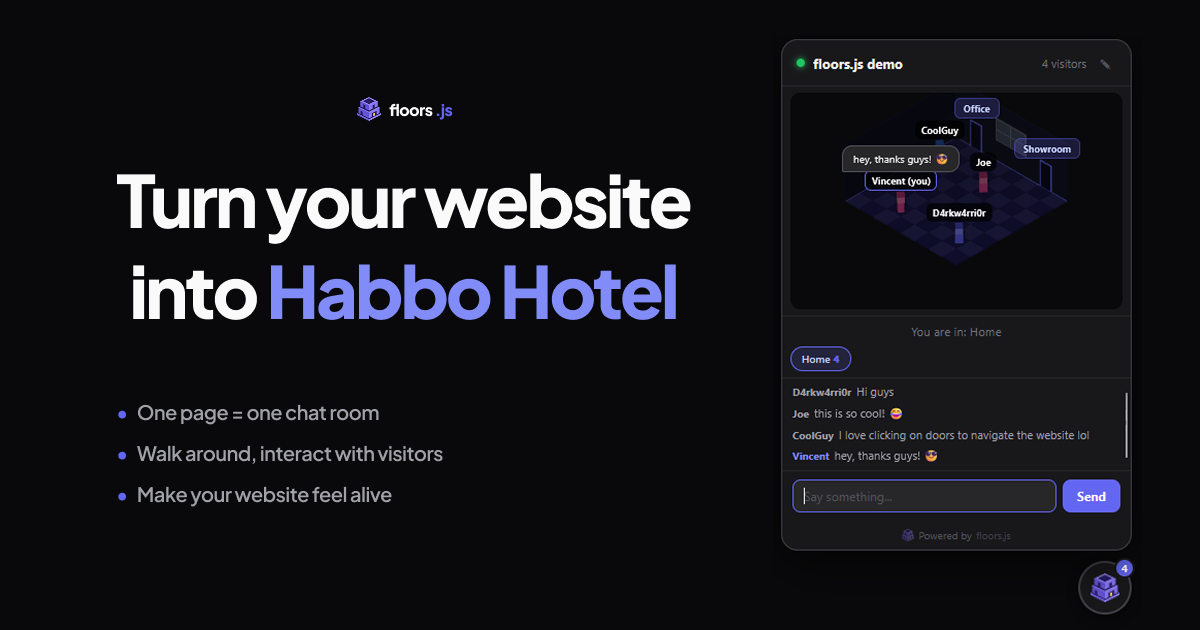
floors.js transforms any website into an interactive 3D social space where visitors appear as avatars, can walk around pages, and chat in real-time without friction.
What is floors.js?
floors.js — Turn Your Website into a Habbo Hotel
What is floors.js?
floors.js is a revolutionary script that injects real-time, persistent social interaction directly onto your existing website using a single line of JavaScript. It converts your static web pages into explorable, isometric 3D rooms, reminiscent of classic social games like Habbo Hotel. Instead of visitors passively consuming content, they become tangible 3D avatars who can see each other, move between pages (rooms), and engage in live conversation right on your domain. This fundamentally changes website engagement from a one-way broadcast to a persistent, shared digital space.
This tool solves the critical problem of high bounce rates and uncaptured visitor intent. By making your site a 'place' rather than just a document, floors.js allows you to be present, offer immediate assistance, gather spontaneous feedback, and build a genuine community atmosphere. It requires absolutely no backend setup, SDK integration, or complex configuration—just drop the script tag, and your site is instantly alive with presence.
Key Features
- Instant 3D Presence: Visitors appear immediately as blocky 3D avatars upon arrival, complete with random names, eliminating signup friction. They see other visitors in real-time.
- Isometric Room Mapping: Every page on your site is automatically mapped to a unique, explorable isometric room layout, complete with floors and walls.
- Real-Time Navigation: Avatars walk across the floor to where the user clicks. Room transitions are seamless, automatically detected via navigation changes (SPA-ready for React, Next.js, Vue, etc.).
- Frictionless Chat: Messages appear as floating speech bubbles above avatars. You can chat directly with visitors while they are actively browsing your content.
- Zero Configuration Setup: The script automatically scans navigation links (
<nav>) to define rooms. It works universally across static sites, WordPress, Shopify, and modern JavaScript frameworks. - Privacy Focused: No cookies, no IP logging, and only uses a random pseudonym stored locally. It is designed to be GDPR-friendly by default.
- Customization Options: Extensive data attributes allow customization of the accent color, display name, pinned welcome messages per room, and designating an owner avatar.
How to Use floors.js
Getting started with floors.js is designed to be incredibly fast and simple, requiring only one step for basic implementation:
- Obtain Your Key: Sign up and retrieve your unique
data-key. - Paste the Script: Insert the provided
<script>tag into the HTML of your website, typically just before the closing</body>tag.<script src="https://floorsjs.com/embed.js" data-key="flr_..." ></script> - Automatic Room Creation: The script immediately begins scanning your site's navigation structure to define the different pages as distinct chat rooms.
- Engage: Once loaded, you and your visitors will see avatars appear. You can click on the widget icon (usually bottom-right) to open the chat panel and begin interacting with users browsing different parts of your site simultaneously.
For advanced control, you can add optional attributes to the script tag, such as data-accent to match your branding or data-pinned-message to set room-specific announcements.
Use Cases
- E-commerce Support & Sales: Instead of relying on static live chat pop-ups, sales staff can walk the 'product page room' and proactively greet shoppers who linger, offering immediate, contextual advice or upselling opportunities.
- SaaS/Software Documentation Hubs: Technical writers and support agents can monitor documentation pages. When a user gets stuck on a complex guide, an expert avatar can instantly appear next to them to offer clarification, reducing support tickets.
- Virtual Events & Conferences: Use floors.js to create persistent lobby areas or breakout rooms for virtual events hosted on a standard website, allowing attendees to mingle and network visually between scheduled sessions.
- Community Building on Blogs/Forums: Transform high-traffic blog posts into persistent gathering spots where readers can discuss the article content in real-time, fostering a stronger sense of community around your content.
- Real-Time Feedback Collection: Launch a new feature or landing page and watch visitors interact with it in 3D. You can gather immediate, qualitative feedback by chatting with users as they experience the new design or functionality for the first time.
FAQ
Q: What exactly counts as a concurrent visitor? A: A concurrent visitor is anyone actively connected to your site at the same moment. If a visitor closes their tab or navigates entirely away from your domain, their slot frees up. The lifetime deal supports up to 100 concurrent visitors per site.
Q: Does this require complex integration for modern frameworks like Next.js or Shopify?
A: No. For Shopify and static sites, you paste the script tag into your theme footer. For Single Page Applications (SPAs) like Next.js, Vue, or Astro, floors.js hooks into the routing system (pushState/popstate) automatically, ensuring room changes happen seamlessly when users navigate internally.
Q: What happens if I exceed the concurrent visitor limit? A: New visitors are placed into a waiting queue. They will automatically join the 3D space as soon as an existing visitor leaves, ensuring that those already present are never disconnected.
Q: Is this GDPR compliant? A: Yes, floors.js is designed to be privacy-first. It uses no cookies, does not log IP addresses, and only stores a random pseudonym in localStorage. It requires no explicit consent prompts for basic functionality.
Q: What is the guarantee if the product doesn't fit my needs? A: floors.js offers a 7-day money-back guarantee. If you are not satisfied within the first week of trying the service, you can email the team for a full refund.
Alternatives

Prompty Town
Prompty Town is an innovative platform that allows users to transform their links into virtual buildings, creating a unique and engaging way to share and interact with content.

Make Real
Draw a UI and make it real using the tldraw SDK.

beehiiv
beehiiv is an all-in-one newsletter platform providing integrated tools for email publishing, no-code website building, audience growth, and monetization for creators and brands.

Actor Builder
Actor Builder turns you into an actor instantly, allowing you to become any character in any setting.

Mixels.ai
Mixels.ai is an AI-powered pixel art generator that allows users to convert images into pixel art and create 8-bit style avatars with perfect grid alignment.

Fronty
Fronty is an AI-powered image to HTML CSS converter that allows users to quickly generate HTML and CSS code from images.