

HomeBar for Homey Pro
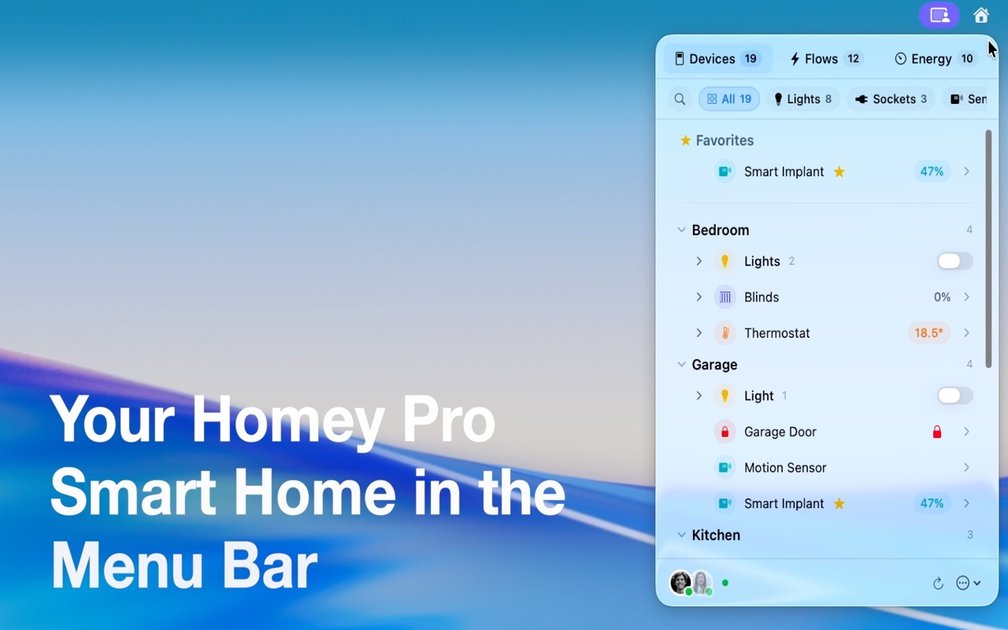
HomeBar is a macOS menu bar application that provides quick, one-click access and control over your Homey Pro smart home devices and automations.
What is HomeBar for Homey Pro?
What is HomeBar for Homey Pro?
HomeBar for Homey Pro is an essential utility designed specifically for macOS users who rely on the Homey Pro smart home hub for managing their connected living spaces. This application seamlessly integrates your entire smart home ecosystem directly into your Mac's menu bar, transforming a typically passive system status area into an active control center. By placing immediate access to devices, flows, and critical insights just one click away, HomeBar eliminates the need to open web browsers or dedicated apps for routine smart home interactions.
This utility bridges the gap between desktop productivity and home automation, ensuring that whether you are deep in work or simply browsing, controlling your environment—from dimming the lights to triggering complex routines—is instantaneous. It is built for efficiency, offering a streamlined, native macOS experience that respects your workflow while keeping you connected to your Homey Pro setup, requiring macOS 14 or later for optimal performance.
Key Features
HomeBar is packed with features designed to maximize convenience and control directly from the menu bar:
- Instant Device Control: Toggle lights, adjust smart blinds, manage outlets, and control all connected devices instantly. Devices are logically grouped by room for intuitive navigation.
- Climate Fine-Tuning: Directly monitor and adjust thermostats and climate control systems across different zones of your home without interrupting your current task.
- One-Click Flow Execution: Trigger complex Homey automations and flows—such as 'Movie Mode,' 'Good Night Routine,' or 'Away Scene'—with a single, swift click.
- Comprehensive Energy Monitoring: Gain immediate visibility into your home's power consumption. Track usage statistics per device or zone to maintain awareness of energy efficiency.
- Real-Time Insights Viewing: Access crucial Homey Insights data directly within the menu bar. Review sensor history, usage patterns, and long-term trends at a glance.
- Quick Link to Homey Interface: A dedicated option allows users to jump straight to the full Homey web interface for advanced configuration, flow editing, or detailed device management when necessary.
How to Use HomeBar for Homey Pro
Getting started with HomeBar is designed to be straightforward, integrating quickly into your daily macOS routine:
- Installation: Download and install the HomeBar application onto your macOS machine (requires macOS 14+).
- Homey Connection: Upon first launch, the application will prompt you to connect to your Homey Pro hub, typically requiring authentication or API key setup as guided by the app interface.
- Customization (Optional): Navigate to the settings to organize your favorite devices or frequently used flows for quick access in the main menu.
- Daily Operation: Once connected, the HomeBar icon will appear in your menu bar. Click the icon to reveal the control panel. From here, you can select a room, tap a device to toggle its state, or execute a saved flow instantly.
- Advanced Access: If deeper configuration is needed, use the 'Open Homey Interface' option to seamlessly transition to the full web application for editing or setup.
Use Cases
HomeBar excels in scenarios where speed and context-switching minimization are critical:
- The Remote Professional: A user working intensely on their Mac can quickly dim the office lights for better focus or check the living room temperature without minimizing their primary application windows or switching desktops.
- Evening Wind-Down: Before heading to bed, a user can trigger their 'Good Night' flow (locking doors, turning off all lights, setting the alarm) directly from the menu bar while reading on their computer.
- Energy Management: A homeowner actively tracking utility bills can periodically check the energy monitoring dashboard within HomeBar to spot unusual spikes in consumption immediately, rather than waiting for a monthly review.
- Guest Arrival: When expecting guests, a user can quickly activate the 'Welcome Home' scene—turning on entryway lights and adjusting the thermostat—while still managing check-in details on their laptop.
- Troubleshooting and Monitoring: During smart home maintenance or troubleshooting, having immediate access to sensor readings and device states in the menu bar speeds up diagnostics significantly.
FAQ
Q: What are the minimum system requirements for HomeBar? A: HomeBar requires a machine running macOS 14 (Sonoma) or a later version. Furthermore, a functioning Homey Pro hub connected to your local network is mandatory for the application to operate.
Q: Is HomeBar a subscription service or a one-time purchase? A: (Assuming standard software model based on context) HomeBar is typically offered as a one-time purchase for a perpetual license, though specific pricing details should be confirmed on the official download page.
Q: Can I control devices that are not connected to Homey Pro? A: No. HomeBar is specifically designed as an interface layer for the Homey Pro hub. It only provides control and visibility over devices and flows managed within your Homey Pro environment.
Q: How secure is the connection between HomeBar and my Homey Pro? A: The connection utilizes secure protocols established by Homey Pro for remote or local access. Users should ensure their Homey Pro security settings are configured appropriately, as HomeBar relies on the established authentication methods of the hub.
Q: If my Mac is offline, can I still use HomeBar? A: If your Mac is offline (no internet connection), you will not be able to communicate with your Homey Pro hub unless the hub is running entirely locally and your Mac is on the same local network. For remote control, an active internet connection is required for both devices.
Alternatives
MealTime
MealTime is your personal, offline-first recipe companion designed to help you save, organize, plan meals, and generate smart grocery lists, all while keeping your data private.

dumppp
The fastest way to capture thoughts to Notion with a 0.5s launch time, eliminating friction and enhancing productivity.

Biji
Biji is a versatile platform designed to enhance productivity through innovative tools and features.

Gemma AI
Gemma AI is a smart application that calls you directly with personalized, intelligent voice reminders to ensure you never miss important tasks, appointments, or deadlines.

Prompty Town
Prompty Town is an innovative platform that allows users to transform their links into virtual buildings, creating a unique and engaging way to share and interact with content.

Tavus
Tavus introduces PALs: AI humans that remember, empathize, and grow with you, bridging the human-machine divide.