
MindDraft
MindDraft is an AI-powered assistant that helps users capture, organize, and manage their thoughts and ideas efficiently, transforming mental chaos into structured notes.
What is MindDraft?
MindDraft
MindDraft is an innovative AI-powered assistant designed to help users capture, organize, and manage their fleeting thoughts and ideas seamlessly. Whether you're a student, professional, or creative, MindDraft acts as your digital mental organizer, ensuring that no idea slips through the cracks. By transforming chaotic thoughts into structured, actionable notes, it enhances productivity and creativity.
This tool is ideal for anyone looking to declutter their mind, improve their note-taking process, or develop a more organized approach to their mental workflow. Its intelligent features enable users to quickly jot down ideas, categorize them, and retrieve information effortlessly, making it a valuable addition to personal and professional routines.
With MindDraft, users can experience a more focused and productive mindset, as it reduces mental clutter and promotes clarity. The platform's intuitive interface and smart organization capabilities make it accessible for all levels of tech-savviness, fostering a habit of mindful thought management.
What is MindDraft?
MindDraft is an AI-driven digital assistant designed to capture and organize your thoughts, ideas, and mental notes efficiently. Its core purpose is to help users manage mental chaos by providing a smart, user-friendly platform that converts fleeting thoughts into well-structured notes. Whether you’re brainstorming, planning, or simply trying to keep track of daily ideas, MindDraft acts as your personal mental scribe.
The product leverages advanced AI algorithms to understand and categorize your inputs, making it easier to find and utilize your ideas later. It integrates seamlessly into your workflow, whether through web or mobile interfaces, ensuring that your thoughts are always within reach.
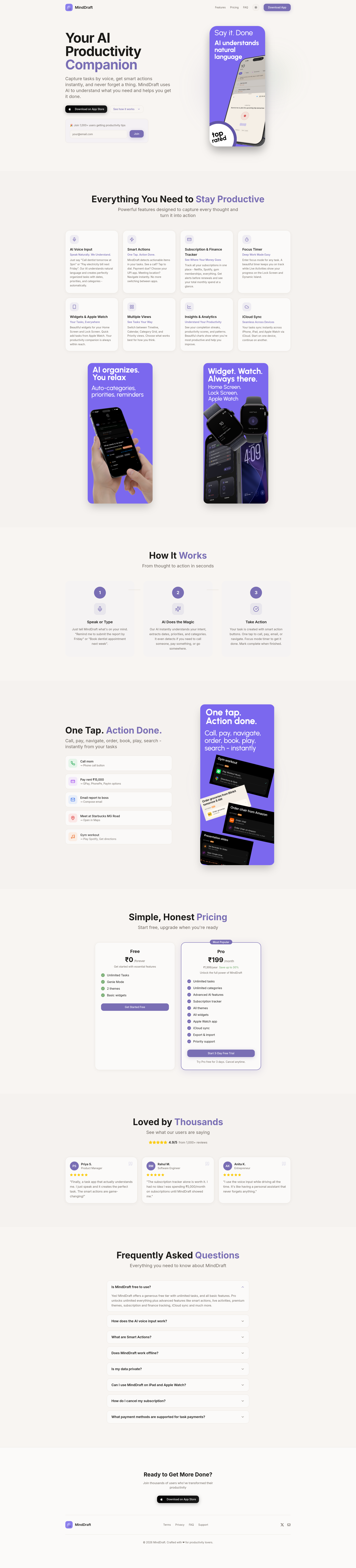
Key Features
- Intelligent Thought Capture: Quickly jot down ideas, reminders, or insights with minimal effort.
- Automatic Organization: AI categorizes and tags your notes for easy retrieval.
- Seamless Integration: Compatible with various devices and platforms for on-the-go access.
- Search and Retrieval: Powerful search functionality to find your notes instantly.
- Privacy and Security: End-to-end encryption to keep your thoughts safe.
- Customizable Workflow: Personalize how your thoughts are organized and prioritized.
- AI Suggestions: Get intelligent prompts and ideas based on your notes.
How to Use MindDraft
Getting started with MindDraft is straightforward. Users can sign up for an account via the website or mobile app. Once logged in, you can start capturing thoughts immediately by typing or voice recording. The AI will automatically suggest categories and tags to organize your notes.
To maximize productivity, users can create folders or projects for different areas of their life or work. The search feature allows quick access to any note, while editing tools enable you to refine your ideas. Regular use helps develop a habit of mental clarity and organization.
For advanced users, integrating MindDraft with other productivity tools or calendars can streamline your workflow further. The platform also offers tutorials and support to help you customize your experience.
Use Cases
- Personal Productivity: Capture daily thoughts, to-do lists, and reminders.
- Creative Writing: Organize story ideas, character notes, and plot points.
- Academic Work: Manage research notes, lecture summaries, and study plans.
- Professional Planning: Brainstorm project ideas, meeting notes, and strategic plans.
- Mental Health and Mindfulness: Track mood patterns, reflections, and mental wellness notes.
FAQ
Q1: Is MindDraft free? A1: MindDraft offers a free tier with basic features. Premium plans are available for additional storage, advanced AI suggestions, and integrations.
Q2: Is it compatible with mobile devices? A2: Yes, MindDraft is available on both iOS and Android platforms, as well as via web browsers.
Q3: How secure is my data? A3: Your data is protected with end-to-end encryption, ensuring privacy and security.
Q4: Can I export my notes? A4: Yes, users can export notes in various formats such as PDF or TXT.
Q5: What kind of support is available? A5: Customer support is available via email, chat, and comprehensive help documentation on the website.
Alternatives
dumppp
The fastest way to capture thoughts to Notion with a 0.5s launch time, eliminating friction and enhancing productivity.
MealTime
MealTime is your personal, offline-first recipe companion designed to help you save, organize, plan meals, and generate smart grocery lists, all while keeping your data private.

Biji
Biji is a versatile platform designed to enhance productivity through innovative tools and features.

Gemma AI
Gemma AI is a smart application that calls you directly with personalized, intelligent voice reminders to ensure you never miss important tasks, appointments, or deadlines.

Prompty Town
Prompty Town is an innovative platform that allows users to transform their links into virtual buildings, creating a unique and engaging way to share and interact with content.

Tavus
Tavus introduces PALs: AI humans that remember, empathize, and grow with you, bridging the human-machine divide.