

Paper Plane Simulator
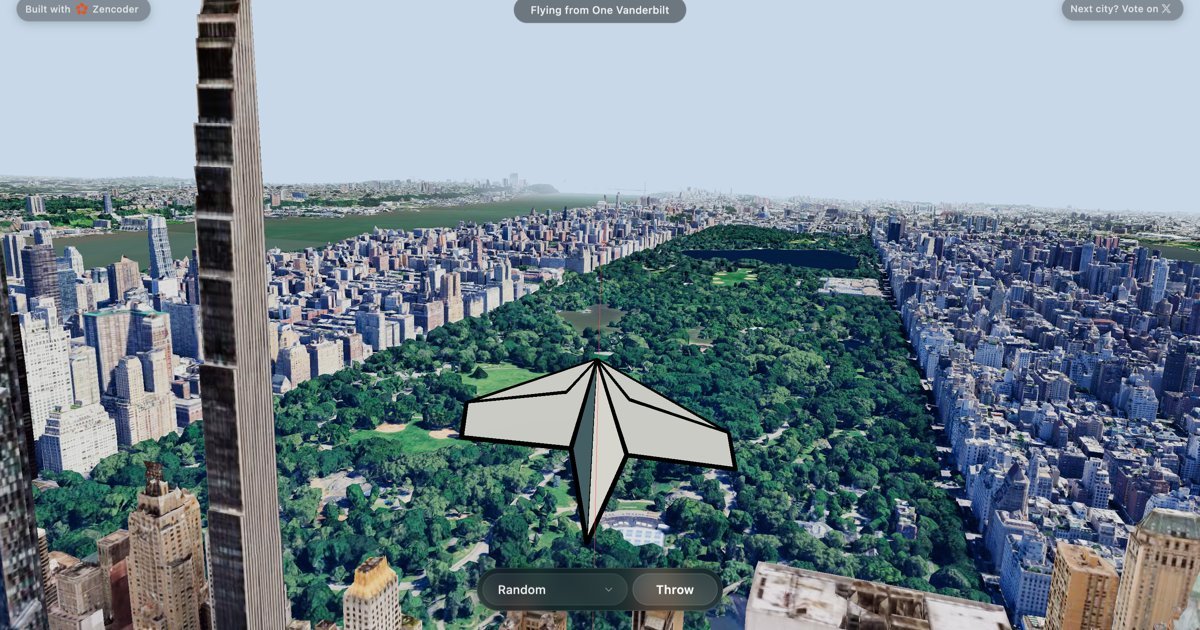
Experience the thrill of throwing paper planes from New York City's skyscrapers in a realistic 3D environment. This desktop-only game offers a unique aerial perspective and immersive gameplay.
What is Paper Plane Simulator?
What is Paper Plane Simulator?
Paper Plane Simulator is an immersive desktop-only game that allows players to experience the exhilarating sensation of launching paper planes from the towering heights of New York City's iconic skyscrapers. Developed with a focus on realistic physics and stunning 3D graphics, the simulator provides a unique perspective on urban landscapes as your paper creations glide through the air. It's a simple yet captivating experience designed for casual play and exploration, offering a moment of digital escape.
The game leverages advanced rendering techniques to bring the bustling cityscape to life, allowing you to choose your launch point and watch your paper plane's trajectory unfold against a detailed backdrop. Whether you're aiming for distance, precision, or simply enjoying the visual spectacle, Paper Plane Simulator offers an engaging way to interact with a virtual urban environment. The developers are also actively seeking community input for future city additions, making it a dynamic and evolving experience.
Key Features
- Realistic 3D Environment: Explore a meticulously crafted 3D rendition of New York City, complete with towering skyscrapers and atmospheric details.
- Physics-Based Gameplay: Experience authentic flight dynamics as your paper plane interacts with wind and gravity, providing a realistic throwing experience.
- Desktop-Only Experience: Optimized for desktop play, ensuring a smooth and immersive performance on your computer.
- Immersive Sound Design: Features ambient city sounds and licensed music to enhance the overall atmosphere and player engagement.
- Community-Driven Development: Players have the opportunity to vote on future city additions, contributing to the game's evolution.
- "Send to My Email" Feature: Save your progress or a link to play later by sending it directly to your email.
How to Use Paper Plane Simulator
Getting started with Paper Plane Simulator is straightforward:
- Access the Game: Navigate to the Paper Plane Simulator website on your desktop browser.
- Load the Game: The game will typically load automatically. Ensure you have a stable internet connection.
- Select Launch Point: Once loaded, you'll be presented with the New York City skyline. Choose your desired skyscraper launch point.
- Throw Your Plane: Interact with the controls (usually mouse-based) to aim and throw your paper plane.
- Observe Flight: Watch as your paper plane glides through the virtual cityscape, affected by simulated physics.
- Explore Options: Utilize features like "Send to My Email" to bookmark your session or share it.
Use Cases
- Casual Entertainment: Perfect for individuals looking for a quick, engaging distraction during breaks or downtime.
- Virtual Tourism: Offers a unique way to experience the iconic New York City skyline from a novel perspective.
- Physics Enthusiasts: Provides a simple yet illustrative example of basic physics principles like gravity and aerodynamics in a fun context.
- Relaxation: The combination of ambient sounds, visual scenery, and simple gameplay can be a calming experience.
- Creative Exploration: Players can experiment with different throwing techniques and observe the varied flight paths their paper planes take.
FAQ
Q1: Is Paper Plane Simulator available on mobile devices?
A1: No, Paper Plane Simulator is currently a desktop-only game and is not optimized for mobile devices.
Q2: What are the system requirements for playing?
A2: While specific requirements aren't listed, it's a browser-based game optimized for desktop performance. A modern web browser and a stable internet connection are recommended for the best experience.
Q3: Can I save my game progress?
A3: The website offers a "Send to My Email" feature, which can be used to save a link to your current session or revisit the game later.
Q4: Is the music in the game licensed?
A4: The music used is noted as being under "fair use" and is from Daniel Pemberton's "Mi Amor", adhering to the Copyright Act of 1976. The background ambiance is licensed under CC BY 4.0.
Q5: How can I suggest a new city for the simulator?
A5: The game prompts users to "Vote on Paper Plane Simulator" for the next city, indicating an active community feedback mechanism for future content.
Alternatives

Exa
Exa is a modern AI search engine and API providing realtime web data retrieval, comprehensive website crawling, and deep research capabilities for powering AI applications.

Superset
Superset is the code editor for AI agents, enabling you to run and orchestrate multiple AI coding agents in parallel on your machine.

Claude Remote Control
Continue your local Claude Code sessions seamlessly from any device, including your phone, tablet, or another browser. Remote Control allows you to access your full local environment, filesystem, and tools from anywhere, ensuring your work stays local and secure.

Perplexity AI
Perplexity is a free, AI-powered answer engine that delivers accurate, trusted, and real-time answers to complex questions by synthesizing information from the web.

Nano Banana 2
Nano Banana 2 is Google DeepMind's latest state-of-the-art image generation model, combining the advanced capabilities of Nano Banana Pro with the lightning-fast speed of Gemini Flash.

Hacker News (macOS Client)
A native, modern macOS client for browsing Hacker News, built entirely using SwiftUI.