

Pinly
Pinly is a smart reminder application that allows users to set context-aware alerts based on specific geographic locations or precise times, ensuring tasks are never forgotten.
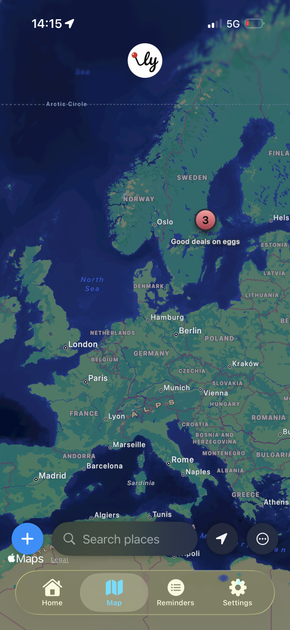
What is Pinly?
What is Pinly?
Pinly is an intelligent, privacy-focused reminder application designed to eliminate the frustration of forgetting important tasks by tying alerts directly to context. Unlike standard to-do lists that rely solely on manual checking, Pinly leverages the power of location awareness (geofencing) and precise scheduling to deliver notifications exactly when and where they are needed. Whether you need a reminder to pick up dry cleaning the moment you leave the office or a prompt to review meeting notes upon arriving at a client site, Pinly ensures your context triggers the necessary action.
This application prioritizes simplicity and user control. Setting up a reminder is intuitive: you either drop a pin on a map for a location-based alert or set a specific date and time. Furthermore, Pinly emphasizes user privacy, processing all location data strictly on-device, meaning your whereabouts are never tracked or shared with external servers. It’s the perfect tool for individuals seeking a reliable, unobtrusive system to manage daily errands, work tasks, and personal commitments.
Key Features
Pinly is packed with features designed for maximum utility and minimal distraction:
- Location Alerts (Geofencing): Drop a pin anywhere on the map and receive an automatic notification when you arrive at or depart from that specific area. This is ideal for location-dependent tasks.
- Timed Reminders: Set highly specific date and time alerts. Users can easily configure recurring schedules, including options to repeat daily or exclude specific days of the week (e.g., weekends).
- Smart Organization & Tagging: Organize your life efficiently by applying custom tags (e.g., "Work", "Groceries", "Home Projects") to your pins. This allows for quick filtering, letting you focus only on relevant tasks at any given moment.
- Lightweight Notes: Create simple, non-timed reminders or checklists that serve as quick capture tools for immediate thoughts or small to-do items that don't require location or time constraints.
- Data Control & Portability: Your data security is paramount. Pinly supports automatic local saving, optional iCloud backup and restore functionality, and offers Pro users the ability to export all data as a JSON file for complete ownership.
- Pro Feature: Quiet Hours: For premium users, the ability to define specific time windows (like evenings or overnight) where notifications are silenced ensures that Pinly respects your downtime and prevents unwanted interruptions.
How to Use Pinly
Getting started with Pinly is designed to be a seamless, three-step process:
- Create a Reminder Type: Decide if your reminder is time-based or location-based. For time-based alerts, select the date, time, and recurrence pattern. For location alerts, open the map interface.
- Set the Context: If setting a location alert, zoom in and drop a precise pin where you need the reminder (e.g., outside the pharmacy). If setting a time alert, confirm the schedule.
- Add Details and Tag: Input a clear description of the task (e.g., "Buy Milk and Eggs"). Apply relevant tags like "Groceries" to ensure it appears in the correct filtered view. Once saved, Pinly handles the rest, monitoring the context passively until the trigger condition is met.
Use Cases
Pinly excels in scenarios where context is the key to remembering an action:
- Errand Management: Set a reminder tagged "Groceries" to trigger when you arrive at the supermarket parking lot, ensuring you never forget the list. Conversely, set a reminder to "Drop off Mail" when you leave the house.
- Professional Field Work: For sales representatives or contractors, set location alerts for client offices. Upon arrival, Pinly can prompt you to review pre-meeting notes or confirm necessary documents.
- Home Maintenance: Use timed reminders for recurring household tasks, such as setting a weekly reminder every Sunday evening to "Take out the trash," with the option to exclude holidays.
- Medication & Health Routines: Utilize precise timed reminders to ensure adherence to medication schedules or daily health goals, leveraging the ability to set specific daily repeats.
- Travel & Transit: Set a location alert for your destination station or airport exit. This prevents you from missing your stop or forgetting essential items when disembarking from public transport.
FAQ
Q: Does Pinly track my location constantly or share my data? A: Absolutely not. Pinly is built on a foundation of privacy. Location data processing for geofencing triggers occurs strictly on-device. We do not monitor, store, or transmit your location data to any external servers.
Q: Is Pinly available for free, and what do the Pro features offer? A: Pinly is free to use for its core location and time reminder functionality. The optional "Pro" subscription supports ongoing development and unlocks advanced features such as the ability to silence notifications during custom Quiet Hours and adjust the geofence radius for more precise triggering.
Q: How can I ensure my reminders are safe if I change devices? A: Pinly supports data backup through standard iCloud synchronization, allowing you to restore your reminders seamlessly on a new device. Pro users also have the added benefit of exporting their entire reminder database as a local JSON file for maximum control.
Q: Can I set a reminder to repeat only on weekdays? A: Yes. The Timed Reminders feature allows for granular control over recurrence. You can easily set reminders to repeat daily while specifically excluding certain weekdays, such as Saturdays and Sundays, ensuring relevance for work-related tasks.
Q: What happens if my phone loses internet connectivity? A: Since location processing is handled on-device, Pinly can still monitor geofences and trigger time-based alerts even when offline. Data synchronization (like iCloud backup) will resume once connectivity is restored.
Alternatives

Gemma AI
Gemma AI is a smart application that calls you directly with personalized, intelligent voice reminders to ensure you never miss important tasks, appointments, or deadlines.

Planndu: Daily Task Planner
Planndu is an intuitive productivity application designed to help users organize tasks, manage projects, build routines, and enhance focus using tools like AI generation and a built-in Pomodoro timer.
MealTime
MealTime is your personal, offline-first recipe companion designed to help you save, organize, plan meals, and generate smart grocery lists, all while keeping your data private.

dumppp
The fastest way to capture thoughts to Notion with a 0.5s launch time, eliminating friction and enhancing productivity.

Biji
Biji is a versatile platform designed to enhance productivity through innovative tools and features.

Prompty Town
Prompty Town is an innovative platform that allows users to transform their links into virtual buildings, creating a unique and engaging way to share and interact with content.