

Prompt Library
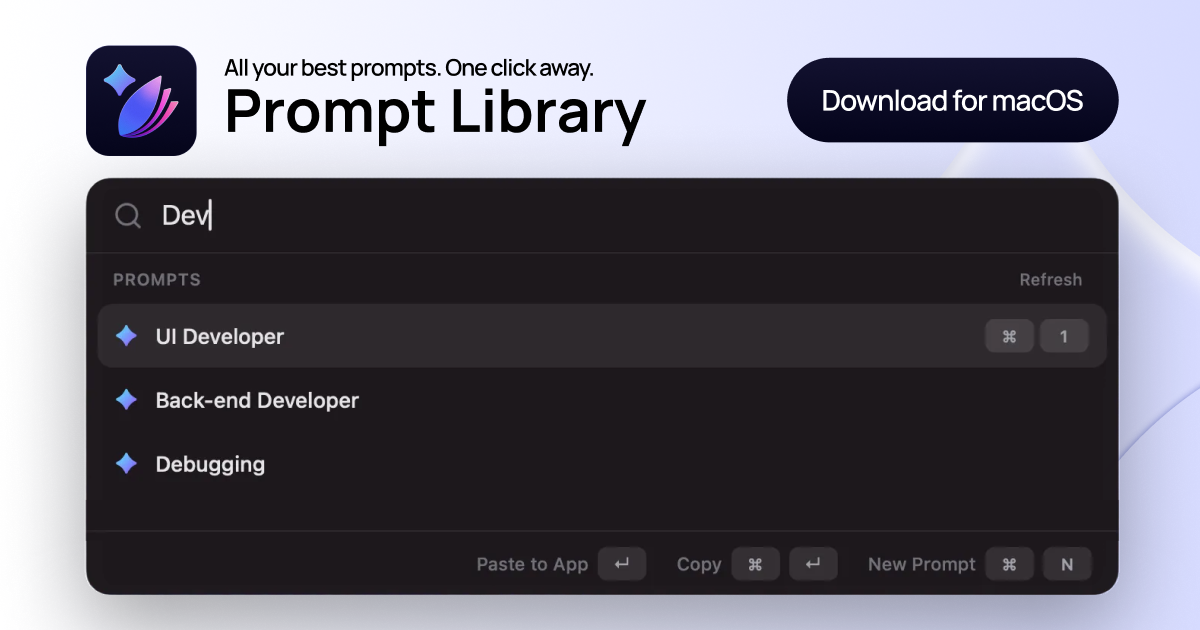
Prompt Library is a macOS utility that helps users save, organize, and instantly reuse their best AI prompts across any application using a global shortcut.
What is Prompt Library?
What is Prompt Library?
Prompt Library is an essential productivity tool designed specifically for macOS users who frequently interact with large language models like ChatGPT, Claude, or Gemini. It solves the common problem of prompt fragmentation extemdash where valuable, high-performing instructions end up scattered across notes apps, browser tabs, or old chat histories. This application transforms prompt chaos into a clean, searchable, and instantly accessible system, ensuring that your most effective prompts are always just one keystroke away.
By centralizing your prompt repository, Prompt Library allows you to maintain a single source of truth for all your reusable AI instructions. This significantly boosts workflow efficiency by eliminating the need to constantly search, copy, tweak, and paste snippets. The core benefit is maintaining creative flow and achieving higher output quality by consistently deploying proven, refined prompts across all your AI interactions, regardless of the application you are currently using.
Key Features
- Global Launcher Shortcut ("[⌘⌥P]"): Instantly summon the prompt search interface from any application on your Mac without breaking your current context.
- Instant Search & Recall: Features real-time, type-as-you-filter searching to surface the exact prompt needed in seconds.
- Organization via Collections: Structure your prompts logically into dedicated collections based on context, such as 'Marketing Campaigns,' 'Engineering Debugging,' or 'Persona Definitions.'
- Tagging System: Apply role-specific or intent-based tags for granular filtering and easier discovery.
- One-Click Insertion: Insert the selected prompt directly into the active application with a simple keyboard command, or copy the raw text without inserting.
- Local Storage: All data is stored securely and privately on your local machine; there are no accounts or cloud dependencies required.
- Format Versatility: Supports saving and inserting prompts in various formats, including raw text, Markdown fenced blocks, and JSON.
- Lifetime Access: Offered as a one-time purchase ($6.35), ensuring unlimited prompt storage without recurring subscription fees.
How to Use Prompt Library
Getting started with Prompt Library is designed to be seamless and immediately impactful on your daily workflow:
- Installation: Download the application (Free Trial or Full Version) and drag the app file into your macOS Applications folder.
- Initial Setup: Launch the app and grant the necessary accessibility permissions required for the global shortcut functionality to work across all applications.
- Saving Prompts: When you craft a prompt that yields excellent results, open the Prompt Library interface (or use the quick create shortcut ⌘N) to save it. Assign it a descriptive name, relevant tags, and place it into the appropriate collection (e.g., 'SEO Content' collection).
- Retrieval Workflow: When you need a prompt while working in another app (like your IDE, email client, or documentation tool), press the global shortcut ⌘⌥P. The launcher appears instantly.
- Insertion: Type a keyword or tag to filter your library, select the desired prompt using the keyboard, and press Enter (↵) to insert it directly into your current text field.
This workflow ensures that the time spent crafting high-quality instructions is leveraged repeatedly, maximizing AI efficiency.
Use Cases
Prompt Library is invaluable for professionals whose productivity hinges on consistent, high-quality AI interaction:
- Content Marketing & SEO: Marketers can maintain collections for different content types (e.g., Blog Outlines, Social Media Copy, Email Sequences). A single press of ⌘⌥P allows them to pull a refined 'SEO Meta Description Generator' prompt instantly while writing in their CMS.
- Software Engineering & Debugging: Developers can store complex debugging prompts, code generation templates, or specific configuration instructions. When facing an error, they can quickly retrieve the 'Analyze Stack Trace' prompt without leaving their terminal or IDE.
- Customer Support & Documentation: Support teams can standardize responses by saving verified, empathetic, and accurate template replies or troubleshooting guides. This ensures consistent tone and accuracy across all customer interactions.
- Data Analysis & Scripting: Users working with data science tools can save complex Python or SQL query generation prompts, ensuring that complex data manipulation requests are executed correctly the first time, every time.
- Persona Development: Consultants or UX designers can keep detailed persona descriptions and role-playing instructions saved, allowing them to instantly switch the AI's context when testing different user scenarios.
FAQ
Q: How do I install Prompt Library? A: Download the Free Trial or full version install .dmg file. Open the file, drag and drop the application into your Applications folder, and launch it. You will be prompted to grant necessary accessibility permissions for the global shortcut to function correctly.
Q: Is my data stored in the cloud? A: No. Prompt Library prioritizes privacy and speed by storing all your saved prompts and collections entirely locally on your Mac. There are no accounts or cloud synchronization services involved.
Q: Does this only work with ChatGPT? A: Prompt Library is model-agnostic. It functions as a universal prompt manager. Since it simply copies text to your clipboard or inserts it into the active application, it works seamlessly with any AI tool you use, including ChatGPT, Claude, Gemini, local models, or proprietary systems.
Q: What is the difference between the Free Trial and the Full App? A: The Free Trial allows you to test the core workflow and organization features but limits you to saving up to 8 prompts. The Full App, available for a one-time fee, unlocks unlimited prompt storage and full access to all organizational features forever.
Q: Can I get a refund if I purchase the full version? A: As stated by the developer, we do not offer refunds for the purchase of the application.
Alternatives

Biji
Biji is a versatile platform designed to enhance productivity through innovative tools and features.

Prompty Town
Prompty Town is an innovative platform that allows users to transform their links into virtual buildings, creating a unique and engaging way to share and interact with content.

AakarDev AI
AakarDev AI is a powerful platform that simplifies the development of AI applications with seamless vector database integration, enabling rapid deployment and scalability.

Planndu: Daily Task Planner
Planndu is an intuitive productivity application designed to help users organize tasks, manage projects, build routines, and enhance focus using tools like AI generation and a built-in Pomodoro timer.

BookAI.chat
BookAI allows you to chat with your books using AI by simply providing the title and author.
MealTime
MealTime is your personal, offline-first recipe companion designed to help you save, organize, plan meals, and generate smart grocery lists, all while keeping your data private.