

rivva
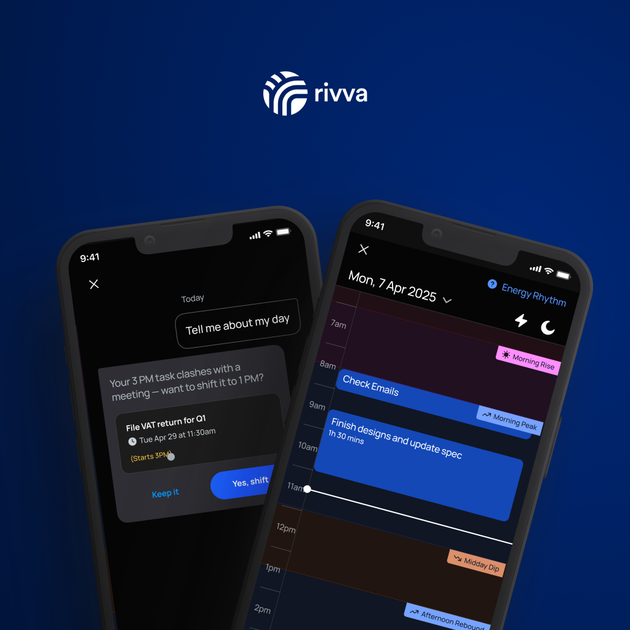
rivva is an AI productivity assistant that automatically plans your day by syncing your work commitments with your personal energy levels to promote sustainable high-performance.
What is rivva?
What is rivva?
rivva is the next-generation AI productivity assistant designed to help professionals work smarter, not just harder, by integrating workload management with personal biological rhythms. It moves beyond traditional to-do lists by analyzing your focus requirements, calendar availability, and real-time energy forecasts to orchestrate a truly optimized workday. The core mission of rivva is to ensure that high-value, deep work is scheduled precisely when you are naturally at your sharpest, preventing burnout and maximizing meaningful output.
This intelligent orchestration is powered by Nia, the AI assistant, which acts as a collaborative partner, managing context switching and adapting schedules instantly when unexpected events occur. By consolidating tasks from email, meetings from calendars, and energy data from wearables into one unified, adaptive workspace, rivva transforms chaotic workdays into intentional, focused sprints, making sustainable productivity achievable for everyone from individual contributors to executive leaders.
Key Features
- Energy-Based Scheduling: Connects with wearables (like Apple Health) to forecast energy highs and lows, scheduling demanding tasks during peak focus windows and lighter tasks during dips.
- Unified Work Inbox: Automatically captures action items, follow-ups, and commitments buried in connected email inboxes, bringing them into a single, prioritized queue for review.
- AI Orchestration (Nia): An advanced AI assistant that manages task breakdown, coaching, rescheduling, and planning based on context, energy, and workload constraints.
- Dynamic Rebalancing: The schedule instantly adapts when meetings shift or tasks run long, recalculating the optimal flow for the remainder of the day to maintain realism.
- Multi-Source Task Capture: Tasks can be added via chat with Nia, manual entry, or automatic extraction from email, ensuring no commitment is forgotten.
- Intelligent Daily Planner: Provides a single view combining all scheduled tasks and meetings across multiple integrated calendars, optimized by the AI.
How to Use rivva
Getting started with rivva is designed to be quick and intuitive, taking less time than a typical morning routine:
- Sync Wearable (Energy Insight): On the mobile app, link your wearable data source (e.g., Apple Health). This step is crucial as it feeds the system your sleep and movement data to generate an accurate energy forecast.
- Connect Work Tools: Link your primary email accounts and digital calendars. rivva immediately begins scanning for existing commitments and potential action items.
- Orchestrate Your Day: Allow rivva to begin its automatic prioritization and scheduling process. You can interact with Nia by asking her to plan your day, break down large tasks, or manually adjust the schedule. The system continuously monitors incoming changes and adjusts the plan accordingly.
Use Cases
- Founders & Executives: For leaders constantly juggling high-leverage strategic work with urgent operational demands. rivva ensures that critical decision-making time is protected during peak cognitive hours, preventing context switching from derailing high-impact progress.
- Neurodivergent Professionals: Individuals managing executive dysfunction or attention challenges benefit immensely from rivva's externalized, adaptive planning structure. The system provides consistent support in task initiation, sequencing, and follow-through.
- Consultants and Project Managers: Professionals managing numerous client deliverables and internal meetings. rivva surfaces forgotten action items from emails and intelligently slots focused work between back-to-back meetings, ensuring deadlines are met without constant manual rescheduling.
- Knowledge Workers Prone to Burnout: Anyone struggling with the feeling that everything is urgent. rivva enforces realistic pacing by scheduling work according to actual capacity, reducing anxiety associated with overwhelming to-do lists.
- Remote/Hybrid Teams: When work patterns are fluid, rivva ensures that asynchronous communication follow-ups don't get lost, automatically integrating them into the daily flow based on when the user is best equipped to handle them.
FAQ
Q: How secure is my personal data, especially energy and email information? A: rivva prioritizes data security. While it requires access to calendars and emails to function, the system is built to process this data contextually for scheduling purposes. Users should review the specific privacy policy regarding wearable data integration, which is used strictly for energy forecasting.
Q: Can I use rivva if I don't have a wearable device? A: Yes, rivva will still function effectively as an AI productivity assistant by using your calendar constraints and manually input task requirements for scheduling. However, the key differentiator—energy-based scheduling—will be unavailable until a wearable is connected.
Q: What happens if I ignore rivva's suggested schedule? A: rivva is designed to be collaborative, not dictatorial. You maintain full control. If you manually move tasks or accept new meetings, Nia will instantly recalculate the remaining schedule to reflect the new reality, offering suggestions to keep you on track without forcing adherence to the original plan.
Q: Is rivva compatible with popular project management tools like Asana or Jira?
A: Currently, the primary integrations focus on email (for task capture) and standard calendars. While direct integration with specialized PM tools may vary, tasks captured within those systems can often be forwarded or manually added to rivva's unified inbox for scheduling optimization.
Q: Is there a free trial or a free tier available? A: rivva typically offers a trial period to experience the full suite of AI features, including energy syncing. Pricing and specific tier details are best confirmed on the official website, as they are subject to change.
Alternatives

Gemma AI
Gemma AI is a smart application that calls you directly with personalized, intelligent voice reminders to ensure you never miss important tasks, appointments, or deadlines.

Planndu: Daily Task Planner
Planndu is an intuitive productivity application designed to help users organize tasks, manage projects, build routines, and enhance focus using tools like AI generation and a built-in Pomodoro timer.
MealTime
MealTime is your personal, offline-first recipe companion designed to help you save, organize, plan meals, and generate smart grocery lists, all while keeping your data private.

dumppp
The fastest way to capture thoughts to Notion with a 0.5s launch time, eliminating friction and enhancing productivity.

Biji
Biji is a versatile platform designed to enhance productivity through innovative tools and features.

Prompty Town
Prompty Town is an innovative platform that allows users to transform their links into virtual buildings, creating a unique and engaging way to share and interact with content.