
Capture every tool call
AEVS sits between an agent and its tools so each invocation is captured as it happens, including tool name, inputs, outputs, timing, and errors.

AEVS is a developer tool for recording and verifying AI agent tool calls with signed, tamper-evident receipts. It helps developers inspect what an agent actually executed through an API or explorer instead of relying on model text alone.
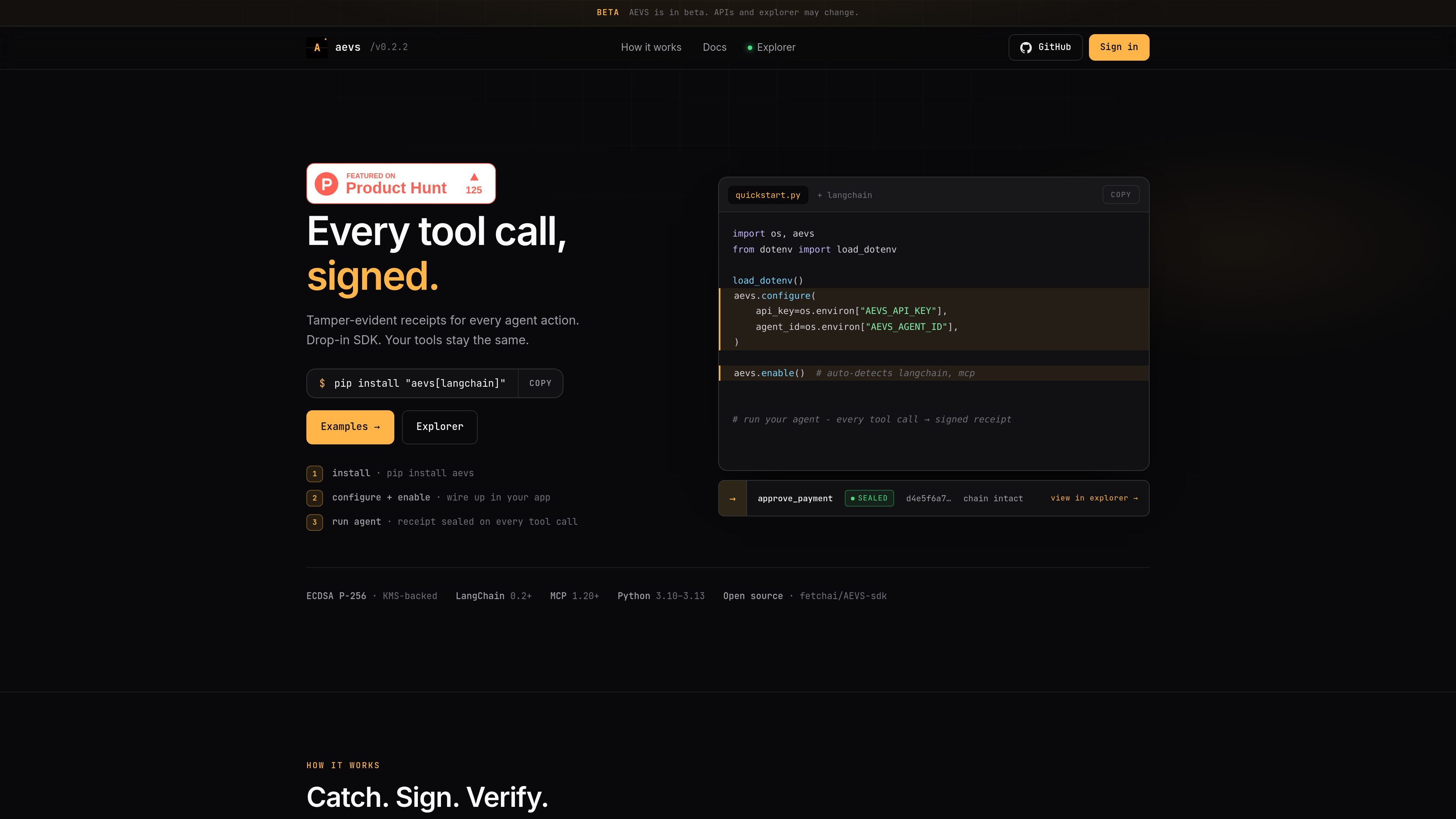
AEVS, the Agent Execution Verification System, is a developer tool for recording and verifying what an AI agent actually did during tool use. The homepage positions it as a way to verify actions rather than relying on model-generated text or chat history.
The product wraps agent tool calls in signed, tamper-evident receipts. Each receipt can include the tool name, inputs, output, timing, errors, and chain metadata, and it can be checked later through an API or a web explorer using a reference ID. The site also shows a Python quickstart and examples for LangChain, with support noted for MCP as well.
AEVS gives teams control over how much information is exposed from each receipt. Public receipts show full payloads, private receipts hide payloads from the public while preserving them for the account, and proof-only receipts keep only hashes and metadata so sensitive inputs and outputs are not stored.
AEVS sits between an agent and its tools so each invocation is captured as it happens, including tool name, inputs, outputs, timing, and errors.
Receipts are ECDSA-signed with P-256 and linked into a hash chain so changes, omissions, or reordering are easier to detect.
A reference ID can be verified through the public API or the explorer without rerunning the agent, which makes validation separate from execution.
The SDK can auto-detect LangChain and MCP, and the homepage also shows a LangChain-specific setup example.
Receipts can be configured as public, private, or proof-only, letting teams choose how much payload data is stored or exposed.
The explorer lets users search by receipt or reference ID and review verification status, chain data, and tool details.
Use AEVS when you need evidence of what an agent actually executed, including the tool used, inputs sent, and output returned.
Use the verify API or explorer to confirm a receipt from a reference ID in CI, review workflows, or auditor-facing checks without re-running the agent.
Use the visibility settings to share full payloads for demonstrations or collaborative reviews, while keeping production receipts private or proof-only.
Use the Python SDK and LangChain example to add signed receipts to an existing agent app without changing the underlying tools.
AEVS is configured in code with an API key and agent ID. The homepage shows a Python quickstart using `aevs.configure(...)` and `aevs.enable()` for auto-detection, plus an example for LangChain.
The homepage shows support for LangChain and MCP, with a quickstart example for LangChain and a note that `aevs.enable()` auto-detects `langchain` and `mcp`.
AEVS records one receipt per tool call, including the tool name, inputs, output, timing, errors, signature, and hash-chain data. Receipts can be viewed through the API or the explorer.
The verify API can confirm a receipt by `reference_id` without needing to rerun the agent, and the explorer lets you search by `reference_id` or `receipt_id`.
The source does not show pricing, and the pricing URL returns a 404. The homepage and public docs shown here do not describe a pricing model.

FixMyCWV is a web-based Core Web Vitals audit tool that produces developer-focused recommendations for improving LCP, INP, and CLS. It works across many site stacks and claims to handle sites with bot protection.

Ably Chat is a chat API platform for building custom realtime chat applications. It supports room-based messaging, typing indicators, presence, reactions, and message updates, with usage-based pricing options for different deployment stages.

Ghost es un asistente de IA para terminal para chatear, generar código y ejecutar tareas en la línea de comandos. Incluye modelos gratuitos, es compatible con Linux, macOS y Windows, y es de código abierto.

AakarDev AI helps teams manage AI provider access, project-level setups, logs, and analytics from one dashboard. It supports BYOK workflows and lists providers including OpenAI, Google Gemini, Anthropic, Groq, Mistral AI, and Perplexity AI.

DeepMotion is a web-based AI motion capture and 3D animation platform with Animate 3D for video-to-animation and SayMotion for text-to-animation. It helps creators and teams generate motion in a browser and export results in common production formats.

Arduino VENTUNO Q is an edge AI computer for AI and robotics applications. It combines AI inference and deterministic control on a single board and is designed to work with Arduino App Lab.