
One-key agent spawning
Spawn an agent from the session list with a short prompt. The bar stays open so you can start the next task immediately, and the selected CLI can be switched before each spawn.

Agent Manager is a tmux-based workflow tool for managing AI coding agents from a session list. It helps you spawn agents, answer blocked sessions, and review diffs without leaving the interface.
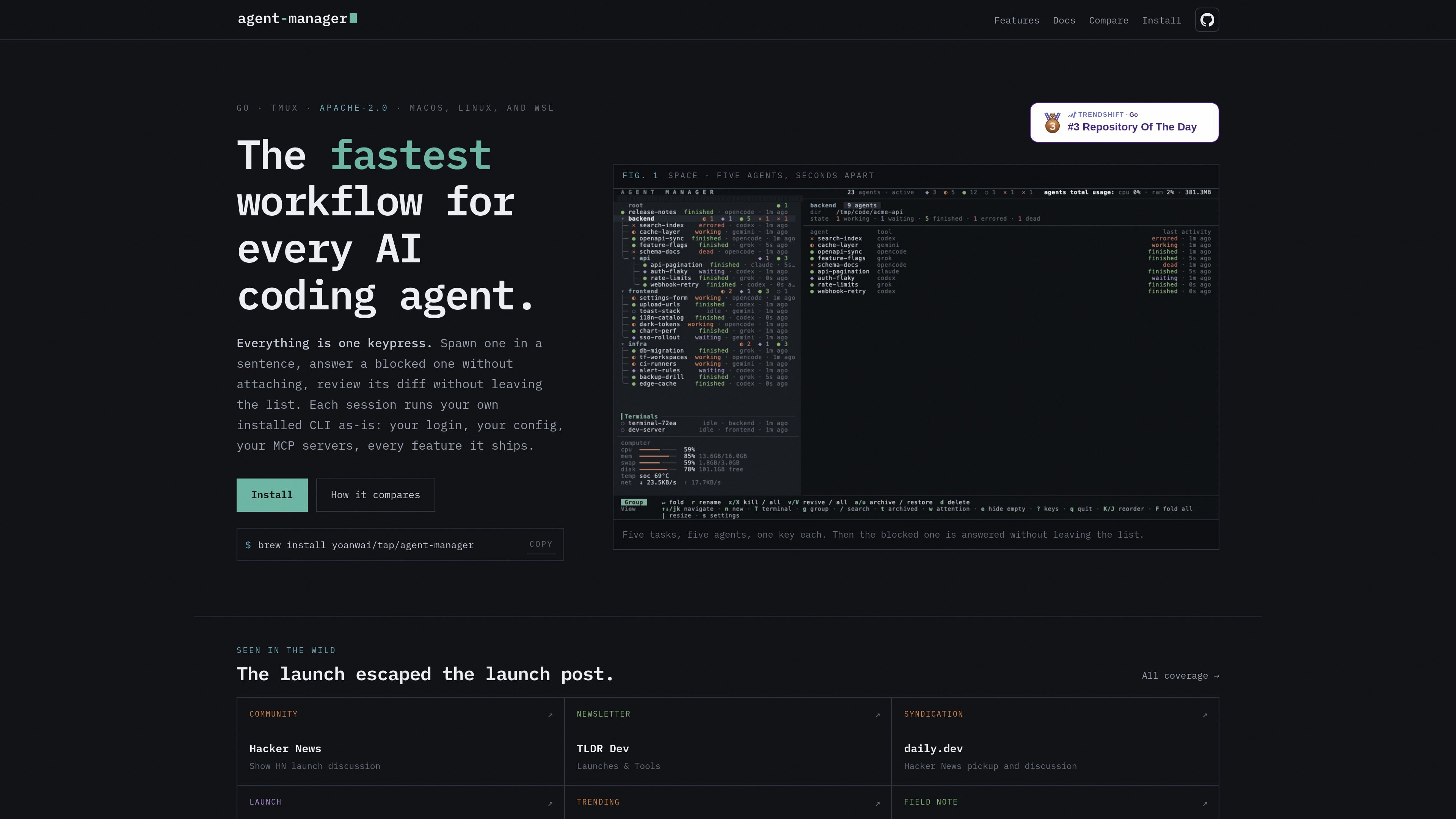
agent-manager is a tmux-based workflow tool for AI coding agents. It presents sessions in a list, lets you start new agents with a single prompt, answer blocked agents without attaching to a pane, and open a full-screen review view for the selected repository.
The product is built around using your own installed CLI tools rather than a hosted agent runtime. Each session runs with your existing login, config, and MCP servers, and the interface is designed for people who keep multiple coding agents active across projects and want to manage them from one screen.
Spawn an agent from the session list with a short prompt. The bar stays open so you can start the next task immediately, and the selected CLI can be switched before each spawn.
Reply to a blocked session directly from its row instead of attaching to the pane. The response is sent as a user message into the agent’s existing conversation.
Sessions are grouped in a path-like tree, with nested groups, fold/unfold controls, reorderable rows, and archive/unarchive actions that preserve arrangement across restarts.
Review a session’s repository in a dedicated screen that shows changed files, line-level comments, syntax highlighting, and refreshes as the agent keeps editing.
Use the agent’s declared repo and merge base when available, or choose the repository, branch, or diff target manually. Review supports uncommitted changes, staged changes, the last commit, and the merge target.
End a tmux process without losing the conversation record, then relaunch the same thread through the tool’s resume flow. You can also fork a named sibling from the current conversation.
Use the list view to create several agents in succession when you have a backlog of tasks. Each spawn can target a different project or group, and the input bar stays open for rapid follow-up work.
When an agent stops on a question or permission prompt, send the reply from its row instead of switching to the pane. This keeps you in the list while continuing the same conversation.
For work that needs review, open the selected session’s repo in the review screen, inspect changed files and comments, and send feedback back to the agent from the same view.
Use nested groups to keep related sessions together by path, fold finished branches out of view, archive completed work, and restore it later if needed.
If a task needs its own branch or isolated workspace, spawn it into a fresh git worktree while keeping it associated with the parent session list.
Agent Manager is designed to launch and manage AI coding agents from a tmux-based list interface. You start a task with one keypress, answer a blocked agent in place, and review its diff without leaving the session list.
The source shows support for macOS, Linux, and WSL. The home page also describes it as a Go and tmux tool released under the Apache-2.0 license.
The pages do not describe a separate hosted service. Each session runs your installed CLI as-is, using your own login, config, and MCP servers.
The review screen opens a selected session’s repository, shows changed files with counts and a file-by-file diff, and lets you send comments back to the agent from the review view.
The pricing page does not show plan tiers or dollar amounts in the provided text. The visible source only confirms install and product information, so pricing should be treated as not documented here.

ByteAsk is a terminal-first AI coding agent for C and C++ that edits repositories and verifies changes with the real compiler, debugger, sanitizers, and tests before showing a diff. It offers a free tier plus paid plans, with editor connectors and zero-retention handling described in the source.

CreateOS Sandbox is an isolated compute environment for running code and agent workloads inside Firecracker micro-VMs. It is designed for workflows that need machine-level isolation, private networking between sandboxes, and programmatic control through SDK, CLI, or MCP.

hob is an independent workspace for coding agents that keeps agent sessions, terminals, history, and follow-up work organized around the tools and providers you already use. It is aimed at developers who want local control over routing, history, and workspace structure rather than a bundled model stack.

Manta AI is an autonomous web app testing tool for teams that want to map application behavior, catch regressions, and generate tests without writing scripts or maintaining selectors. It works from a URL and supports plain-English test flows, run results with screenshots, and scheduled or deployment-triggered checks.

Redline is a budgeting tool for Claude Code that paces sessions to stay within time, token, cost, or plan-percentage limits. It uses Claude Code’s native hooks and statusline to help sessions finish with a usable result instead of stopping abruptly.

SonOf connects to your repo and PM tool, audits the codebase and surrounding product context, and turns approved work into shipped tickets with senior engineering review. It is aimed at founders and engineering leaders who need backlog help without hiring a full team immediately.