
Paste or drop session transcripts
Paste text or drop a transcript file and let agentpng auto-detect supported formats for rendering.

agentpng is a free browser-based tool that turns coding agent transcripts and prompts into shareable PNG images. It supports pasted text and common session file formats from tools like Claude Code, Kiro, Cursor, and Codex.
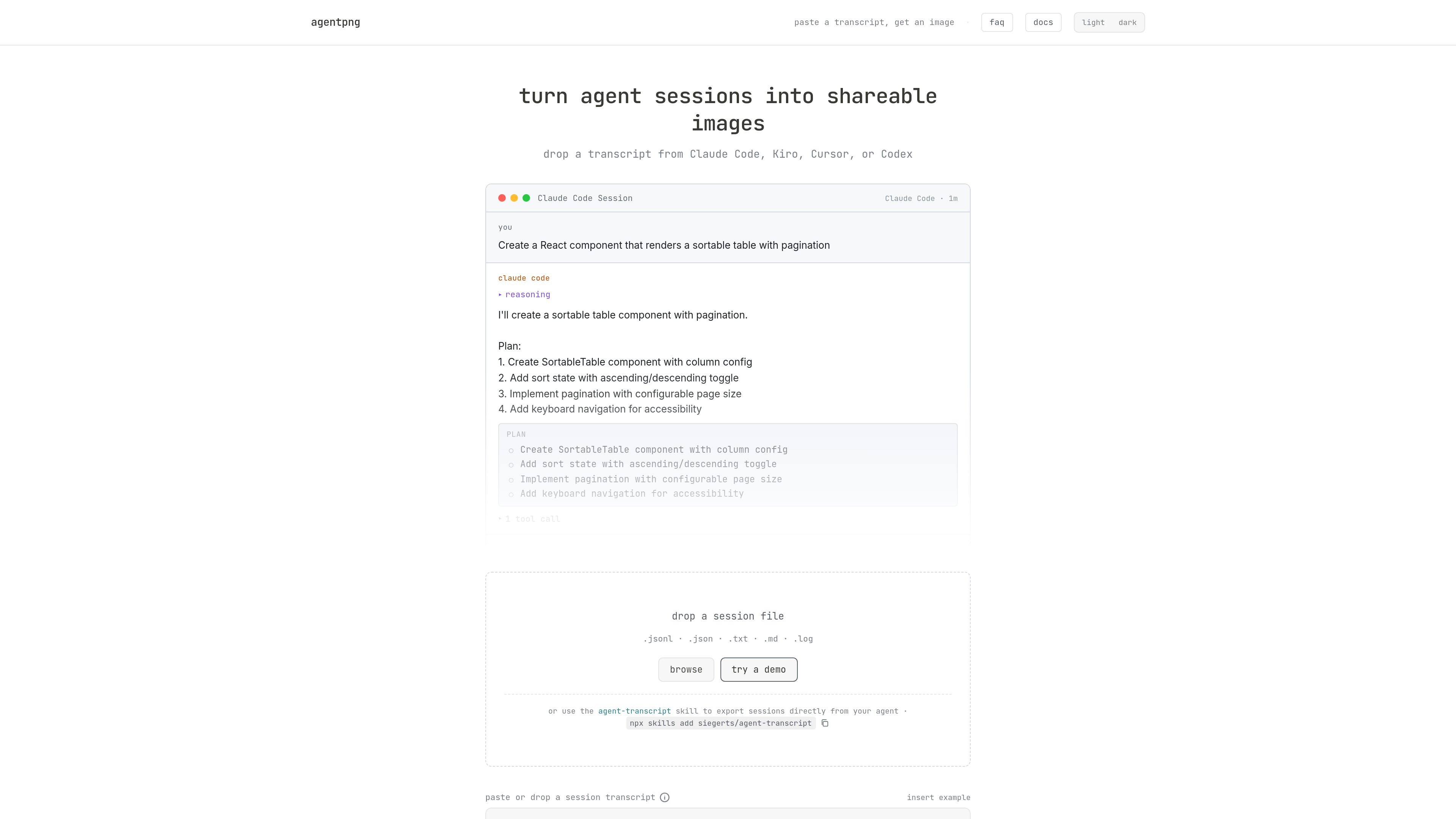
agentpng is a browser-based tool for turning AI coding agent sessions and prompts into shareable PNG images. It accepts pasted transcripts or exported session files and renders them as styled cards that can be exported for sharing.
The product is built for transcripts from Claude Code, Kiro, Cursor, and Codex, with additional support for generic text formats and several other agents that are marked as needing validation. It also includes controls for themes, card width, message selection, and whether to show tool calls, timestamps, reasoning blocks, and other message details.
Paste text or drop a transcript file and let agentpng auto-detect supported formats for rendering.
Supports .jsonl, .json, .txt, .md, and .log inputs, including generic User:/Assistant: transcripts.
Choose syntax themes, card width, and display toggles for tool calls, timestamps, reasoning, plans, sources, and window buttons.
Exclude individual messages and split long sessions into parts for size-limited platforms.
Export the final result as PNG, or as a multi-part ZIP when a single image is too large.
Runs fully in the browser with no upload step, keeping the workflow local to the device.
Turn a Claude Code, Cursor, or Codex conversation into a polished image that is easier to post in a team chat, issue thread, or social feed.
Keep only the most relevant turns, hide tool output or reasoning when appropriate, and tailor the width and theme for a cleaner presentation.
Export long conversations in parts so they fit platform limits instead of being cut off in a single oversized image.
Paste a plain-text exchange with User: and Assistant: prefixes when the agent does not have a dedicated parser.
Have a supported coding agent export the session first, then import that file into agentpng for styling and sharing.
Create shareable visuals from Kiro spec or task documents when you want to present structured agent work as an image.
agentpng is a free browser-based tool that converts AI coding agent transcripts into styled images you can export as PNG files.
Claude Code, Kiro, Cursor, and Codex are fully validated. Gemini CLI, Copilot CLI, and ChatGPT have parsers available but still need testing.
Paste a transcript into the text area or drag and drop a session file. agentpng parses the content, lets you adjust display settings, and exports a styled image.
Yes. agentpng runs entirely in the browser and no session data is sent to a server.
Yes. You can install the agent-transcript skill so your coding agent can find and export session transcripts directly.

Vectorizer.AI converts raster images into vector formats such as SVG, PDF, EPS, and DXF, with a browser-based workflow and developer tools for automation. It is designed for users who want previewable, editable vector output from logos, artwork, sketches, scans, and other bitmap images.

PixelDrive is a bulk image generation API for creating many on-brand images from one template through a browser editor, REST API, CSV batch, or MCP. It suits teams that need repeatable image output with cacheable renders and usage-based pricing.

Snapmark is a VS Code extension that lets you annotate clipboard screenshots before pasting them into AI chats. It supports blur redaction, numbered callouts, and automatic resizing for large images.

Arduino VENTUNO Q is an edge AI computer for AI and robotics applications. It combines AI inference and deterministic control on a single board and is designed to work with Arduino App Lab.

Napkin AI convierte texto en visuales editables para presentaciones, documentos y contenido compartible. Generación desde texto y exportación a PPT, PNG, SVG o PDF.

Refero MCP for AI agents connects an MCP-compatible agent to Refero’s curated library of web and iOS product interfaces and user flows. It helps agents research real design patterns before generating UI, with access included in the Refero Pro plan.