
Automatic task tracking
Timeslicer automatically tracks task activity so you can review how your day was spent without running a timer or entering work manually.

Timeslicer is a time tracking and distraction-blocking app that automatically infers tasks from visible content in the browser and supported desktop apps. It helps users review their day without manual timers while keeping activity data stored locally on their device.
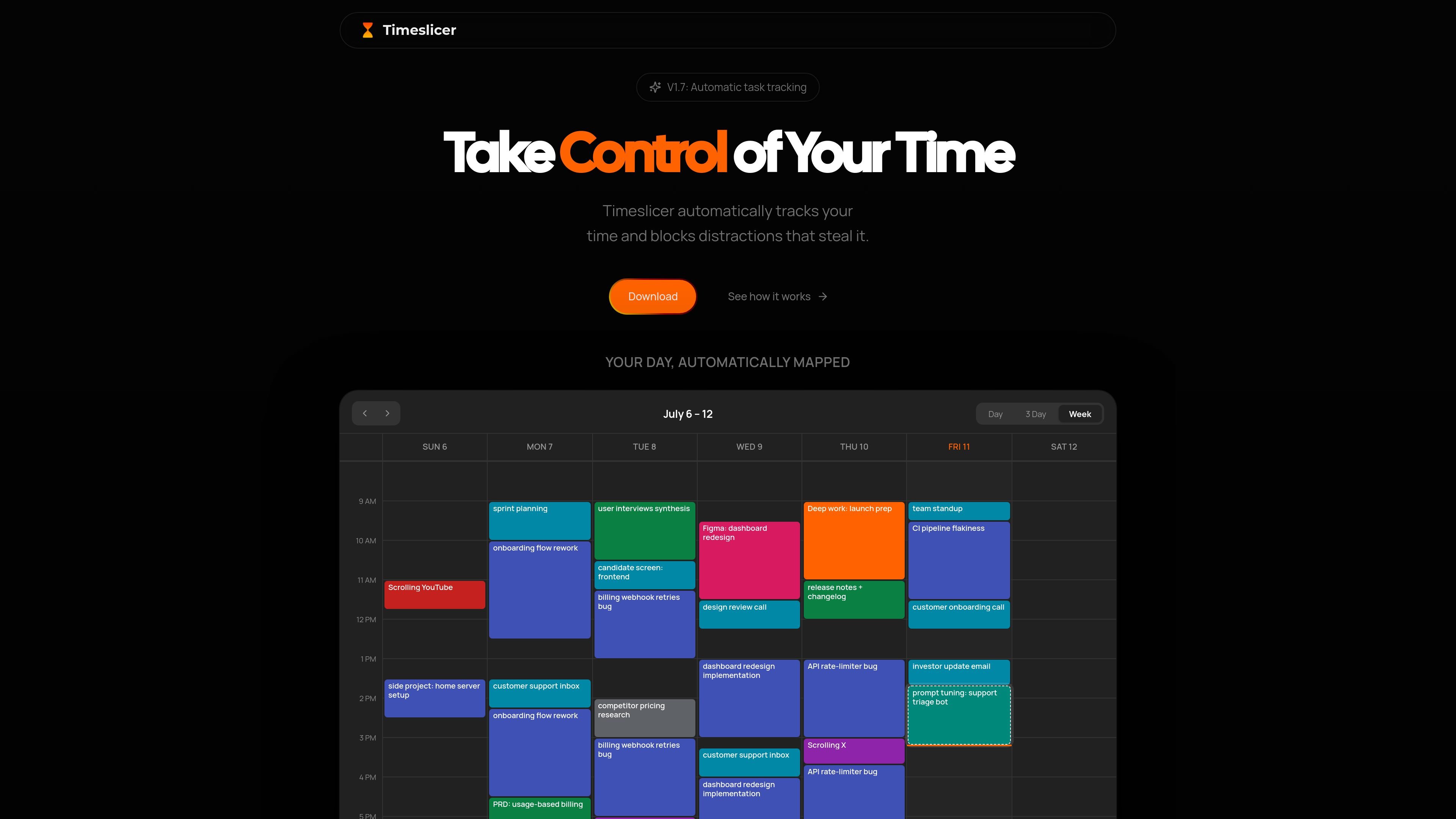
Timeslicer is a time tracking and distraction-blocking product that automatically maps what you work on into tasks and a daily timeline. It is designed to reduce manual timer use by inferring activity from visible content in the browser and from supported desktop apps.
The home page frames the product as a way to “take control of your time,” while the privacy policy shows how it works in practice: a desktop app and browser extensions read limited visible text, then store task data locally on the device. The product is available for Mac and Windows, with browser-extension support in Chrome, and it offers a free tier, a Pro subscription, and an Enterprise option.
Timeslicer automatically tracks task activity so you can review how your day was spent without running a timer or entering work manually.
The browser extension and desktop app classify what is on screen to identify work and distractions based on content rather than only the app name or website address.
The product can block distracting content using subjective categories, which the site distinguishes from simple URL blocking.
The home page shows a daily timeline of tasks and activities, and the Pro plan adds full history, search, advanced analytics, and reports.
Timeslicer stores activity data locally and says it does not record screenshots, keystrokes, or screen video, which is part of its privacy model.
Setup is presented as a quick install on macOS or Windows, followed by connecting browser extensions such as Chrome.
For people who want a running record of what they actually spent time on during the day, Timeslicer builds a timeline from activity rather than asking them to start and stop timers.
For knowledge workers moving between documents, browser pages, and chat apps, the product can infer task names from visible content and grouped activity so the log is closer to real work than site visits alone.
For users trying to cut down on distracting browsing, Timeslicer can block content based on subjective categories instead of relying only on simple website rules.
For people who want to audit work patterns after the fact, the Pro tier adds full history, search, reports, and advanced analytics for deeper review.
For teams or organizations that want centralized support and deployment help, the Enterprise offering mentions custom features, productivity analysis, IT integration support, training, and a dedicated account manager.
Timeslicer uses a desktop app and browser extensions to read limited visible content, then infers what task you were working on. In its privacy policy, it says the browser extension extracts up to 500 characters of visible text from the page you are viewing, while the desktop app can use the active application name, window title, and text inside supported apps to derive task records.
Timeslicer says activity data is stored locally on your computer. The privacy policy states that raw captured text, task attributions, task history, and supporting files are kept on your device and are not synchronized to Timeslicer’s servers.
No. Timeslicer says it does not take screenshots, record your screen, log keystrokes, or track mouse movement.
The site says the desktop app is for macOS and Windows, and the home page also offers downloads for Mac and Windows. The browser extension is set up by connecting it after installing the desktop app.
The privacy policy says Timeslicer can read text inside Discord, Slack, Notion, and Obsidian through the desktop app. It also says the browser extension can block distractions based on content, not just the app name or URL.

Goldfish is an AI memory app for macOS that helps you reply, write, summarize, and continue using the context already on your Mac. It stores memory locally and writes in your tone.

Biji es una plataforma versátil diseñada para mejorar la productividad a través de herramientas y características innovadoras.

Liam is an AI copilot for managing inboxes, writing replies, prioritizing email, and scheduling meetings. It is offered free for individuals, with custom pricing for teams and enterprise.

Gemma AI is a phone call reminder app that calls you with scheduled reminders instead of push notifications. It helps people who want a more direct way to stay on schedule, with Google Calendar sync and conversational call interactions.

ClawTick is an AI agent automation platform for scheduling jobs from the CLI, dashboard, or REST API. It is aimed at developers and teams running LangChain, CrewAI, webhook, or custom agent workflows that need monitoring, alerts, and logs.

Redline is a budgeting tool for Claude Code that paces sessions to stay within time, token, cost, or plan-percentage limits. It uses Claude Code’s native hooks and statusline to help sessions finish with a usable result instead of stopping abruptly.