
AirPods-based posture detection
Use the motion sensors in compatible AirPods to establish an upright baseline and identify forward head drift while you sit.

AirPosture: Sit Straight is an iPhone posture coach that uses compatible AirPods to detect forward head drift and provide adjustable voice, chime, or tap reminders. It is designed for desk work, calls, reading, and other seated activities, with locked-phone coaching and a Mac companion.
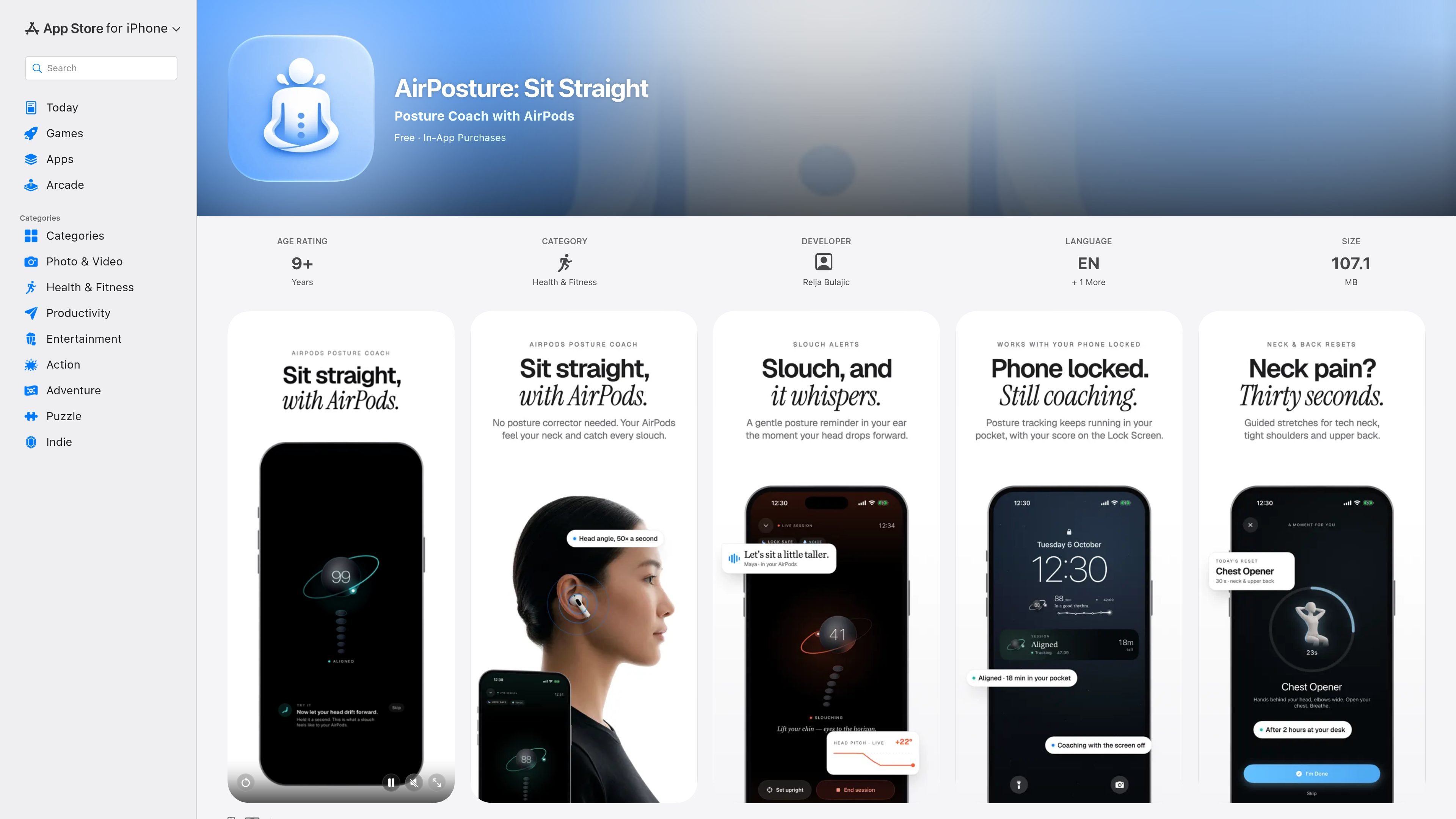
AirPosture: Sit Straight is a Health & Fitness posture coach for iPhone that uses motion sensors in compatible AirPods to monitor head position. After the user taps “Set upright” to establish a baseline, the app detects forward drift associated with tech neck, text neck, and forward-head posture, then provides an audio or haptic-style reminder.
The app is designed for passive coaching during desk work, calls, reading, and other seated activities. It can run with the iPhone locked and screen off, offers a live posture score and saved session history, and has a Mac menu bar companion that syncs sessions through iCloud. It is free to start with a daily tracking limit, while Premium removes that cap and adds AI-written daily coaching according to the App Store listing.
AirPosture requires AirPods Pro, AirPods 3 or later, or AirPods Max, plus iOS 17 or later. App Store reviews include earlier complaints about tracking accuracy, interface usability, and the need to keep the screen on; developer responses state that later versions redesigned calibration and interface behavior and added locked-phone tracking. These responses describe subsequent changes rather than independently verified performance for every user.
Use the motion sensors in compatible AirPods to establish an upright baseline and identify forward head drift while you sit.
Receive a short spoken reminder, a soft chime, or a phone tap, with controls for timing, frequency, volume, muting, and escalation.
Continue a session with the iPhone locked and screen off, while the app keeps the phone in a pocket and displays the score on the lock screen.
Follow a live 0–100 posture score and review saved sessions, including patterns by hour, week, and month.
Use the Mac menu bar app during long focus periods and sync sessions between iPhone and Mac over iCloud.
Keep posture data on the device and the user's iCloud, with no ads or cross-app tracking stated in the listing. Optional social and AI features use service providers and allow control over shared data.
Set an upright baseline at the start of a work block and let the app provide discreet reminders while the phone remains locked and out of the way.
Use a voice cue, chime, or tap while participating in calls, with controls to mute or adjust coaching when interruptions would be distracting.
Start a session while reading on the couch or looking down at a device, then use the immediate cue to correct forward head drift before continuing.
Run the Mac menu bar app during longer periods of computer use and review synced sessions across iPhone and Mac.
Review hourly, weekly, and monthly patterns to identify when posture tends to worsen and adjust work or rest habits accordingly.
AirPosture uses motion sensors in compatible AirPods to detect when your head drifts forward from a calibrated upright position, then provides a voice cue, chime, or phone tap.
Yes. AirPosture can continue coaching while the iPhone is locked, the screen is off, and the phone is in a pocket. The free tier includes up to two hours of tracking per day.
The app requires AirPods Pro, AirPods 3 or later, or AirPods Max, and requires iOS 17 or later. It is also available on Mac, with sessions syncing between iPhone and Mac through iCloud.
AirPosture is free to start with a two-hour daily tracking limit. The App Store listing also identifies yearly, monthly, and lifetime Premium options, but pricing and trial terms may vary by storefront or current offer.

Google Fitbit Edge is an ultra-slim fitness tracker for everyday wear and structured workouts. It provides on-wrist exercise guidance, built-in GPS, automatic activity recognition, and health and wellness trend tracking, with some Health Guardian features requiring Google Health Premium.

Malyatko is a baby tracker for logging feeding, sleep, growth, teething, and milestones in one app. It works on iPhone, Apple Watch, and widgets, with no sign-up, offline use, and family sharing through iCloud.
MIRA vision develops synthetic-data-driven AI for pathology image analysis in medical diagnostics. Its website positions the product for teams that need privacy-compliant training data, automatic annotations, and controlled data generation.

Teloframe is an AI-powered football coaching platform for building tactics, editing drills, planning sessions, and managing player development in one workspace. It includes a Free tier plus Pro and Club plans for coaches and analysts who need more collaboration and team features.

LeanUp is an AI calorie tracker and meal-planning app for logging meals, tracking macros, and getting personalized nutrition guidance. It supports barcode scanning, photo-based food recognition, manual search, and recipe reuse.

TrakMac is a voice-first macro tracking app for fitness-focused users on iOS. It estimates calories and macros from spoken meal descriptions, then helps users log food and stay aligned with their training goals.